

IntelliFinder DE
Version:3.11.3
Published:2026-10-14
Introduction
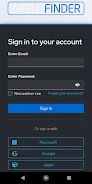
IntelliFinder DE is a mobile app for field work that helps teams locate physical assets, record on-site activities, and keep asset information synchronized between field and office. Designed for technicians who need reliable identification and a fast data capture workflow, IntelliFinder DE combines RFID, NFC, QR codes and GPS to guide technicians to assets, scan tags, view detailed records, take photos and complete digital forms with optional signatures, all from a smartphone.
Key features and how they work
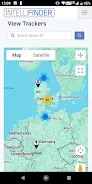
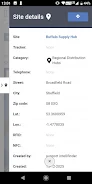
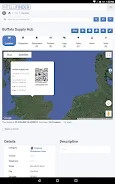
The app supports multiple identification technologies so you can choose the most practical tagging strategy for each environment: close-range NFC for locked cabinets, RFID for batch reads, QR codes for low-cost tagging and GPS for location-based navigation. Scans open the matching asset record where users can update attributes, add time-stamped notes, attach photos and sign forms. Navigation integrates with device maps so crews can get directions to site coordinates and confirm arrival with a geotagged check-in. Task and work order handling is embedded in the mobile interface so assignments appear on the device, progress is recorded, and completed jobs sync back to the central database.
Controls and on-device workflow
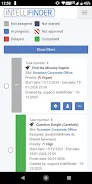
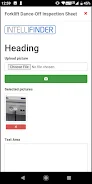
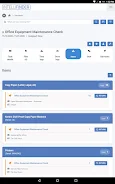
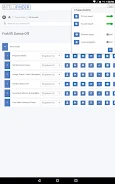
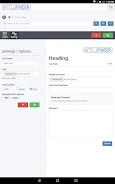
The user interface is optimized for field operations and supports simple gestures and one-handed use. Tapping a task opens a clear checklist view; swiping advances to the next required field; the camera and signature panels are invoked with a single tap. Scanning flows are streamlined so a successful tag read automatically opens the corresponding asset view without extra navigation steps. Form fields can be filled by typing, selecting options, or using predefined templates to speed data entry during repetitive inspections.
Progression, reporting and audit trail
Work progression follows an explicit lifecycle that mirrors common field processes: assigned, en route, on site, in progress and completed. Each status change is recorded with timestamps and the technician’s identifier to provide an audit trail for compliance and reporting. Completed checks generate compact digital reports with photos and signatures attached, and these reports can be reviewed in the office after synchronization. The app keeps a local history of recent actions so crews can verify what was done even when connectivity is intermittent.
Visual style and site structure
IntelliFinder DE adopts a clear, functional visual design that prioritizes readability and rapid access to key controls. Map and list views are available to suit different tasks: a map-centric mode for navigation and a list-centric mode for sequential inspections. Project and site hierarchies let administrators organize assets by client, region or facility, and technicians can switch between databases or projects on the fly to handle multiple contracts from a single device.
Customization and integration
The app can be configured to match established workflows without changing field behavior. Administrators can tailor form templates, field types and required checks so each inspection follows the same structure. IntelliFinder DE offers customization options for API integration so back-office systems receive updates in a format that fits existing asset management or ERP systems. While some integrations require technical setup, the app is built to accept common REST-style endpoints and to map mobile fields to external database schemas.
Offline operation and accessibility
Recognizing that field sites often have limited coverage, the app supports offline caching of asset lists, queued updates and deferred synchronization. Actions performed offline are stored locally and transmitted when a reliable connection is re-established, minimizing data loss. Accessibility features include adjustable font sizes, high-contrast display modes and simplified navigation to accommodate varied lighting conditions and reduce input errors during rapid inspections.
Reliability, limitations and practical tips
Effective use depends on assets being tagged or having usable GPS coordinates, and some environments may require additional hardware for RFID/NFC reads. When scans fail, the app supports manual identifier entry and clear prompts to retry or log an exception. Integration or customization may need input from IT to align APIs and authentication, and compatible field hardware can extend capability where required. Teams typically plan tag strategies and firmware checks in advance to ensure smooth deployment.
Who benefits and ongoing value
Technicians in telecom, construction, transport, municipal services and industrial maintenance find IntelliFinder DE valuable for recurring inspections, preventive maintenance schedules and audit preparation. By consolidating field data capture, photographic evidence and signed forms into a single tool, the app reduces paperwork, streamlines reporting and helps organizations maintain a consistent, verifiable record across repeated site visits and long-term asset management.
Show More
Information
Screenshots
Latest Update












Hot Tags
Latest News
-
![Revealing the Launch Playlists and Cross-Progression for COD Warzone Mobile News]()
-
![March 2024 Free Redemption Codes for Honkai: Star Rail News]()
-
PUBG Mobile Teams Up with Bentley Motors: Luxury Cars, Exclusive Collectibles, and Beyond 2024-04-18
![PUBG Mobile Teams Up with Bentley Motors: Luxury Cars, Exclusive Collectibles, and Beyond News]()
-
![Monster Never Cry is now accessible on both Android and iOS mobile devices. News]()
-
V2.2 of the Farlight 84 update introduces an overhauled Season structure, fresh in-game currency, an 2024-04-16
![V2.2 of the Farlight 84 update introduces an overhauled Season structure, fresh in-game currency, an News]()
-
![Arrival of Genshin Impact 4.6 Update: 'Embers of Two Realms, Twilight of Crimson' News]()
-
April 2024 Clash of Clans Update: Unveiling a Fresh Companion, Enhanced Levels, Chat Tagging, and Be 2024-04-16
![April 2024 Clash of Clans Update: Unveiling a Fresh Companion, Enhanced Levels, Chat Tagging, and Be News]()






