

Dokani
Version:1.0.7
Published:2026-10-14
Introduction
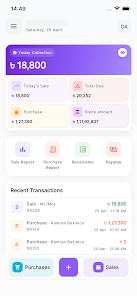
Dokani is a powerful and easy-to-use Point of Sale (POS) app built for small and medium businesses who need to manage sales, purchases and inventory from a single mobile interface. Dokani helps you create fast sales invoices, run multiple sales sessions at once and keep stock updated automatically, reducing manual record-keeping for shops, pharmacies, garment stores and other retail outlets. This editor description explains how the app organizes daily checkout tasks, product catalogs and financial tracking so you can evaluate fit for your business needs.
Key features at a glance
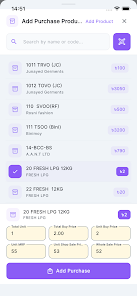
The app provides rapid sales and purchase entry with a barcode search and instant invoice creation designed for touch-first workflows. Multi-session sales allow you to keep several carts or customer sessions open concurrently and process both cash and credit transactions without losing context. Product entries include fields for company, category, unit, MRP, shop price and wholesale price so you can maintain differentiated pricing. Dokani also records purchases with quantity and transport cost fields and automatically adjusts stock levels after each recorded transaction. Customer and distributor records store contact details and running balances to support receivable and payable tracking.
How Dokani works in daily operations
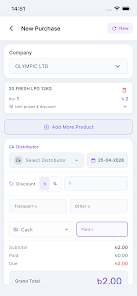
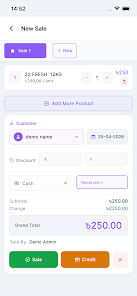
Begin a sales session and add items with a quick search or barcode scan; the invoice builds instantly showing quantities and totals. If you manage multiple checkouts or layaway orders, open an additional session and switch between them without losing data. When purchases arrive, log the supplier, item quantities and transport costs to reflect accurate landed cost and update inventory counts. At any point you can print a sales receipt or a summary report to a Bluetooth thermal printer for customers or ledger filing. The workflow is oriented around repeated daily tasks typical of neighborhood retailers.
Controls and user experience
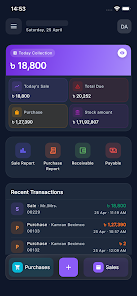
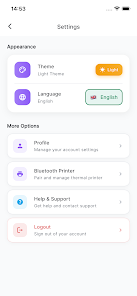
The interface favors simple, touch-oriented controls: searchable product fields, tappable session tabs and straightforward payment dialogs to speed transactions. Menus and form fields are arranged so common actions—adding items, applying discounts, accepting a payment—require minimal taps. Language support for Bengali and English and light and dark themes make the interface adaptable to local preferences and varying lighting conditions. Clear labels and consistent feedback reduce errors at the point of sale, helping staff learn the system quickly.
Inventory, pricing and catalog management
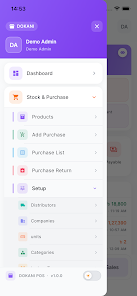
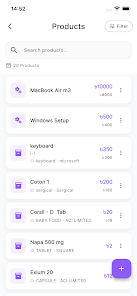
Maintain a complete product catalog with company and category organization to keep fast-moving items accessible. Dokani’s pricing fields let you maintain MRP, shop price and wholesale price for each SKU so you can sell at different margins to retail and wholesale customers. Stock levels are updated automatically whenever sales or purchases are recorded, and simple product searches help you find and restock items before they run out. Over time the product list grows with your business, and careful categorization keeps inventory manageable as SKUs increase.
Reporting, printing and financial tracking
Dokani generates sales, purchase and due reports with date and party filters so you can review performance for a day, week or custom range. Receivable and payable tracking is integrated with customer and distributor records, making it easier to spot overdue balances and reconcile accounts. Reports can be printed to a Bluetooth thermal printer for hand-held summaries or ledger purposes, and printable invoices provide a familiar record for customers. These reports aim to support bookkeeping and cash flow monitoring without requiring complex accounting software.
Customization, localization and accessibility
The app is tailored to common workflows found in Bangladeshi retail environments but remains suitable for similar small and medium operations elsewhere with minor adjustments. Language options, theme choices and flexible price fields allow basic localization for local tax and currency practices. The design emphasizes legible fonts, clear contrast in both light and dark modes and straightforward navigation to accommodate users with varying familiarity with mobile apps.
Target users and known limitations
Dokani is intended for shop owners, pharmacy managers, garment retailers and other small to medium merchants who need a mobile-first POS that reduces paperwork and speeds daily transactions. It focuses on core retail features rather than enterprise-level capabilities, so very large chains or businesses needing centralized multi-store ERP features may find some advanced reporting or integration tools missing. The app’s strengths are simplicity, quick invoicing and basic ledger tracking rather than extensive customization at the enterprise scale.
Getting started and support
Set up begins by adding products, creating customer and distributor entries and configuring basic pricing for your shop. Use multi-session sales to simulate multiple counters while training staff, and run short date-range reports to validate transactions at the end of the day. If you need to evaluate compatibility with your thermal printer or billing routine, test a few sample invoices before migrating all records. The app is designed to be approachable for new users while offering the control needed for routine retail management.
Show More
Information
Screenshots
Latest Update












Latest News
-
![Revealing the Launch Playlists and Cross-Progression for COD Warzone Mobile News]()
-
![March 2024 Free Redemption Codes for Honkai: Star Rail News]()
-
PUBG Mobile Teams Up with Bentley Motors: Luxury Cars, Exclusive Collectibles, and Beyond 2024-04-18
![PUBG Mobile Teams Up with Bentley Motors: Luxury Cars, Exclusive Collectibles, and Beyond News]()
-
![Monster Never Cry is now accessible on both Android and iOS mobile devices. News]()
-
V2.2 of the Farlight 84 update introduces an overhauled Season structure, fresh in-game currency, an 2024-04-16
![V2.2 of the Farlight 84 update introduces an overhauled Season structure, fresh in-game currency, an News]()
-
![Arrival of Genshin Impact 4.6 Update: 'Embers of Two Realms, Twilight of Crimson' News]()
-
April 2024 Clash of Clans Update: Unveiling a Fresh Companion, Enhanced Levels, Chat Tagging, and Be 2024-04-16
![April 2024 Clash of Clans Update: Unveiling a Fresh Companion, Enhanced Levels, Chat Tagging, and Be News]()






