
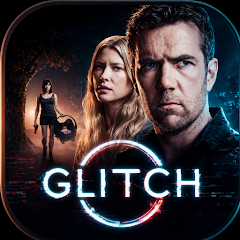
Glitch TV: Films and Series
Version:1.0.0
Published:2026-10-14
Introduction
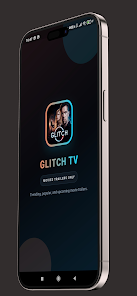
Glitch TV: Films and Series is a mobile streaming app that brings movies and TV shows into one clean, easy-to-navigate interface. It organizes content by genre and mood, supports offline downloads, and includes personalized recommendations to help you find new favorites quickly.
What Glitch TV Offers
Glitch TV: Films and Series focuses on making discovery and playback straightforward. The app provides curated lists, trending rows, and editor picks so you can browse without being overwhelmed. It supports high-definition playback where available and adapts streaming quality to match your network conditions, minimizing buffering on slower connections.
Interface and Navigation
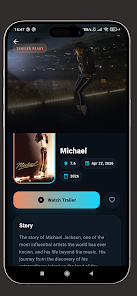
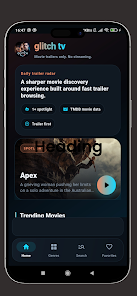
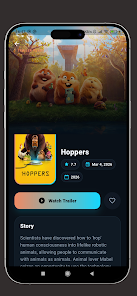
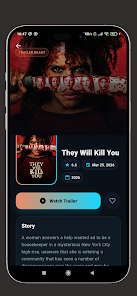
The user interface prioritizes clarity: large cover art, concise metadata, and quick-access controls for play, add to watchlist, and download. Tabs separate Movies, Series, and My Library, while a persistent search bar surfaces results instantly. On larger Android devices the layout scales to a multi-column grid for faster browsing.
Personalization and Recommendations
Personalization in Glitch TV: Films and Series is driven by simple, privacy-conscious signals: viewing history, explicit likes, and saved titles. These inputs produce a customized home feed that evolves with your tastes. Recommendations are grouped by theme or mood, making it easier to pick a film for a quiet night or a bingeable series for the weekend.
Download and Offline Mode
For users on the go, offline download is a core feature. Episodes and movies can be stored on internal or removable storage and managed from a dedicated downloads page. Downloads can be set to Wi-Fi only, and automatic deletion of watched items helps conserve space. Playback of offline content uses the same polished player as streaming.
Player Features and Controls
The in-app player includes standard controls plus a few advanced touches: adjustable playback speed, subtitle selection, and an easy-to-use timeline for skipping forward or back. Audio and subtitle languages are listed clearly, and the player supports casting to compatible devices. Glitch TV: Films and Series also offers a picture-in-picture mode so you can keep watching while using other apps.
Search and Discovery Tools
Search is fast and forgiving, returning results as you type and offering filters for year, genre, language, and rating. Discovery tools include curated collections, director or actor pages, and algorithmic mixes that group similar titles. A weekly digest highlights new releases and staff picks, helping you stay up to date.
Parental Controls and Profiles
Multiple profiles let family members maintain separate watch histories and recommendations. Parental controls restrict content based on maturity ratings and require a PIN to modify. These controls make Glitch TV: Films and Series suitable for households that want to manage what younger viewers can access.
Performance and Compatibility
The app is optimized to run smoothly on a wide range of Android devices. Adaptive bitrate streaming reduces interruptions on variable networks, and background tasks such as content prefetching help the app launch quickly. Glitch TV supports Android version ranges commonly used in the market and includes settings to conserve battery and data.
Practical Tips for Getting Started
- Sign in or create a profile to enable synchronization across devices.
- Allow downloads over Wi-Fi and choose preferred storage to manage space.
- Use the like and save buttons to improve recommendations fast.
- Explore curated collections to discover titles outside your usual genres.
Why Choose Glitch TV
Glitch TV: Films and Series aims to balance breadth of content with a clean, efficient user experience. It combines practical features like downloads and parental controls with smart discovery tools, making it a solid option for viewers who want flexibility without complexity. Regular updates refine playback performance and expand content, keeping the app responsive to changing needs.
Show More
Information
Screenshots
Latest Update












Hot Tags
Latest News
-
![Revealing the Launch Playlists and Cross-Progression for COD Warzone Mobile News]()
-
![March 2024 Free Redemption Codes for Honkai: Star Rail News]()
-
PUBG Mobile Teams Up with Bentley Motors: Luxury Cars, Exclusive Collectibles, and Beyond 2024-04-18
![PUBG Mobile Teams Up with Bentley Motors: Luxury Cars, Exclusive Collectibles, and Beyond News]()
-
![Monster Never Cry is now accessible on both Android and iOS mobile devices. News]()
-
V2.2 of the Farlight 84 update introduces an overhauled Season structure, fresh in-game currency, an 2024-04-16
![V2.2 of the Farlight 84 update introduces an overhauled Season structure, fresh in-game currency, an News]()
-
![Arrival of Genshin Impact 4.6 Update: 'Embers of Two Realms, Twilight of Crimson' News]()
-
April 2024 Clash of Clans Update: Unveiling a Fresh Companion, Enhanced Levels, Chat Tagging, and Be 2024-04-16
![April 2024 Clash of Clans Update: Unveiling a Fresh Companion, Enhanced Levels, Chat Tagging, and Be News]()






