

Jlife V5
Version:5.1.10
Published:2026-10-14
Introduction
Jlife V5 is a modern productivity app that centralizes personal and team tasks, calendars, and lightweight collaboration tools into a single mobile interface. Designed for smooth daily use, Jlife V5 balances simplicity with power, offering quick access to schedules, reminders, and shared notes across devices.
Core Functionality
At its core, Jlife V5 brings together task management, calendar scheduling, and messaging in a compact package. Users can create to‑do lists with deadlines, assign items to collaborators, attach files or photos, and set recurring events. The app supports push reminders and in‑app notifications to keep priorities visible without overwhelming the user.
Key Features and Tools
- Unified Calendar: Merge multiple calendars and toggle views between day, week, and month to get both high‑level and detailed perspectives.
- Task Boards: Visual kanban boards let you drag tasks between stages, add tags, and filter by owner or due date.
- Shared Notes: Lightweight collaborative notes support inline checklists and simple formatting for meeting minutes or project briefs.
- Integrations: Connect with email, cloud storage, and popular calendar services to sync events and attachments.
- Notifications: Fine‑grained alert settings let you control sounds, snooze options, and notification frequency.
Interface and Navigation
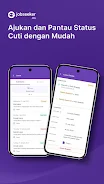
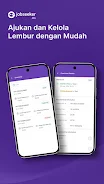
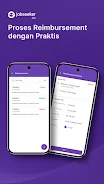
Jlife V5 adopts a clean, tile‑based layout that prioritizes the most relevant items for the day. Navigation is driven by a bottom bar with quick tabs for Home, Tasks, Calendar, and Profile. Contextual action buttons appear when creating new items, and gestures are used for fast operations like marking tasks complete or scheduling follow‑ups.
Workflow and Collaboration
The app supports flexible workflows for individuals and small teams. Assigning tasks, commenting on items, and sharing attachments are straightforward, and the activity log tracks changes so team members can see progress without back‑and‑forth messages. For teams, shared workspaces can be organized by project, department, or client, keeping related tasks and communications together.
Customization and Personalization
Jlife V5 offers several customization layers. Users can create custom tags and color schemes to visually differentiate projects, set default reminders for recurring tasks, and configure which modules appear on the Home screen. These options let the app adapt to different working styles, from heavy planners to quick task checkers.
Performance and Compatibility
Designed to run on a wide range of Android devices, Jlife V5 aims to be responsive on both mid‑range phones and flagship models. Background syncing is optimized to minimize battery drain, while offline mode keeps essential data available when connectivity is limited. Sync performance will vary with network conditions and the number of linked accounts.
Security and Data Handling
Security is handled with standard measures such as encrypted data in transit and local device protections. Users can enable biometric or PIN locks to protect the app, and workspace permissions control who can view or modify shared content. The privacy settings allow selective syncing of contacts and calendar items to preserve personal information.
How to Get Started
Begin by creating an account or signing in with a supported provider. The setup wizard helps import calendars and suggests initial templates for tasks and projects. Spend a few minutes customizing the Home layout and notification preferences to reduce noise. Inviting teammates is simple: add their emails to a workspace and assign a starter task to introduce the flow.
Practical Tips for Daily Use
- Use recurring tasks for routine items like weekly reviews or bill payments to automate repeat entries.
- Create project templates for commonly repeated workflows to save setup time.
- Limit notifications to high‑priority events to avoid alert fatigue.
- Archive completed projects periodically to keep the workspace focused and fast.
Jlife V5 focuses on removing friction from everyday planning and teamwork. With a balance of essential features, customizable views, and collaboration tools, it’s well suited for users who want a compact, adaptable productivity hub without a lengthy learning curve. Regular updates refine features and improve reliability, so the experience continues to evolve with user needs.
Show More
Information
Screenshots


Latest Update












Latest News
-
![Revealing the Launch Playlists and Cross-Progression for COD Warzone Mobile News]()
-
![March 2024 Free Redemption Codes for Honkai: Star Rail News]()
-
PUBG Mobile Teams Up with Bentley Motors: Luxury Cars, Exclusive Collectibles, and Beyond 2024-04-18
![PUBG Mobile Teams Up with Bentley Motors: Luxury Cars, Exclusive Collectibles, and Beyond News]()
-
![Monster Never Cry is now accessible on both Android and iOS mobile devices. News]()
-
V2.2 of the Farlight 84 update introduces an overhauled Season structure, fresh in-game currency, an 2024-04-16
![V2.2 of the Farlight 84 update introduces an overhauled Season structure, fresh in-game currency, an News]()
-
![Arrival of Genshin Impact 4.6 Update: 'Embers of Two Realms, Twilight of Crimson' News]()
-
April 2024 Clash of Clans Update: Unveiling a Fresh Companion, Enhanced Levels, Chat Tagging, and Be 2024-04-16
![April 2024 Clash of Clans Update: Unveiling a Fresh Companion, Enhanced Levels, Chat Tagging, and Be News]()






