

WhenSpace
Version:1.1.8
Published:2026-10-14
Introduction
WhenSpace is a smart scheduling and workspace management app that helps users coordinate time, locations, and shared resources. It combines calendar integration, room booking, and context-aware reminders in a compact mobile interface to simplify everyday planning for teams and individuals who juggle meetings, desks, and deadlines.
What this app does
WhenSpace streamlines how you reserve physical spaces and schedule activities. Instead of hopping between different tools, you can view availability, book rooms or desks, and invite participants from one place. The app syncs with popular calendar services to keep entries consistent and presents a unified timeline of commitments.
Core features at a glance
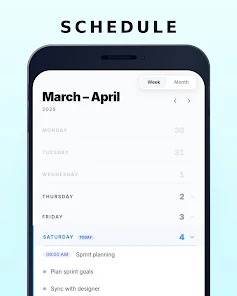
- Unified calendar — Merge multiple calendars into a single timeline so you never double-book.
- Space booking — Search and reserve meeting rooms, hot desks, or equipment with clear availability indicators.
- Contextual reminders — Receive prompts based on time, location, and participant status.
- Team coordination — Share bookings, propose alternative times, and see colleagues’ schedules.
- Offline access — Cached bookings and schedules are available without a connection.
How it works in daily use
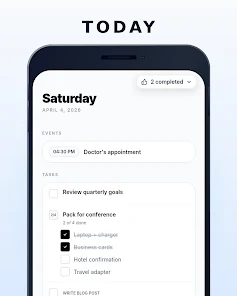
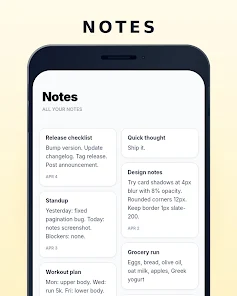
Open WhenSpace to check available slots and book a resource in a few taps. The interface highlights free and occupied periods, shows room capacity and amenities, and lets you attach notes or agendas. When you create an event, the app suggests optimal times based on attendees’ free slots and sends out invitations automatically.
Tools and integrations
The app supports two-way synchronization with major calendar platforms so changes appear everywhere. It also connects to directory services so finding team members is quick. For organizations, admin tools allow managers to set booking rules, reserve recurring slots, and export usage reports.
Customization and personal workflow
WhenSpace adapts to your preferences. Choose notification styles, set default booking lengths, and save favorite rooms or locations. Widgets provide a glanceable view of today’s schedule from your home screen, and smart suggestions learn which spaces you prefer at different times of day.
Design and performance
The interface prioritizes clarity: color-coded timelines, readable typography, and minimal animations keep the app responsive. It’s optimized to limit battery drain while maintaining background sync. Push notifications arrive promptly and the app gracefully handles large calendars without slowing down the device.
User experience and accessibility
Menus are organized around common tasks like "Book Room" and "Find Availability," reducing friction for first-time users. Accessibility options include scalable text, high-contrast themes, and screen reader compatibility. The onboarding flow walks new users through connecting calendars and making their first reservation.
Tips for beginners
- Link your primary calendar first to prevent conflicts.
- Enable location permissions if you want location-based reminders or automatic check-ins.
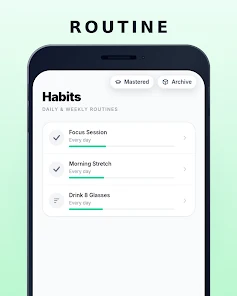
- Create a few recurring bookings for regular meetings to save time.
- Use the favorites function for frequently used rooms to speed up future reservations.
Security and admin controls
WhenSpace provides role-based access so admins can control who can book what and when. Data is encrypted in transit and at rest, and audit logs track changes to reservations. For teams, you can enforce approval workflows for high-demand resources and set blackout periods to protect critical times.
Why teams choose it
Teams appreciate the combination of simplicity and control. WhenSpace reduces scheduling friction by showing real-time availability, automating invitations, and consolidating tools. That means less time spent juggling emails and more predictable room usage for facility managers.
Getting started
Download the app, grant calendar and location permissions as prompted, and connect the accounts you use daily. Create your first booking to experience the full workflow; from there you can invite teammates, mark resources as favorites, and tweak notifications to match your pace. With minimal setup, WhenSpace can quickly become the central hub for managing your time and shared spaces.
Show More
Information
Screenshots
Latest Update












Hot Tags
Latest News
-
![Revealing the Launch Playlists and Cross-Progression for COD Warzone Mobile News]()
-
![March 2024 Free Redemption Codes for Honkai: Star Rail News]()
-
PUBG Mobile Teams Up with Bentley Motors: Luxury Cars, Exclusive Collectibles, and Beyond 2024-04-18
![PUBG Mobile Teams Up with Bentley Motors: Luxury Cars, Exclusive Collectibles, and Beyond News]()
-
![Monster Never Cry is now accessible on both Android and iOS mobile devices. News]()
-
V2.2 of the Farlight 84 update introduces an overhauled Season structure, fresh in-game currency, an 2024-04-16
![V2.2 of the Farlight 84 update introduces an overhauled Season structure, fresh in-game currency, an News]()
-
![Arrival of Genshin Impact 4.6 Update: 'Embers of Two Realms, Twilight of Crimson' News]()
-
April 2024 Clash of Clans Update: Unveiling a Fresh Companion, Enhanced Levels, Chat Tagging, and Be 2024-04-16
![April 2024 Clash of Clans Update: Unveiling a Fresh Companion, Enhanced Levels, Chat Tagging, and Be News]()






