
Kick & Snare: Live Beatmaker
Version:1.1.5
Published:2026-10-14
Introduction
Kick & Snare: Live Beatmaker is a compact, hands-on rhythm studio that lets you create drum grooves in real time using touch and gestures. It blends a responsive sampler, step sequencer and effects for quick sketching or stage-ready loops, ideal for producers, live performers and hobbyists wanting immediate beat creation.
Core tools and layout
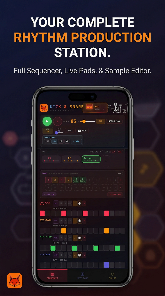
The interface in Kick & Snare: Live Beatmaker places essential controls within thumb reach. A tappable pad grid triggers samples while a timeline-driven sequencer arranges patterns into bars. Built-in effects like delay, reverb and a transient shaper allow shaping each hit without leaving the main screen. Visual meters and zoomable lanes help you spot timing and level issues fast.
Sound engine and sampling
At the heart of the app is a low-latency sampler optimized for percussion. You can import WAV files or record directly into the app, trim start and end points, and assign samples to individual pads. The engine supports layering, so you can combine short kicks with longer textured snares and tweak pitch or envelope per layer. This keeps beats lively and avoids thin, repetitive sounds.
Sequencing and arrangement
Sequencing in Kick & Snare: Live Beatmaker mixes grid-based programming with live recording. Use the step sequencer for tight, quantized patterns, or record gestures in real time to preserve feel and human timing. Patterns can be grouped into scenes and chained into longer arrangements, which makes constructing songs or DJ-style sets intuitive. Tempo, swing and pattern length are adjustable per scene, giving you control over groove and variation.
Performance features for live use
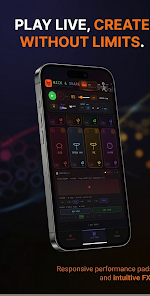
Designed with stage performance in mind, the app offers clip launching, one-touch mute/solo, and a low-latency audio path to external output devices. Assignable pads let you trigger fills, transitions and FX in a performance-friendly layout. A built-in metronome and visual feedback make it simple to stay locked to tempo while improvising with loops.
Customization and sound design
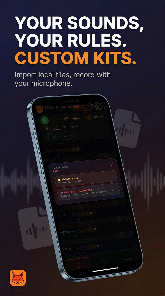
Customization is flexible: create kits from imported samples, save multi-pad presets, and export your creations for backup or use in other projects. Each pad includes tuning, decay, and velocity curves so you can craft expressive dynamics. The effects chain is modular; insert EQ or distortion at different stages to build grit or clarity depending on the mix.
Workflow and integration
Kick & Snare: Live Beatmaker supports common audio workflows. Export stems or full mixes, sync via MIDI clock, and route audio through virtual outputs for recording on a laptop. The app is built to slot into a mobile studio setup: use it as the main drum source or as a sketchpad to capture rhythmic ideas that can be refined later in a DAW.
Performance and device compatibility
Performance is tuned for modern Android devices, but latency and CPU load vary by hardware. The app exposes buffer size settings and background audio options so you can balance responsiveness against stability. For best results connect headphones or an audio interface and disable battery-saving settings when performing live to avoid audio dropouts.
Practical tips for better beats
- Start simple: build a solid kick and snare pattern before adding percussion layers.
- Use humanization: slight timing and velocity changes make loops feel organic.
- Save iterations: version your kits and patterns frequently to preserve creative options.
- Practice transitions: rehearse mute/solo and effect changes to keep performances smooth.
Getting started quickly
To get rolling, load a default kit, tap out a basic pattern with the pad grid, and experiment with the step sequencer for tighter timing. Import one or two samples to personalize your sound, then map a few pads for fills and FX. Spend a few minutes with the tempo and swing controls; small adjustments often transform a basic loop into a compelling groove.
Kick & Snare: Live Beatmaker offers a focused set of features that bridge quick creativity and stage-ready performance. With straightforward controls, robust sampling, and flexible sequencing, it fits into both mobile production workflows and live setups where dependable timing and tactile control matter.
Show More
Information
Screenshots

Latest Update












Hot Tags
Latest News
-
![Revealing the Launch Playlists and Cross-Progression for COD Warzone Mobile News]()
-
![March 2024 Free Redemption Codes for Honkai: Star Rail News]()
-
PUBG Mobile Teams Up with Bentley Motors: Luxury Cars, Exclusive Collectibles, and Beyond 2024-04-18
![PUBG Mobile Teams Up with Bentley Motors: Luxury Cars, Exclusive Collectibles, and Beyond News]()
-
![Monster Never Cry is now accessible on both Android and iOS mobile devices. News]()
-
V2.2 of the Farlight 84 update introduces an overhauled Season structure, fresh in-game currency, an 2024-04-16
![V2.2 of the Farlight 84 update introduces an overhauled Season structure, fresh in-game currency, an News]()
-
![Arrival of Genshin Impact 4.6 Update: 'Embers of Two Realms, Twilight of Crimson' News]()
-
April 2024 Clash of Clans Update: Unveiling a Fresh Companion, Enhanced Levels, Chat Tagging, and Be 2024-04-16
![April 2024 Clash of Clans Update: Unveiling a Fresh Companion, Enhanced Levels, Chat Tagging, and Be News]()






