

Vauult
Version:1.3.1
Published:2026-10-14
Introduction
Vauult is a modern productivity app designed to simplify how you store, organize, and access sensitive data on Android devices. It combines encrypted storage, fast search, and intuitive categorization to help professionals and everyday users keep passwords, documents, and notes secure yet instantly available when needed.
What Vauult Does
Vauult acts as a central hub for private information, offering layered encryption and cross-device syncing. The app focuses on minimizing friction: strong security under the hood and a clean interface on the surface. It aims to strike a balance between advanced protection and everyday usability for individuals and small teams.
Core Features Overview
- Encrypted storage — Items are protected using industry-standard encryption to keep sensitive content private.
- Search and filters — Rapid search and tag-based filters let you find entries without digging through folders.
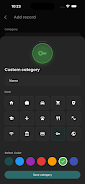
- Category templates — Predefined templates for passwords, documents, and secure notes speed up data entry.
- Sync options — Selective cloud sync or local-only storage depending on your privacy preferences.
- Biometric unlock — Use fingerprint or face unlock for quick, secure access.
How It Works Day to Day
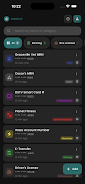
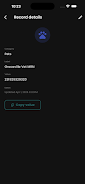
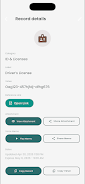
The workflow in Vauult is straightforward: create an item, assign a category and tags, and the app encrypts the content automatically. Items can include text, attachments, or structured fields such as usernames and URLs. A persistent search bar and smart suggestions shorten repetitive tasks, while bulk actions allow you to update, export, or delete multiple entries at once.
Interface and Usability
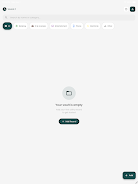
The interface favors clarity. Main navigation elements are arranged horizontally with immediate access to favorites and recent items. Vauult’s design avoids clutter; forms adapt to the type of entry you create, showing only relevant fields. This reduces mistakes and accelerates daily use, particularly when you need to retrieve a login or reference a document quickly.
Customization and Organization
Organizational controls are flexible enough for different workflows. Custom tags, nested categories, and color-coded labels help you build a structure that matches how you think. Vauult supports custom templates, so you can set up specialized forms for recurring entry types, such as software licenses, client contracts, or medical records.
Security and Permissions
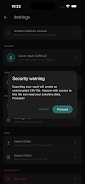
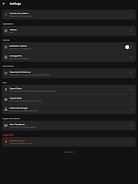
Security is layered and transparent. Local encryption keys are generated on-device and can be protected with a passphrase. For teams, Vauult allows permissioned sharing of individual items without exposing the rest of your vault. Access logs and optional two-factor authentication provide additional auditability and protection against unauthorized use.
Performance and Compatibility
Performance is tuned for mobile responsiveness. Search results appear instantly and loading large attachments is handled in the background to avoid blocking the UI. Vauult supports recent Android versions and common file formats, and it minimizes battery and data usage while syncing in the background.
Tips for New Users
- Start by importing or entering your most-used logins and documents to see immediate value.
- Create category templates for regular forms to save time later.
- Enable biometric unlock for quick access without compromising security.
- Use tags instead of deep folder trees for faster cross-referencing.
Why People Choose Vauult
Users gravitate to Vauult for its combination of strong security, efficient organization, and a non-technical interface. Whether you need a personal password manager or a lightweight team vault for shared documents, the app adapts to varied needs without imposing complicated procedures.
Getting Started
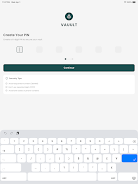
Installation is simple: download from a trusted source, create a secure master passphrase, and follow the setup wizard to configure sync and backup preferences. Spend a short session importing critical items and configuring templates; after that, Vauult becomes a smooth part of daily routines.
Vauult blends practical tools with careful security choices, offering an accessible yet robust solution for managing private information on Android devices. Its balance of speed, clarity, and protection makes it a reliable option for users who want control without complexity.
Show More
Information
Screenshots

Latest Update












Hot Tags
Latest News
-
![Revealing the Launch Playlists and Cross-Progression for COD Warzone Mobile News]()
-
![March 2024 Free Redemption Codes for Honkai: Star Rail News]()
-
PUBG Mobile Teams Up with Bentley Motors: Luxury Cars, Exclusive Collectibles, and Beyond 2024-04-18
![PUBG Mobile Teams Up with Bentley Motors: Luxury Cars, Exclusive Collectibles, and Beyond News]()
-
![Monster Never Cry is now accessible on both Android and iOS mobile devices. News]()
-
V2.2 of the Farlight 84 update introduces an overhauled Season structure, fresh in-game currency, an 2024-04-16
![V2.2 of the Farlight 84 update introduces an overhauled Season structure, fresh in-game currency, an News]()
-
![Arrival of Genshin Impact 4.6 Update: 'Embers of Two Realms, Twilight of Crimson' News]()
-
April 2024 Clash of Clans Update: Unveiling a Fresh Companion, Enhanced Levels, Chat Tagging, and Be 2024-04-16
![April 2024 Clash of Clans Update: Unveiling a Fresh Companion, Enhanced Levels, Chat Tagging, and Be News]()






