
TASCK
Version:1.01
Published:2026-10-14
Introduction
TASCK is a modern task management app designed to streamline daily workflows and team coordination. It combines flexible to-do lists, visual boards, and real-time collaboration into a single interface, helping individuals and small teams organize priorities, automate recurring work, and keep deadlines visible across devices.
Overview: what TASCK does
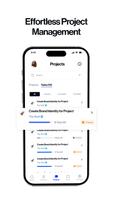
At its core, TASCK is built for clarity. Users can create nested tasks, assign owners, set due dates, and attach files without clutter. The app supports multiple views—list, board, and timeline—so you can switch perspectives quickly depending on the task at hand. Notifications and smart reminders help prevent missed deadlines while integrations let TASCK sit comfortably inside existing toolchains.
Key features that improve productivity
- Flexible task creation: Create simple checklists or detailed tasks with subtasks, tags, and dependencies.
- Multiple views: Kanban boards, calendar timelines, and compact lists provide different ways to plan and review work.
- Collaboration tools: Comment threads, mentions, and shared workspaces make project communication contextual and searchable.
- Automation: Rules to move tasks, set status, or trigger notifications reduce repetitive work.
- Integrations: Connect with calendar apps, cloud drives, and messaging platforms to centralize information.
- Offline support: Make changes offline and sync automatically when a connection is available.
How it works in daily use
Getting started with TASCK usually begins with setting up a workspace or project for an initiative. From there you add tasks, assign priorities and owners, or import task lists from spreadsheets. Use filters to surface tasks due this week, or label items by type such as bug, feature, or research. When work changes, drag-and-drop movement across stages updates the task state instantly for everyone involved.
Customization and organization options
TASCK lets you structure projects in ways that match real processes. Create custom fields to track budgets, sprint points, or client IDs. Templates accelerate recurring workflows like onboarding checklists or release plans. Color-coded tags and saved filters make it easy to find what matters without sifting through unrelated items.
Interface and performance
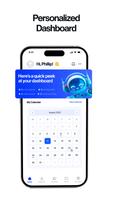
The interface favors readability and quick actions. Task cards display key information at a glance and expand for full details when needed. Performance remains smooth even with large project sets thanks to incremental loading and lightweight syncing. Visual themes and compact layouts let users tailor the UI to their preference, while widgets provide glanceable summaries on the home screen.
Collaboration and permissions
Collaboration in TASCK focuses on clear ownership and history. Role-based permissions let administrators control who can edit projects or manage templates. Activity logs capture changes so teams can see who updated a task and when. For external stakeholders, guest access provides limited visibility without exposing full workspace content.
Tips for new users
- Start small: Begin with one project and a few tasks to learn the flow before scaling up.
- Use templates: Turn frequently repeated procedures into templates to save time.
- Automate simple rules: Create automations for status changes and reminders to reduce manual updates.
- Review weekly: A weekly review session in TASCK keeps your backlog tidy and priorities aligned.
Why teams adopt TASCK
Teams choose TASCK because it balances simplicity with power. It handles basic to-do tracking well but also supports more advanced needs like dependencies and integrations. The app keeps project context and discussions next to tasks, reducing the need to switch between multiple tools and helping teams move faster with fewer misunderstandings.
Installation and getting started
Installing TASCK is straightforward from official app stores. After signing up, connect any calendars or cloud storage you use and import existing task lists if needed. The onboarding flow highlights key features and suggests templates based on your project type. For teams, invite colleagues to your workspace and assign an initial set of tasks to establish momentum.
Whether you’re managing personal projects or coordinating a small team, TASCK provides a practical mix of structure and flexibility to keep work visible, prioritized, and on track.
Show More
Information
Screenshots


Latest Update












Hot Tags
Latest News
-
![Revealing the Launch Playlists and Cross-Progression for COD Warzone Mobile News]()
-
![March 2024 Free Redemption Codes for Honkai: Star Rail News]()
-
PUBG Mobile Teams Up with Bentley Motors: Luxury Cars, Exclusive Collectibles, and Beyond 2024-04-18
![PUBG Mobile Teams Up with Bentley Motors: Luxury Cars, Exclusive Collectibles, and Beyond News]()
-
![Monster Never Cry is now accessible on both Android and iOS mobile devices. News]()
-
V2.2 of the Farlight 84 update introduces an overhauled Season structure, fresh in-game currency, an 2024-04-16
![V2.2 of the Farlight 84 update introduces an overhauled Season structure, fresh in-game currency, an News]()
-
![Arrival of Genshin Impact 4.6 Update: 'Embers of Two Realms, Twilight of Crimson' News]()
-
April 2024 Clash of Clans Update: Unveiling a Fresh Companion, Enhanced Levels, Chat Tagging, and Be 2024-04-16
![April 2024 Clash of Clans Update: Unveiling a Fresh Companion, Enhanced Levels, Chat Tagging, and Be News]()






