

Unlock Device
Version:3.0.2
Published:2026-10-15
Introduction
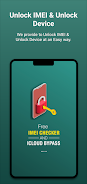
Unlock Device is a compact utility designed to help Android users check IMEI status and manage common device lock issues in a straightforward, privacy-aware way. Unlock Device reads local device information when permitted, validates IMEI formats, and presents essential identifiers so you can confirm a phone's status before transfer, repair, or contacting a carrier. The app is intended as an informational tool: it collects and stores identifiers securely on your device, provides simple sharing options, and points to professional unlocking or owner-recovery services when additional intervention is required.
Key features and workflow
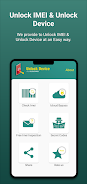
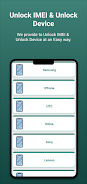
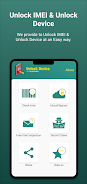
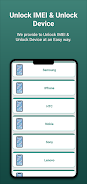
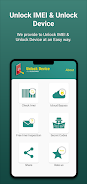
The app offers a concise set of tools that mirror a typical support workflow: it fetches available device identifiers from system APIs, performs basic IMEI lookup and validation, and displays manufacturer and model information alongside lock and network status indicators where available. Controls are intentionally simple — tap to view details, long-press or use the dedicated control to copy an IMEI, and open the platform share sheet to send a copy via email or a messaging app. Saved checks appear in an internal history so you can revisit previous lookups without repeating manual entry, and each record includes timestamps and optional notes to track progression during a support or unlocking process.
How checks work and progression system
When you run a check, the app validates the numeric structure of the IMEI and compares available identifiers against stored history and local heuristics to surface obvious issues such as mismatched manufacturer or missing identifiers. Progression in Unlock Device is practical rather than gamified: records move from new checks to flagged entries when a problem is detected, and you can annotate or mark items as resolved after contacting a carrier or a third-party service. This makes it easy to manage multiple devices or a queue of customer support requests, and it keeps a clear audit trail for resale or recovery tasks.
User experience and controls
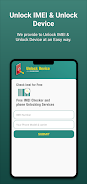
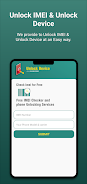
The user interface emphasizes clarity and minimal steps. Primary controls include quick-access buttons for copy and share, an editable text field for manual IMEI entry, and a compact history view for previously scanned or entered devices. Visual style favors high-contrast typography and clear grouping of information so you can scan status at a glance. Error messages and validation hints appear inline to reduce confusion, and contextual help explains terms like carrier lock, network blacklist, and iCloud status where relevant. Offline mode retains saved records and local device details; online lookups that require remote queries will indicate network dependency before proceeding.
Customization, accessibility, and visual options
Unlock Device supports basic customization so you can tailor the app to your workflow. You can choose how long entries are kept in history, enable auto-copy for convenience, or require confirmation before sharing sensitive identifiers. Accessibility options include support for system font scaling, clear color contrast for users with low vision, and compatibility with Android accessibility services such as TalkBack for screen reader support. These choices are intended to keep the app usable by a broad set of users and to reduce friction when verifying multiple devices.
Privacy, data handling, and offline considerations
Privacy is emphasized: IMEI and related identifiers are stored locally and presented clearly so you decide when to share them. The app does not attempt to perform unlocking itself; instead, it provides references and contact information for reputable providers or carriers when an intervention is required. Offline functionality allows you to access previously saved records without a network connection, while any lookup that queries external resources will request permission and clearly indicate what data is transmitted. Secure handling practices help when reporting a lost or stolen device to authorities or when preparing documentation for a service provider.
Limitations and expected outcomes
Unlock Device is a diagnostic and organizational tool: actual unlocking, carrier unblocking, or activation lock bypasses typically require intervention by the carrier, manufacturer, or a specialized third-party service and cannot be guaranteed. iCloud and carrier lock information may be unavailable for some models or networks. The app provides guidance and contact points, validates identifiers, and streamlines information sharing to make professional unlocking or recovery easier to pursue, but results depend on the external provider and the device's specific condition.
Replay value and practical use cases
For technicians, resellers, and individuals recovering a lost phone, Unlock Device reduces repetitive steps by preserving history, compressing key information into shareable reports, and offering a consistent workflow for verifying device status. The straightforward controls, clear visual layout, and annotation capabilities increase efficiency for repeated checks and make it simple to track progress across a set of devices over time.
Show More
Information
Screenshots
Latest Update












Latest News
-
![Revealing the Launch Playlists and Cross-Progression for COD Warzone Mobile News]()
-
![March 2024 Free Redemption Codes for Honkai: Star Rail News]()
-
PUBG Mobile Teams Up with Bentley Motors: Luxury Cars, Exclusive Collectibles, and Beyond 2024-04-18
![PUBG Mobile Teams Up with Bentley Motors: Luxury Cars, Exclusive Collectibles, and Beyond News]()
-
![Monster Never Cry is now accessible on both Android and iOS mobile devices. News]()
-
V2.2 of the Farlight 84 update introduces an overhauled Season structure, fresh in-game currency, an 2024-04-16
![V2.2 of the Farlight 84 update introduces an overhauled Season structure, fresh in-game currency, an News]()
-
![Arrival of Genshin Impact 4.6 Update: 'Embers of Two Realms, Twilight of Crimson' News]()
-
April 2024 Clash of Clans Update: Unveiling a Fresh Companion, Enhanced Levels, Chat Tagging, and Be 2024-04-16
![April 2024 Clash of Clans Update: Unveiling a Fresh Companion, Enhanced Levels, Chat Tagging, and Be News]()






