

XMTV Player
Version:2.0.10.22
Published:2026-10-15
Introduction
XMTV Player is a free multimedia and streaming app designed to unify live TV, video-on-demand and local media playback in a single, compact package. XMTV Player supports a wide range of containers and streaming protocols so you can open live channels, VOD links and files stored on your device without switching between multiple players. The interface focuses on quick access to streams, simple subtitle and audio track switching, and tools for building and managing playlists while exposing technical details when you need them.
Key features and formats
Support for common streaming protocols and formats sits at the core of the app: live HLS/HTTP streams, RTMP with advanced options, and standard VOD links are all playable alongside local files. The player accepts popular containers such as MKV, MP4, AVI, MOV, FLV and ASF and handles most widely used codecs, so you can open content from different sources with minimal fuss. Built-in subtitle support makes it easy to load internal or external SRT and similar files and to switch between multiple audio tracks for multilingual media. The M3U playlist builder and the exposed API let technically minded users assemble channel lists and integrate the player into other tools.
Playback controls and user interface
Playback controls are focused on familiar gestures and on-screen buttons: play/pause, seek, frame-accurate skipping where supported, and quick access to subtitle and audio selection. The player provides responsive controls for both touch navigation and remote-control style inputs on set-top Android devices. Visual feedback during streaming shows buffer level, current bitrate and codec information, helping you diagnose stream quality or latency. Options for list and grid views, configurable sorting of playlists, and per-stream settings let you tailor how channels and files are presented without overwhelming the main viewing screen.
Library organisation, progression and playlists
XMTV Player keeps local files and user-created playlists accessible through a simple library structure that organizes content by folder or user-defined lists. M3U playlist creation gives you a way to sequence live channels or VOD entries and to maintain a personal lineup of frequently watched streams. For longer viewing sessions, the app remembers playback position for local media and most streamed content where the source reports position metadata, helping you resume without hunting for timestamps. These features together provide a coherent progression from discovery to repeat viewing and make it straightforward to maintain an evolving watchlist.
Customization, performance and offline play
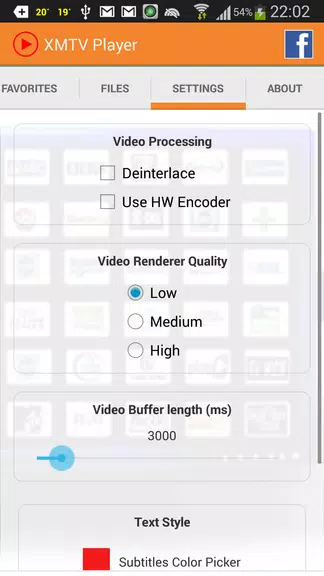
Customization centers on playback and playlist options rather than cosmetic changes: you can adjust decoding preferences, toggle hardware acceleration for smoother rendering, and configure RTMP options for compatibility with specific sources. Local files are available for true offline play because the app reads media stored on the device or attached storage, while streamed content requires a network connection and will depend on the source’s availability. Hardware acceleration and codec selection reduce battery draw and improve performance on lower-end devices when enabled appropriately.
Accessibility and experience for different users
Subtitles, audio track switching and on-screen metadata improve accessibility for viewers who rely on captions or alternate languages. The app’s readable layout and clear control labels make navigation straightforward for users of varying technical skill, while advanced options such as the API and RTMP configurations give power users the ability to integrate the player into broader workflows. Error messages and stream diagnostics are presented in plain language alongside technical details so you can choose how deep to dig when troubleshooting.
Sharing, API and advanced tools
Streaming-focused sharing is supported for live channels, letting users distribute a live stream link to friends or other devices. For developers or integrators, RTMP support with advanced options and an API interface enable scripted playlist updates and automated stream handling in environments where that level of control is required. These tools are oriented toward custom setups and are most useful when you have some familiarity with network streams and playlist formats.
Limitations and technical notes
Not every specialist or proprietary stream will play universally: some rare or protected sources depend on server-side compatibility and may not be accessible. Advanced RTMP options, the API and some configuration panels are intended for technical users and can require specialized knowledge to set up correctly. Sharing is described primarily for live streams; options for distributing VOD content depend on source permissions and are not universally available. Despite these limitations, XMTV Player offers a flexible, practical solution for users who need consolidated playback across live TV, VOD and local media.
Show More
Information
Screenshots

Latest Update












Hot Tags
Latest News
-
![Revealing the Launch Playlists and Cross-Progression for COD Warzone Mobile News]()
-
![March 2024 Free Redemption Codes for Honkai: Star Rail News]()
-
PUBG Mobile Teams Up with Bentley Motors: Luxury Cars, Exclusive Collectibles, and Beyond 2024-04-18
![PUBG Mobile Teams Up with Bentley Motors: Luxury Cars, Exclusive Collectibles, and Beyond News]()
-
![Monster Never Cry is now accessible on both Android and iOS mobile devices. News]()
-
V2.2 of the Farlight 84 update introduces an overhauled Season structure, fresh in-game currency, an 2024-04-16
![V2.2 of the Farlight 84 update introduces an overhauled Season structure, fresh in-game currency, an News]()
-
![Arrival of Genshin Impact 4.6 Update: 'Embers of Two Realms, Twilight of Crimson' News]()
-
April 2024 Clash of Clans Update: Unveiling a Fresh Companion, Enhanced Levels, Chat Tagging, and Be 2024-04-16
![April 2024 Clash of Clans Update: Unveiling a Fresh Companion, Enhanced Levels, Chat Tagging, and Be News]()






