

Qi Services
Version:5.4.6-Release
Published:2026-10-15
Introduction
Qi Services is a streamlined Android utility that centralizes device maintenance, diagnostics, and service requests in one easy interface. Designed for technicians and everyday users, it simplifies scheduling, performance checks, and remote assistance while keeping controls accessible and organized for quick problem resolution and routine upkeep.
Overview
Built to reduce friction between device problems and solutions, this app presents diagnostic tools, appointment booking, and progress tracking in a single workspace. The design prioritizes speed and clarity, letting users find actionable items without diving into complex menus. It suits small service businesses and individuals who want a lightweight yet capable support toolkit.
Primary Capabilities
- Diagnostics: Run health checks on battery, storage, and connectivity to generate clear issue reports.
- Scheduling: Book in-person or remote service slots and sync with calendar apps.
- Remote Assistance: Initiate screen-sharing or session requests securely when expert help is needed.
- Ticketing: Create, assign, and track repair tasks with timestamps and status updates.
- Notifications: Keep informed with push alerts for status changes, confirmations, and reminders.
How It Works
The workflow emphasizes three steps: detect, decide, and dispatch. First, run a short diagnostic scan to capture current system metrics and flagged items. Next, review suggested actions or consult a knowledge base entry that outlines probable causes and quick fixes. Finally, schedule a technician, request remote help, or assign an internal ticket for follow-up.
User Interface and Performance
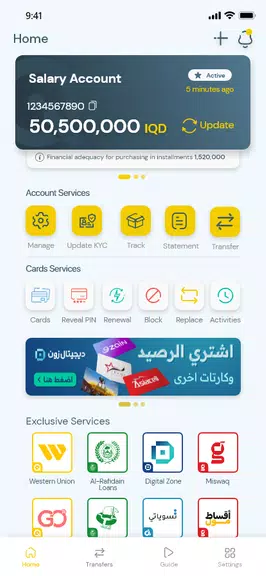
Qi Services favors a clean, card-based layout where each tool occupies a clear panel. Response times are brisk on modern devices, and background processes are limited to essential checks to minimize battery drain. Font sizes and contrast meet accessibility basics, and interactive elements are large enough for accurate taps, which helps reduce user frustration during busy workflows.
Tools and Integration
The app integrates with common productivity and communication services to streamline handoffs. Sync options include calendar apps for appointment reminders and email or messaging platforms for status notifications. Exportable reports in PDF format make it easy to share diagnostic results with customers or technicians, and an internal notes field captures contextual details for each ticket.
Customization Options
Users can tailor alerts, set diagnostic frequency, and choose which system checks run automatically. For businesses, role-based access allows managers to view all open tickets while technicians see only assignments. Custom fields for ticket entries let teams track unique information like device location, warranty status, or serial numbers.
Practical Tips for New Users
- Run a full diagnostic after initial installation to establish a baseline status.
- Link your preferred calendar to avoid missed appointments.
- Set conservative notification preferences at first, then adjust as needed to balance awareness with interruptions.
- Use the note field liberally to record troubleshooting steps and relevant context for faster future resolution.
Qi Services also benefits from routine calibration: periodically re-run diagnostics after major OS updates or hardware changes to ensure reports remain accurate.
Security and Privacy
Security measures center on session permissions for remote help and encrypted data export. The app requests only the minimum system access necessary for diagnostics and communication, and user consent is required before launching any remote-control session. For businesses handling sensitive customer data, role controls and audit logs provide an additional layer of oversight.
Installation and First Steps
Installing is straightforward via the Android package. Grant the requested permissions during setup to enable full diagnostic functionality. After installation, follow the onboarding checklist to connect calendars, configure notification preferences, and run the first diagnostic. Administrators can invite team members and assign roles from the settings menu.
Qi Services strikes a balance between helpful automation and manual control, making it a practical choice for users who want a focused maintenance and service coordination tool without the overhead of enterprise platforms. Whether managing a handful of devices or running a local repair shop, its workflow-oriented approach helps keep tasks visible and progress measurable.
Show More
Information
Screenshots
Latest Update












Latest News
-
![Revealing the Launch Playlists and Cross-Progression for COD Warzone Mobile News]()
-
![March 2024 Free Redemption Codes for Honkai: Star Rail News]()
-
PUBG Mobile Teams Up with Bentley Motors: Luxury Cars, Exclusive Collectibles, and Beyond 2024-04-18
![PUBG Mobile Teams Up with Bentley Motors: Luxury Cars, Exclusive Collectibles, and Beyond News]()
-
![Monster Never Cry is now accessible on both Android and iOS mobile devices. News]()
-
V2.2 of the Farlight 84 update introduces an overhauled Season structure, fresh in-game currency, an 2024-04-16
![V2.2 of the Farlight 84 update introduces an overhauled Season structure, fresh in-game currency, an News]()
-
![Arrival of Genshin Impact 4.6 Update: 'Embers of Two Realms, Twilight of Crimson' News]()
-
April 2024 Clash of Clans Update: Unveiling a Fresh Companion, Enhanced Levels, Chat Tagging, and Be 2024-04-16
![April 2024 Clash of Clans Update: Unveiling a Fresh Companion, Enhanced Levels, Chat Tagging, and Be News]()






