
Files by Google
Version:1.5244.687811703.0-r
Published:2026-10-15
Introduction
Files by Google simplifies storage management on Android devices with fast file browsing, smart cleanup suggestions, and effortless offline file sharing. It blends a clean interface with practical tools—file search, duplicate detection, and categorized browsing—helping users reclaim space and keep documents, photos, and downloads organized without technical hassle.
Quick overview
Files by Google is a lightweight utility meant for everyday phone maintenance. It targets casual users and power users alike, offering basic file management plus automated recommendations to free up storage. The app focuses on clarity and speed, avoiding cluttered menus while still delivering visibility into what’s consuming space.
Core capabilities at a glance
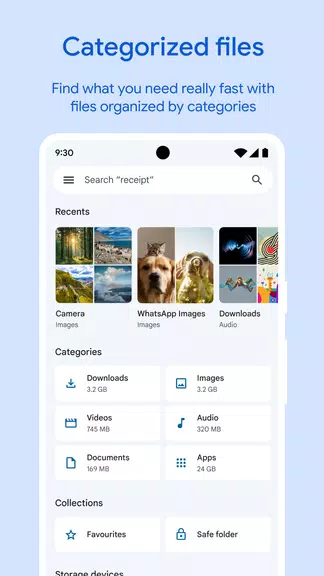
- File browsing: Navigate internal storage and SD cards with folder and category views tailored to images, videos, audio, and documents.
- Smart cleanup: Automated suggestions surface large files, unused apps, and duplicate content to remove in a few taps.
- Secure file sharing: Transfer files offline to nearby devices using encrypted, high-speed connections without mobile data.
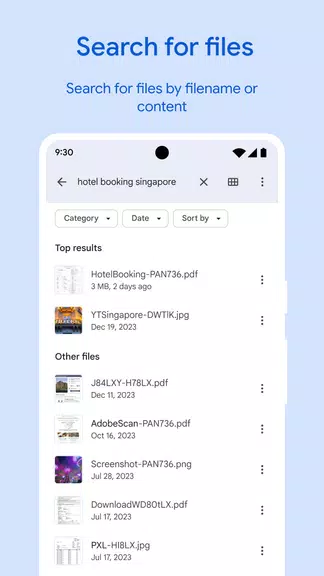
- Search and sort: Quickly locate files by name, type, or size with intuitive filters and sort options.
- Storage insights: Visual breakdowns show which file types occupy the most space so you can prioritize action.
How it works in everyday use
Open the app and you’re presented with immediate storage recommendations and a categorized file list. Tapping a category—like Videos or Downloads—displays content with thumbnails and size information. The cleanup workflow highlights suggestions that are safe to remove, such as duplicate photos or temporary installation files, while allowing you to review items before deletion.
Tools and workflow
The built-in file manager supports common actions: move, rename, copy, share, and delete. It integrates with Android’s document picker so you can attach files to messages or cloud services without leaving the app. For transfers, the Nearby Share-style feature establishes a direct local connection to exchange files quickly and reliably.
User interface and performance
Files by Google adheres to modern Android design guidelines with a compact layout and clear typography. The app launches quickly and uses minimal memory, making it suitable for devices across performance tiers. Visual indicators—like storage bars and badges—help you understand the device’s health at a glance.
Responsiveness and reliability
Navigation is snappy and actions complete without long delays. The cleanup algorithms run locally, prioritizing privacy by minimizing cloud interactions. Background tasks, such as scanning for duplicates, are scheduled efficiently to avoid draining battery or slowing the phone during active use.
Privacy and security considerations
Files by Google requests standard storage permissions to access and manage files; it does not require broad system privileges. File transfers use encryption over local connections, and the app isolates suggestions so you always confirm before any deletion. For sensitive documents, the app encourages manual review rather than blind bulk removal.
Good practices for safety
- Review suggested deletions before confirming.
- Back up irreplaceable photos or documents to cloud storage before clearing space.
- Disable automatic actions if you prefer full manual control.
Tips for getting the most from the app
Schedule periodic checks to keep storage under control, especially on devices with limited capacity. Use the category filters to spot large media files or forgotten downloads. When sharing files between devices, choose the local transfer option to avoid consuming mobile data and to speed up transfers.
Who benefits most?
Anyone looking to maintain a tidy phone without complex file management will find Files by Google helpful. It’s particularly useful for users who want fast cleanup, reliable local file transfers, and a straightforward interface that reduces the time spent managing storage.
Installation and first steps
Install from the official app store, grant the requested storage permissions, and allow the app to scan for recommendations. Spend a few minutes reviewing the initial cleanup suggestions and explore the categories to understand how files are organized. Frequent short maintenance sessions prevent storage issues from building up.
Files by Google strikes a balance between simplicity and power: it keeps routine file tasks accessible while offering enough features for users who want more control over their device’s storage and file transfers.
Show More
Information
Screenshots
Latest Update












Latest News
-
![Revealing the Launch Playlists and Cross-Progression for COD Warzone Mobile News]()
-
![March 2024 Free Redemption Codes for Honkai: Star Rail News]()
-
PUBG Mobile Teams Up with Bentley Motors: Luxury Cars, Exclusive Collectibles, and Beyond 2024-04-18
![PUBG Mobile Teams Up with Bentley Motors: Luxury Cars, Exclusive Collectibles, and Beyond News]()
-
![Monster Never Cry is now accessible on both Android and iOS mobile devices. News]()
-
V2.2 of the Farlight 84 update introduces an overhauled Season structure, fresh in-game currency, an 2024-04-16
![V2.2 of the Farlight 84 update introduces an overhauled Season structure, fresh in-game currency, an News]()
-
![Arrival of Genshin Impact 4.6 Update: 'Embers of Two Realms, Twilight of Crimson' News]()
-
April 2024 Clash of Clans Update: Unveiling a Fresh Companion, Enhanced Levels, Chat Tagging, and Be 2024-04-16
![April 2024 Clash of Clans Update: Unveiling a Fresh Companion, Enhanced Levels, Chat Tagging, and Be News]()






