

ZArchiver
Version:1.0.9
Published:2026-10-15
Introduction
ZArchiver is a compact Android utility for creating, viewing and extracting archives across many formats. It supports split archives, encrypted files, and background operations while keeping a simple interface. The app is aimed at users who need reliable compression and extraction without unnecessary complexity.
Overview
ZArchiver is built for people who routinely manage compressed files on mobile devices. It handles popular archive types, delivers fast packing and unpacking, and integrates with Android file systems so you can work with local storage and external SD cards. The tool is practical whether you are organizing backups, sharing large folders, or reading contents before download.
Key capabilities
At its core, ZArchiver focuses on the essentials: a compact feature set executed well. Expect multi-format support, partial archive browsing, and secure handling of encrypted archives. Operations run in the background so you can continue other tasks while compression continues. For users who need fine control, the app exposes options for compression level, split volumes, and character set handling for archive names.
Supported formats and security
The app covers a broad set of archive formats. You can open and extract ZIP, 7z, TAR, GZ, BZ2, XZ, and RAR archives among others. Creation features typically include ZIP and 7z, while extraction handles a wider range. Password-protected archives are supported, and the application handles common encryption methods. Unicode support ensures file names in different languages remain intact after extraction.
How it works in daily use
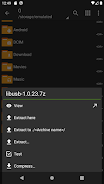
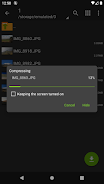
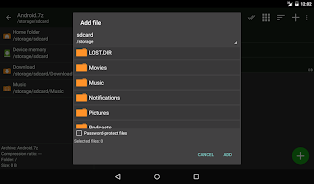
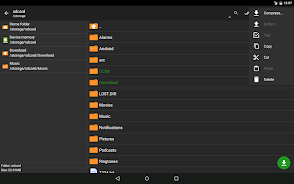
ZArchiver places file operations behind simple long-press menus and context actions. Tap to view folder contents, long-press to select multiple items, and use the top-level menu for packing, extracting, or testing archives. The app shows progress notifications and allows you to pause or cancel tasks. Background processing and task queuing make it convenient for large jobs like unpacking multi-gigabyte archives.
Interface and performance
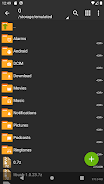
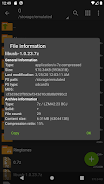
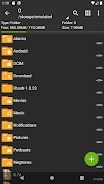
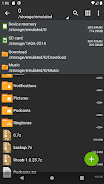
The interface is deliberately minimal. Listings show file names, sizes, and basic metadata without excessive animations. This restraint helps the app stay responsive even on older devices. ZArchiver is optimized for low memory usage and can process archives without extracting everything to temporary locations when not required. This approach reduces storage spikes during big operations.
Advanced tools and customization
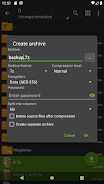
Power users will appreciate options for split archives, custom compression levels, and the ability to set default extraction paths. There is an option to display hidden files, change the default file manager integration, and set the method for handling filename encodings. While the UI is plain, these settings give strong control over how archives are produced and unpacked.
Tips for new users
- Check formats first: Use the view mode to inspect an archive before extracting to avoid unnecessary downloads.
- Use background mode: Start long operations and let them run while you continue other work on the device.
- Protect sensitive files: When creating archives with confidential data, enable password protection and choose a strong passphrase.
- Manage space: Extract to a location with enough free space and delete temporary archives after confirming success.
Installation and setup
Install ZArchiver from a trusted store, grant storage permissions, and point the app to folders you use most. The default settings suit casual users, but checking compression and extraction preferences can improve results for complex archives. If working with an SD card, verify Android permissions for external storage to avoid write errors.
Why users pick it
Many people choose ZArchiver because it balances functionality with simplicity. It does not overload the user with marketing or in-app clutter; instead, it focuses on robust archive handling. Whether you are a developer grabbing logs, a student exchanging large documents, or a photographer moving photo collections, the app provides reliable, predictable behavior.
Overall, ZArchiver remains a solid choice for anyone needing a dependable archive manager on Android. Its combination of format coverage, performance optimizations, and practical controls makes it a useful tool in everyday mobile workflows.
Show More
Information
Screenshots
Latest Update












Hot Tags
Latest News
-
![Revealing the Launch Playlists and Cross-Progression for COD Warzone Mobile News]()
-
![March 2024 Free Redemption Codes for Honkai: Star Rail News]()
-
PUBG Mobile Teams Up with Bentley Motors: Luxury Cars, Exclusive Collectibles, and Beyond 2024-04-18
![PUBG Mobile Teams Up with Bentley Motors: Luxury Cars, Exclusive Collectibles, and Beyond News]()
-
![Monster Never Cry is now accessible on both Android and iOS mobile devices. News]()
-
V2.2 of the Farlight 84 update introduces an overhauled Season structure, fresh in-game currency, an 2024-04-16
![V2.2 of the Farlight 84 update introduces an overhauled Season structure, fresh in-game currency, an News]()
-
![Arrival of Genshin Impact 4.6 Update: 'Embers of Two Realms, Twilight of Crimson' News]()
-
April 2024 Clash of Clans Update: Unveiling a Fresh Companion, Enhanced Levels, Chat Tagging, and Be 2024-04-16
![April 2024 Clash of Clans Update: Unveiling a Fresh Companion, Enhanced Levels, Chat Tagging, and Be News]()






