

MERA PROXY PRO
Version:3.3
Published:2026-10-15
Introduction
MERA PROXY PRO is a privacy-focused proxy and tunneling app designed to help you browse more securely and anonymously on mobile networks and Wi‑Fi. MERA PROXY PRO combines support for multiple modern transport protocols with a clean interface so users can reach blocked sites, protect personal data, and switch networks quickly. The app targets people who need more control than a basic VPN: it offers one-tap server selection that is aware of your SIM network, protocol options for different conditions, and straightforward toggles for the most common connection settings.
Key features and connection options
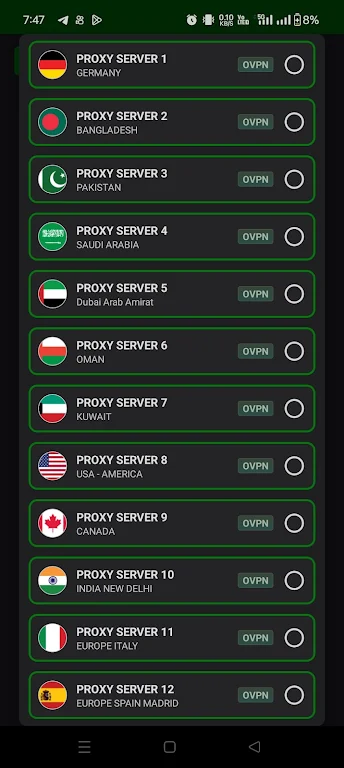
MERA PROXY PRO supports a range of protocols including OVPN3, HYSTERIA UDP, SSH and DNSTT, allowing you to choose the best approach for speed, compatibility and reliability. A single connection button gets you online fast, while protocol selectors and a short list of recommended presets let you fine-tune behavior without digging through complex menus. The SIM-aware server selection makes it possible to quickly pick a server profile optimized for your current mobile carrier, and the app can remember recent or preferred servers so common switches are faster.
User experience and controls
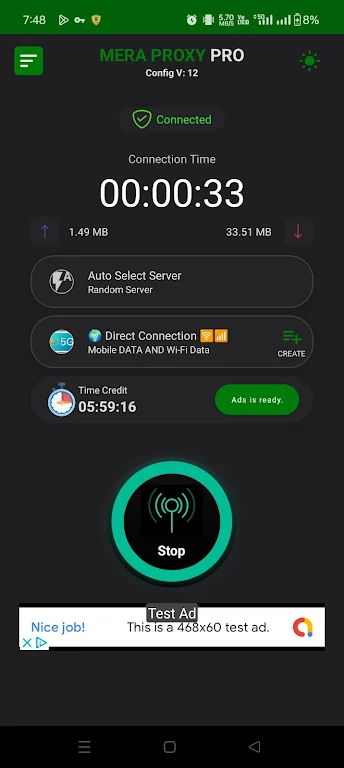
The interface emphasizes simple controls for everyday use and more detailed options for advanced users. Primary controls are built around a clear connect/disconnect toggle, a visible connection status indicator, and a straightforward menu for switching protocols and servers. For users who want to tweak performance, MERA PROXY PRO exposes essential options such as timeout settings, UDP fallbacks, and basic port selection in an advanced section that is hidden by default to preserve a low-friction workflow for casual users.
Customization, profiles and progression
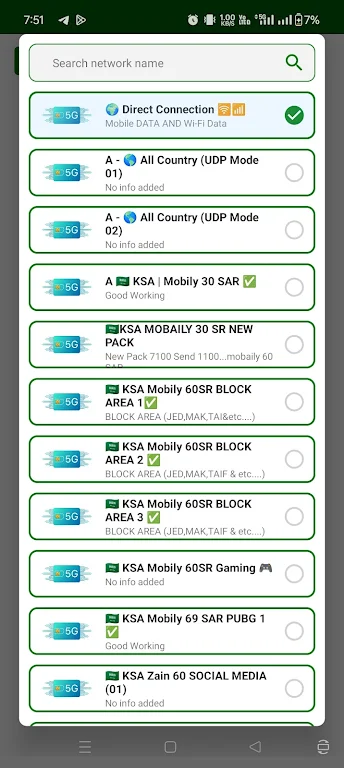
To accommodate different situations, the app supports quick configuration choices and lightweight profiles so you can maintain separate setups for home Wi‑Fi, public hotspots, and mobile data. These profiles let you store preferred protocol choices and server selections, reducing setup time when you move between networks. Progression in the app simply means building a set of trusted profiles and favorite servers that match your regular routes and access needs, improving convenience with repeated use.
Visual style and accessibility
MERA PROXY PRO presents a modern, uncluttered visual design that balances readability and compactness on small screens. Labels are kept concise and actionable, and contrast levels aim to support readability in bright sunlight or low-light conditions. Basic accessibility features include large tap targets for essential controls and clear textual states for connections, which help users relying on screen magnification or assistive touch. Color-coded status indicators make it easy to see at a glance whether you are connected and which protocol is active.
Level structure, challenge and replay value
Rather than levels in a game sense, MERA PROXY PRO offers progressive engagement through increasingly tailored configurations. New users benefit from the one-tap connection flow and recommended presets, while more technical users can experiment with tunneling options and protocol parameters. The “challenge” is largely network variability: testing different protocols or servers in restrictive environments can improve reliability over time and encourages exploring settings to find the best combination for your location and carrier.
Offline use, limitations and troubleshooting
The app is primarily an online tool and requires a working internet connection to establish tunnels and proxy sessions. However, you can edit settings, view saved profiles, and prepare server lists while offline so you are ready when a connection is available. Users should note that in some regions or on certain carriers, network restrictions may still interfere with proxy or tunneling traffic; the app provides protocol fallbacks and guidance to try alternate transports but cannot guarantee connectivity in every environment.
Security, privacy and data handling
Security and privacy are central to MERA PROXY PRO's design: the app focuses on minimizing data exposure by using modern tunneling protocols and encryption where available. It does not require excessive permissions beyond what is needed to manage connections, and it is intended to protect identity and browsing data during active sessions. Advanced users will find options to prioritize stronger transports when available, while everyday users can rely on sensible defaults optimized for a balance of speed and privacy.
Support, updates and compatibility
MERA PROXY PRO is built to work across a wide range of Android devices and network conditions. Regular updates improve protocol support and compatibility with carrier behaviors. If you encounter issues, built-in status messages and diagnostic hints help identify whether the problem is local device configuration, a specific carrier restriction, or a server-side issue, enabling more effective troubleshooting and support requests.
Show More
Information
Screenshots
Latest Update












Hot Tags
Latest News
-
![Revealing the Launch Playlists and Cross-Progression for COD Warzone Mobile News]()
-
![March 2024 Free Redemption Codes for Honkai: Star Rail News]()
-
PUBG Mobile Teams Up with Bentley Motors: Luxury Cars, Exclusive Collectibles, and Beyond 2024-04-18
![PUBG Mobile Teams Up with Bentley Motors: Luxury Cars, Exclusive Collectibles, and Beyond News]()
-
![Monster Never Cry is now accessible on both Android and iOS mobile devices. News]()
-
V2.2 of the Farlight 84 update introduces an overhauled Season structure, fresh in-game currency, an 2024-04-16
![V2.2 of the Farlight 84 update introduces an overhauled Season structure, fresh in-game currency, an News]()
-
![Arrival of Genshin Impact 4.6 Update: 'Embers of Two Realms, Twilight of Crimson' News]()
-
April 2024 Clash of Clans Update: Unveiling a Fresh Companion, Enhanced Levels, Chat Tagging, and Be 2024-04-16
![April 2024 Clash of Clans Update: Unveiling a Fresh Companion, Enhanced Levels, Chat Tagging, and Be News]()






