

Shop Seller Center
Version:3.41.0
Published:2026-10-15
Introduction
Shop Seller Center is a mobile management app designed to streamline online selling for small businesses and individual vendors. It consolidates orders, inventory, and customer messaging into a single dashboard, helping sellers save time while maintaining control over listings and fulfillment from a smartphone.
Overview of the experience
This review examines how the app balances utility and accessibility. The interface focuses on fast workflows for common tasks: processing orders, updating stock, and checking sales analytics. For merchants juggling multiple sales channels, the app aims to reduce repetitive work and surface the actions that matter most every day.
Key functions that matter
The functional core of the product is pragmatic and well-scoped. Features are grouped around three priorities: order management, product administration, and performance monitoring. The layout favors action buttons and clear labels so new users can pick up routine tasks quickly without a steep learning curve.
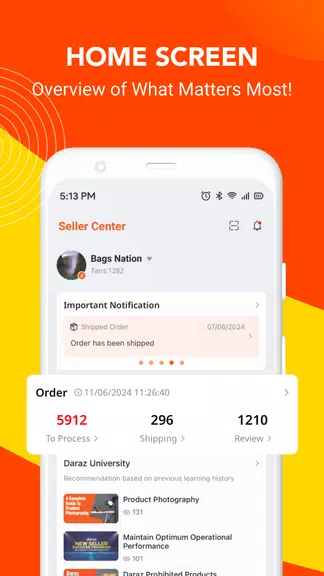
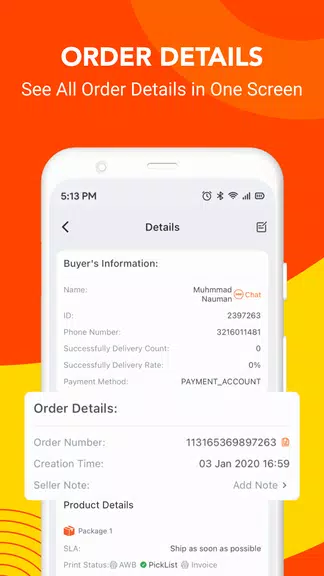
- Order queue: A consolidated view shows pending, shipped, and returned orders with quick filters.
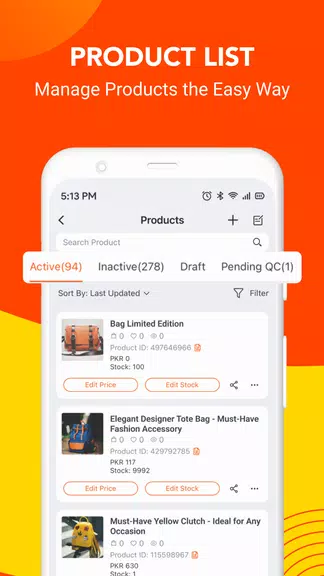
- Inventory control: Bulk edits and low-stock alerts help prevent overselling during peak periods.
- Sales reports: Daily and monthly metrics visualize revenue, best-selling SKUs, and refund activity.
- Customer messaging: A unified inbox keeps buyer conversations in one place to resolve issues faster.
Interface and performance
The design is utilitarian and avoids unnecessary animations that can slow down older devices. Navigation relies on a bottom bar and expandable cards, so common actions are never buried. Loading times are short for most tasks, though synchronization for very large catalogs can take longer depending on network speed.
How it handles workflows
Workflows are built around the typical seller day: check new orders, confirm shipments, adjust inventory, and review analytics. Each workflow includes context-aware prompts, such as suggested shipping methods based on destination or recommended restock quantities based on historical sales. The step-by-step approach reduces the chance of human error and helps maintain consistent customer service standards.
Tools and customization options
Customization is functional rather than flashy. Sellers can configure notification rules, set default responses for frequently asked questions, and create simple automation for repetitive tasks like marking orders as shipped when a tracking number is added. These tools aim to shave minutes off common tasks and scale daily operations.
- Alert filters for specific product categories or order values
- Template messages for refunds, shipping updates, and inquiries
- Import/export options for bulk product uploads
Tips for new users
Adopting the app is faster when you focus on a few setup steps first. Sync your primary product catalog, configure low-stock alerts, and create two or three message templates for common buyer questions. Shop Seller Center becomes more powerful as you standardize processes, so invest a little time in templates and rules early on.
User experience and reliability
In daily use the app feels stable and predictable. Notifications arrive promptly and background syncing keeps listings up to date. Occasionally, API limits from connected marketplaces can delay updates; the app surfaces these issues with clear error messages and suggested actions to resolve them without guesswork.
Practical advantages for sellers
For sellers who need mobility, the app replaces several desktop-only tasks with a compact, mobile-first experience. It shortens the feedback loop between receiving an order and confirming shipment, which can improve customer satisfaction and seller ratings. The analytics section also highlights opportunities to optimize pricing and promotions.
Getting started
Installation is straightforward: download, sign in with your marketplace credentials, and allow sync permissions. The initial sync may take longer for large catalogs, but once complete, routine operations are fast. Shop Seller Center includes a short onboarding flow that walks through key features and helps set initial notification preferences.
Overall, the product serves sellers who need an efficient, no-nonsense tool to run day-to-day operations from a phone. It favors clarity and speed over complex customization, making it a solid choice for merchants focused on execution and consistent customer service.
Show More
Information
Screenshots
Latest Update












Hot Tags
Latest News
-
![Revealing the Launch Playlists and Cross-Progression for COD Warzone Mobile News]()
-
![March 2024 Free Redemption Codes for Honkai: Star Rail News]()
-
PUBG Mobile Teams Up with Bentley Motors: Luxury Cars, Exclusive Collectibles, and Beyond 2024-04-18
![PUBG Mobile Teams Up with Bentley Motors: Luxury Cars, Exclusive Collectibles, and Beyond News]()
-
![Monster Never Cry is now accessible on both Android and iOS mobile devices. News]()
-
V2.2 of the Farlight 84 update introduces an overhauled Season structure, fresh in-game currency, an 2024-04-16
![V2.2 of the Farlight 84 update introduces an overhauled Season structure, fresh in-game currency, an News]()
-
![Arrival of Genshin Impact 4.6 Update: 'Embers of Two Realms, Twilight of Crimson' News]()
-
April 2024 Clash of Clans Update: Unveiling a Fresh Companion, Enhanced Levels, Chat Tagging, and Be 2024-04-16
![April 2024 Clash of Clans Update: Unveiling a Fresh Companion, Enhanced Levels, Chat Tagging, and Be News]()






