
List & Do!
Version:1.1.0
Published:2026-10-15
Introduction
List & Do! is a compact task manager that helps Android users organize projects, routines, and daily errands with minimal friction. It combines list-based planning, timed reminders, and quick note capture so you can prioritize tasks, set recurring items, and see what matters at a glance across devices.
Overview of the app
List & Do! puts straightforward productivity tools in a clean package. The app focuses on speed: create tasks in seconds, group them into lists, and attach deadlines or reminders without navigating deep menus. It’s suited for single users who want a reliable checklist app and for small teams that need simple task sharing.
Core strengths
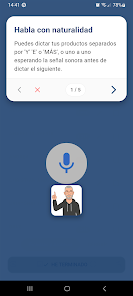
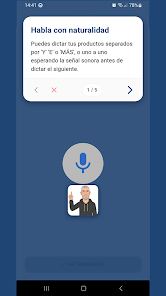
- Fast task entry — add items with one tap, voice input, or a quick keyboard shortcut.
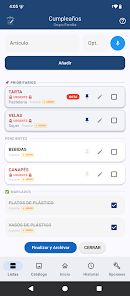
- Flexible lists — make project lists, shopping lists, or daily routines and reorder items by drag-and-drop.
- Reminders and repeat rules — set one-time alerts or complex recurring schedules (daily, weekly, custom intervals).
- Sync and backup — optional cloud sync keeps lists current across multiple devices and provides backup options.
How the app works in everyday use
Starting a plan is simple: create a list, add tasks, and tag or prioritize them. Tasks can carry notes, checklists, or small file attachments such as images and receipts. Notifications are configurable so you only get interruptions when something truly needs attention. For users who plan by time blocks, tasks can be linked to calendar events for a combined view of what to do and when to do it.
Task management features
- Subtasks and progress — break big items into actionable steps and watch percentage completion update automatically.
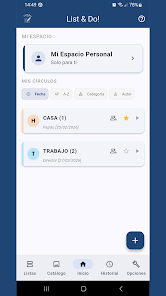
- Labels and filters — color-code lists, add labels for context (work, home, errands), and filter tasks by due date or tag.
- Smart suggestions — the app learns frequently added tasks and offers shortcuts for recurring entries.
Interface and performance
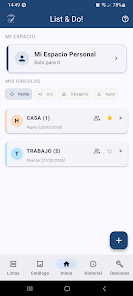
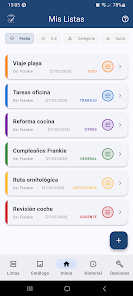
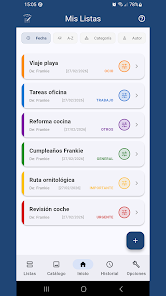
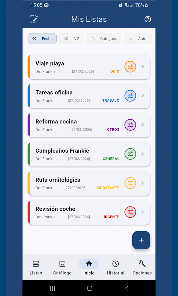
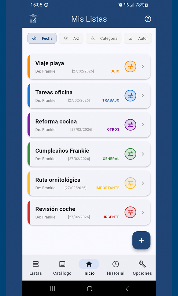
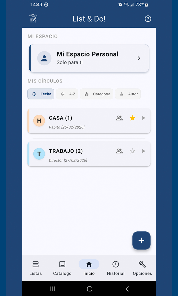
The user interface favors clarity over bells and whistles. Lists display as cards with clear typography and responsive touch targets. The app runs smoothly on a wide range of Android devices and has low battery impact. Theme options include light and dark modes, and font sizes are adjustable for accessibility.
Navigation and visual design
- Minimal navigation — primary controls are located on a bottom bar and a floating add button for quick entry.
- Widgets — home-screen widgets show active tasks and let you check off items without opening the app.
- Animations — subtle transitions help track changes without causing distraction.
Workflow tips for new users
To get the most from List & Do!, start by creating three core lists: Today, This Week, and Someday. Use labels to separate work and personal tasks, and set two daily reminders—one for morning planning and one for end-of-day review. Leveraging subtasks for complex items reduces friction when delegating or tracking progress.
Advanced usage
- Use repeat rules for habits and maintenance tasks so they reappear automatically.
- Integrate with your calendar to avoid overbooking and to visualize workload.
- Archive completed projects — keep history without cluttering active lists.
Installation and getting started
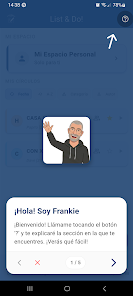
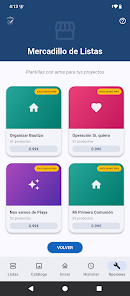
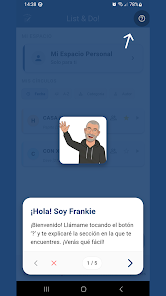
Installing List & Do! is straightforward from the app store. Grant notification permission to receive reminders, and opt into cloud sync if you plan to access lists across devices. Initial setup takes just a few minutes and the guided walkthrough helps you create your first lists with presets for common use cases.
User experience highlights
Users report that the app’s simplicity is its biggest advantage. The layout reduces friction for rapid capture while offering enough features for nuanced planning. Customer support provides clear documentation and a feedback channel inside the app, which helps drive frequent, focused updates.
Final considerations before downloading
List & Do! is a strong choice if you want a reliable, no-nonsense task manager that grows with your needs. It balances lightweight design with practical features like subtasks, reminders, and widgets. Whether you manage household chores or small projects, the app's workflow tools make staying organized less effortful.
Show More
Information
Screenshots


Latest Update












Hot Tags
Latest News
-
![Revealing the Launch Playlists and Cross-Progression for COD Warzone Mobile News]()
-
![March 2024 Free Redemption Codes for Honkai: Star Rail News]()
-
PUBG Mobile Teams Up with Bentley Motors: Luxury Cars, Exclusive Collectibles, and Beyond 2024-04-18
![PUBG Mobile Teams Up with Bentley Motors: Luxury Cars, Exclusive Collectibles, and Beyond News]()
-
![Monster Never Cry is now accessible on both Android and iOS mobile devices. News]()
-
V2.2 of the Farlight 84 update introduces an overhauled Season structure, fresh in-game currency, an 2024-04-16
![V2.2 of the Farlight 84 update introduces an overhauled Season structure, fresh in-game currency, an News]()
-
![Arrival of Genshin Impact 4.6 Update: 'Embers of Two Realms, Twilight of Crimson' News]()
-
April 2024 Clash of Clans Update: Unveiling a Fresh Companion, Enhanced Levels, Chat Tagging, and Be 2024-04-16
![April 2024 Clash of Clans Update: Unveiling a Fresh Companion, Enhanced Levels, Chat Tagging, and Be News]()






