

Expense control
Version:1.0.32
Published:2026-10-15
Introduction
Expense control is a simple home budget tracker designed to help you understand where your money goes and to regain control of everyday spending. The app focuses on quick entry, clear category breakdowns and straightforward monthly overviews so you can log purchases and bills in seconds, see totals at a glance and track progress toward savings goals without sifting through complex menus.
Key features and day-to-day controls
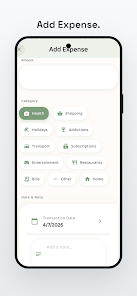
The core interaction in Expense control is fast expense entry: tap to add an amount, choose a category and the entry is recorded. Controls are intentionally minimal — amount, category, optional note and date — so recording a coffee, bill or grocery run takes only a few seconds. Categories are color coded and editable, and common operations like editing or deleting an item are available from the entry view. The monthly budget overview shows totals and remaining balances for each category so you can adjust spending quickly when you need to.
Progression and challenge systems
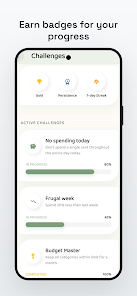
Instead of levels, progression in Expense control comes from habit-building and goal milestones. Monthly budgets act as your repeating timebox to measure improvement. Savings challenges let you set aside small amounts regularly and earn badges or milestone markers when you hit targets; these visual milestones are designed to motivate steady progress and make it easy to compare one month to the next. Progress reporting highlights trends so you can see which categories are shrinking or growing over time.
Visual style, layout and accessibility
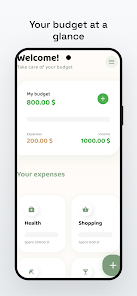
The interface uses a clean, uncluttered layout with clear typography and contrasting colors for category labels and graphs. A simple dashboard presents the most important numbers first: total spent, remaining budget and active savings goals. Accessibility features include adjustable text sizes, high-contrast color options and a dark mode to reduce eye strain; these options make the app easier to use for people who prefer larger text or low-light reading. Buttons and input fields are sized for comfortable tapping on phones of varying sizes.
Customization and flexibility
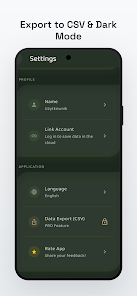
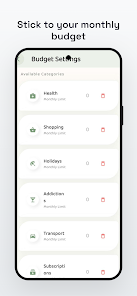
Expense control supports flexible use patterns: create and rename categories to reflect your lifestyle, set monthly limits for categories and adjust budgets as needs change. You can start in a free mode to track daily spending and upgrade to Pro when you want CSV export, dark mode and deeper insights. Registration is optional for basic use; registering raises usage limits and enables cloud-linked features for those who choose to use them.
Offline use, privacy and data handling
Because Expense control is privacy-first, you can begin tracking without creating an account, and the app keeps your data local unless you explicitly register or export. Offline use is supported so you can add entries when you don’t have connectivity and sync or export later if desired. Export options (CSV) are available in the Pro tier for users who want backups or to run custom reports on a computer.
Replay value and long-term use
Replay value comes from repeating monthly cycles, recurring savings challenges and the satisfaction of improving spending habits. Reviewing month-over-month trends, adjusting budgets and trying new savings challenges provide continuing reasons to open the app. The simplicity of Expense control encourages daily use: small actions add up, and the app is structured so that brief, frequent entries are rewarded with clear insight and momentum toward financial goals.
Limitations and upgrade details
Expense control is intended for straightforward personal budgeting. Advanced accounting or business finance features are not part of the app’s focus, and some premium tools — such as CSV export and extended analytics — require a Pro upgrade. A free account will increase basic usage limits, while the Pro tier unlocks exports and additional insights for users who need them.
Tips for getting started
Begin by creating a few high-level categories that match your spending (for example groceries, transport and bills), set realistic monthly limits and record every transaction for two weeks to build a baseline. Try one savings challenge at a time and review the monthly overview on the same day each month to adjust limits. Over time you can refine categories and use the export feature if you want to analyze your data on a computer. Expense control is built to be approachable, private and useful for everyday money management.
Show More
Information
Screenshots
Latest Update












Latest News
-
![Revealing the Launch Playlists and Cross-Progression for COD Warzone Mobile News]()
-
![March 2024 Free Redemption Codes for Honkai: Star Rail News]()
-
PUBG Mobile Teams Up with Bentley Motors: Luxury Cars, Exclusive Collectibles, and Beyond 2024-04-18
![PUBG Mobile Teams Up with Bentley Motors: Luxury Cars, Exclusive Collectibles, and Beyond News]()
-
![Monster Never Cry is now accessible on both Android and iOS mobile devices. News]()
-
V2.2 of the Farlight 84 update introduces an overhauled Season structure, fresh in-game currency, an 2024-04-16
![V2.2 of the Farlight 84 update introduces an overhauled Season structure, fresh in-game currency, an News]()
-
![Arrival of Genshin Impact 4.6 Update: 'Embers of Two Realms, Twilight of Crimson' News]()
-
April 2024 Clash of Clans Update: Unveiling a Fresh Companion, Enhanced Levels, Chat Tagging, and Be 2024-04-16
![April 2024 Clash of Clans Update: Unveiling a Fresh Companion, Enhanced Levels, Chat Tagging, and Be News]()






