
Shift Planner - Rota & Hours
Version:1.0.46
Published:2026-10-16
Introduction
Shift Planner - Rota & Hours helps shift workers and managers schedule, track hours, and manage availability with a clear mobile interface. It centralizes rotas, overtime calculation, and time-off requests while offering fast editing and export options for payroll or personal timekeeping.
Quick overview of the app
This shift planning tool focuses on practicality: create rotas, monitor worked hours, and generate clean reports for payroll. The app balances automation and hands-on control so both individual employees and small teams can keep schedules accurate without spreadsheets or paper diaries.
Core functionality you’ll use daily
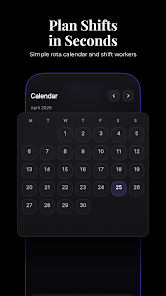
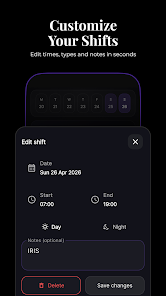
At its heart, Shift Planner - Rota & Hours provides a visual calendar where shifts are created, copied, and adjusted in seconds. It supports multiple pay rates, break rules, and overtime calculations that respect week or custom pay periods. Timesheets are summarized per shift, per day, or for a whole pay run.
Key features and tools
- Drag-and-drop rota editing — rearrange shifts on the calendar quickly and assign staff with a tap.
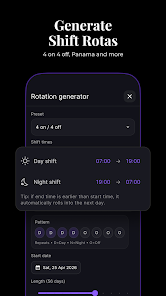
- Recurring shifts and templates — save common patterns and apply them across weeks or months.
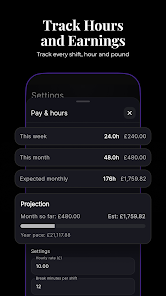
- Accurate hours tracking — automatic totals, break deductions, and overtime flags so you never miscount time.
- Export options — generate CSV or PDF reports suitable for payroll, accounting, or sharing with employees.
- Availability and leave management — staff can mark availability and request time off; managers review and approve in-app.
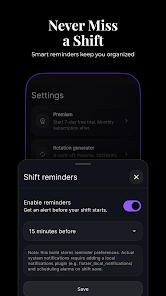
- Notifications and reminders — push alerts for upcoming shifts, swaps, or rota changes.
How it works in real workflows
Set up starts by creating roles, locations, and pay rules. Add employees and assign default availability. Build the first rota week using templates or manual entry. When shifts are awarded, the app calculates hours instantly and records any exceptions such as late starts or early finishes. Managers can lock a pay period to prevent accidental edits.
Customization for different industries
Shift Planner - Rota & Hours adapts well whether you manage hospitality, retail, healthcare, or field teams. Customize shift colors, label positions, and notification preferences to match your operation. Use multiple locations for multi-site businesses and set specific break rules per role to comply with legal or company policies.
User interface and performance
The interface is built for speed. The main calendar view is responsive, with clear typography and color-coding for quick comprehension. Offline mode allows viewing and editing without network access; changes sync when connectivity returns. The app stays lightweight on battery while processing large rosters efficiently.
Practical tips for new users
- Start with a two-week template to capture common patterns before scaling to monthly rotas.
- Enable pay-period locking once shifts are finalized to avoid accidental changes during payroll processing.
- Use color codes for roles or sites to help staff scan the rota faster.
- Encourage team members to set availability and confirm shifts through the app to cut down on messages and calls.
Reporting and exports
Reporting tools let managers pull totals by employee, period, or project. Export formats are designed for compatibility with common payroll systems and spreadsheets. You can include notes and custom headers on reports when sharing with payroll or HR.
Why teams adopt this planner
Teams choose Shift Planner - Rota & Hours for its blend of simplicity and depth. It reduces scheduling mistakes, saves administrative time, and provides a single source of truth for hours worked. Whether you're a lone manager or running a multi-site operation, the app streamlines the steps that traditionally required manual reconciliation.
Getting started quickly
Download and follow the guided setup: define pay periods, add staff, and create a first rota. Most managers can generate a usable weekly schedule in under fifteen minutes. Regular backups and familiar export options make it safe to adopt as the core scheduling tool.
For anyone managing variable hours, Shift Planner - Rota & Hours brings tangible improvements to accuracy and communication. Its practical feature set and thoughtful interface reduce the time spent on rota admin so teams can focus on the work that matters.
Show More
Information
Screenshots
Latest Update












Latest News
-
![Revealing the Launch Playlists and Cross-Progression for COD Warzone Mobile News]()
-
![March 2024 Free Redemption Codes for Honkai: Star Rail News]()
-
PUBG Mobile Teams Up with Bentley Motors: Luxury Cars, Exclusive Collectibles, and Beyond 2024-04-18
![PUBG Mobile Teams Up with Bentley Motors: Luxury Cars, Exclusive Collectibles, and Beyond News]()
-
![Monster Never Cry is now accessible on both Android and iOS mobile devices. News]()
-
V2.2 of the Farlight 84 update introduces an overhauled Season structure, fresh in-game currency, an 2024-04-16
![V2.2 of the Farlight 84 update introduces an overhauled Season structure, fresh in-game currency, an News]()
-
![Arrival of Genshin Impact 4.6 Update: 'Embers of Two Realms, Twilight of Crimson' News]()
-
April 2024 Clash of Clans Update: Unveiling a Fresh Companion, Enhanced Levels, Chat Tagging, and Be 2024-04-16
![April 2024 Clash of Clans Update: Unveiling a Fresh Companion, Enhanced Levels, Chat Tagging, and Be News]()






