
Android TV Remote - CHAMLAB
Version:1.0.1
Published:2026-10-20
Introduction
Android TV Remote - CHAMLAB turns your Android phone into a straightforward and dependable remote for Android TV and Google TV devices, providing quick discovery, reliable controls, and a minimal setup that gets you watching faster. From precise D-Pad navigation to a gesture-friendly touchpad, the app balances accuracy and fluid control while offering power and volume buttons plus an integrated keyboard that speeds up searches and text entry. Built-in quick-launch shortcuts and an auto-save for recently used TVs make switching between living room devices simple, which is especially useful if you share or rotate TVs in a household.
Key Features
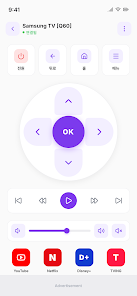
Android TV Remote - CHAMLAB focuses on core remote functionality delivered in an approachable interface: a D-Pad mode for precise directional control and menu navigation, a touchpad mode for swipe-and-tap gestures, on-screen power and volume controls to manage playback, and a soft keyboard to enter searches, passwords, and text fields more quickly than pecking on a physical remote. The app also includes quick-launch tiles for commonly used streaming apps and remembers frequently connected TVs so you can reconnect instantly without repeating discovery steps.
User Experience and Controls
The app offers two complementary control schemes so different viewing situations are covered. D-Pad mode mimics a classic remote with distinct directional presses for browsing grids and menus, while touchpad mode emphasizes fluid gestures for scrolling and pointer-style navigation when an app on TV benefits from freeform input. Tactile feedback, responsiveness, and simple on-screen labels are designed to minimize confusion when you switch modes. CHAMLAB balanced the layout to keep the most-used controls within thumb reach and to reduce accidental commands when you pick up your phone in the dark.
Setup, Compatibility and Connectivity
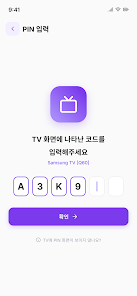
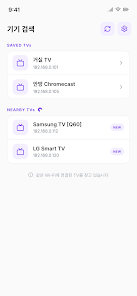
Automatic discovery over your local Wi-Fi network makes the initial connection fast: the phone and TV must be on the same Wi-Fi for discovery and control. Because the app communicates on the local network, it does not require an internet connection for basic remote functions once devices are discoverable on the same router, which can be helpful in private networks or when internet access is intermittent. Android TV Remote - CHAMLAB is intended for Android TV and Google TV platforms; if your TV model follows the common Android TV or Google TV protocols it should appear automatically, and the app provides simple on-screen prompts for pairing if confirmation on the TV is required.
Accessibility, Customization and Practical Use
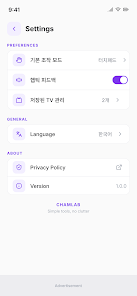
The integrated keyboard and clear button layout help users who need larger targets and faster text entry, improving accessibility for those who find small physical remotes difficult to use. Quick-launch shortcuts speed access to frequently used streaming apps, and the app’s recent-TV auto-save reduces repetitive pairing steps for households with multiple TVs. Settings focus on practical options such as switching between navigation modes and managing saved devices so you can tailor the experience without navigating a complex preferences screen.
Performance, Offline Use and Reliability
Designed to be lightweight, the app emphasizes reliability and low latency on a typical home Wi-Fi network. Because it relies on local network discovery and control protocols, performance is primarily influenced by your router and network congestion; in busy networks you may notice small delays, and the app includes guidance in its help text to troubleshoot common connection issues. Offline use is supported in the sense that the app does not need cloud services to function for remote control once devices are on the same network, but it does require that local connectivity between phone and TV remains available.
Limitations and Support
While the app covers essential remote functionality, it is purposefully focused rather than feature-heavy: advanced functions found on some official remotes (such as built-in voice assistants directly tied to manufacturer services or proprietary hardware sensors) are not included. The main limitations are the requirement that phone and TV share the same Wi-Fi network and a focus on core controls rather than every manufacturer-specific enhancement. CHAMLAB maintains the app with periodic updates and provides basic support information for pairing issues, compatibility questions, and suggestions for improvement.
About the Developer
Android TV Remote - CHAMLAB is developed by CHAMLAB as a clean, no-frills companion to physical remotes, intended to make everyday TV interaction simpler. The development team prioritizes stability, clear controls, and a compact feature set that serves the majority of TV tasks reliably. If you need a straightforward remote replacement that emphasizes simplicity and on-device control, this app aims to be a dependable option for Android TV and Google TV users.
Show More
Information
Screenshots
Latest Update












Hot Tags
Latest News
-
![Revealing the Launch Playlists and Cross-Progression for COD Warzone Mobile News]()
-
![March 2024 Free Redemption Codes for Honkai: Star Rail News]()
-
PUBG Mobile Teams Up with Bentley Motors: Luxury Cars, Exclusive Collectibles, and Beyond 2024-04-18
![PUBG Mobile Teams Up with Bentley Motors: Luxury Cars, Exclusive Collectibles, and Beyond News]()
-
![Monster Never Cry is now accessible on both Android and iOS mobile devices. News]()
-
V2.2 of the Farlight 84 update introduces an overhauled Season structure, fresh in-game currency, an 2024-04-16
![V2.2 of the Farlight 84 update introduces an overhauled Season structure, fresh in-game currency, an News]()
-
![Arrival of Genshin Impact 4.6 Update: 'Embers of Two Realms, Twilight of Crimson' News]()
-
April 2024 Clash of Clans Update: Unveiling a Fresh Companion, Enhanced Levels, Chat Tagging, and Be 2024-04-16
![April 2024 Clash of Clans Update: Unveiling a Fresh Companion, Enhanced Levels, Chat Tagging, and Be News]()






