
Text Repeater: Emoji & Fonts
Version:1.0.0
Published:2026-10-20
Introduction
Text Repeater: Emoji & Fonts helps you create repeated text, styled messages and emoji patterns quickly for social posts, chats, and bios. This lightweight tool turns typed phrases into repeated lines, decorative blocks, or unique font styles so you can craft playful or attention-grabbing messages in seconds.
What this tool offers
Text Repeater: Emoji & Fonts is designed for people who want to speed up message creation while adding personality. Instead of manually copying and pasting, the app generates repeated strings, converts normal characters into decorative fonts, and inserts emoji sequences at chosen intervals. It focuses on simplicity and fast sharing.
Key features at a glance
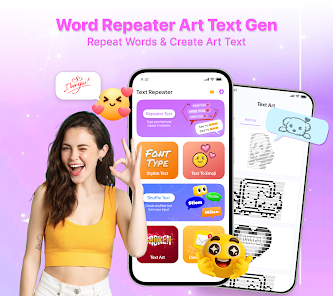
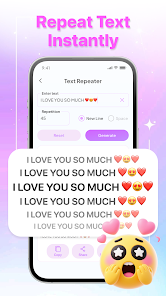
- Repeat generator — choose how many times a word or phrase appears, set separators like spaces, commas or line breaks, and preview results instantly.
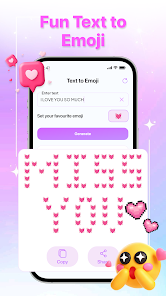
- Emoji patterns — build smiley chains, banners or alternating emoji sequences to decorate posts and status updates.
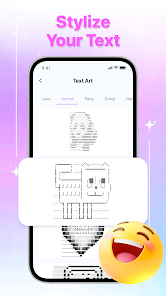
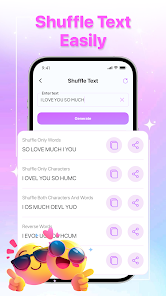
- Font transformations — apply a range of stylish Unicode fonts to turn plain text into bold, cursive, or futuristic-looking characters.
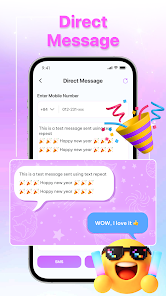
- Clipboard and share — copy generated content with a single tap or send it directly to messaging apps, social platforms, and notes.
- History and favorites — save commonly used patterns and recent creations for quick reuse.
How it works in practice
Open the app, type or paste the base text, then select repetition count and pattern options. You can insert separators and choose whether the output repeats on one line or across multiple lines. Tap different font styles to see live previews. When you find a result you like, use the copy button to paste it anywhere or the share menu to send it straight to a contact.
Customization and creative control
The app gives granular controls so outputs match your intent. Change spacing, switch between inline and block repetition, or alternate emojis with text segments. Font choices are presented as previews, so you can compare a few looks before committing. For social bios, the compact output settings help keep characters under platform limits.
Practical use cases
- Social media captions: emphasize a phrase with repeated words or a decorative emoji border.
- Chat flair: create a fun, eye-catching greeting or sign-offs for group messages.
- Profile bios and headlines: apply unique fonts to make short bios stand out.
- Event and reminder texts: generate formatted lists or banners to highlight dates and times.
- Copy templates: build reusable blocks of text for customer replies, quick notes, or promotional messages.
Usability and interface
The interface is built around a single workspace where input, options and preview are visible together. Buttons and sliders make adjusting repetition count and spacing quick. The live preview updates without delays, so experimenting with different shapes and fonts feels immediate. Accessibility options and clear labels improve usability for a wide audience.
Performance and compatibility
Because the app performs lightweight text transformations, it runs smoothly on most Android devices without significant battery or memory demands. Generated text uses Unicode variants for fonts, which display correctly across current Android versions and most social platforms. When a particular font isn’t supported by a destination app, switching to a fallback style within the app resolves the issue.
Tips for effective results
- Keep platform limits in mind — some social sites truncate long lines or remove repeated characters; use compact output for bios and tweets.
- Mix fonts sparingly to maintain readability; decorative fonts work best for short phrases.
- Use separators to control visual rhythm — a single space creates a cleaner look, while line breaks build stacked banners.
- Save frequently used combos to favorites so you don’t recreate them each time.
Getting started quickly
Install the app, grant any requested clipboard permissions for seamless copying, then type an example phrase. Experiment with repetition counts and emoji patterns until you find a style you enjoy. Because results are immediate, it’s easy to iterate and develop a library of shareable templates.
Final notes
Text Repeater: Emoji & Fonts is a compact utility that brings visual variety to everyday messages without complicated design skills. It streamlines repetitive tasks, makes text more expressive, and offers simple controls suited to casual users and social creators alike.
Show More
Information
Screenshots
Latest Update












Latest News
-
![Revealing the Launch Playlists and Cross-Progression for COD Warzone Mobile News]()
-
![March 2024 Free Redemption Codes for Honkai: Star Rail News]()
-
PUBG Mobile Teams Up with Bentley Motors: Luxury Cars, Exclusive Collectibles, and Beyond 2024-04-18
![PUBG Mobile Teams Up with Bentley Motors: Luxury Cars, Exclusive Collectibles, and Beyond News]()
-
![Monster Never Cry is now accessible on both Android and iOS mobile devices. News]()
-
V2.2 of the Farlight 84 update introduces an overhauled Season structure, fresh in-game currency, an 2024-04-16
![V2.2 of the Farlight 84 update introduces an overhauled Season structure, fresh in-game currency, an News]()
-
![Arrival of Genshin Impact 4.6 Update: 'Embers of Two Realms, Twilight of Crimson' News]()
-
April 2024 Clash of Clans Update: Unveiling a Fresh Companion, Enhanced Levels, Chat Tagging, and Be 2024-04-16
![April 2024 Clash of Clans Update: Unveiling a Fresh Companion, Enhanced Levels, Chat Tagging, and Be News]()






