
CustomKeys Programmable Calc
Version:1.0.0
Published:2026-10-20
Introduction
CustomKeys Programmable Calc is a powerful, customizable calculator app that turns your device into a programmable keypad for fast numeric entry and automation. It combines a tactile key-mapping interface with scripting-capable functions, letting professionals and hobbyists create tailored workflows for calculations and repetitive tasks.
Overview: What the app does
CustomKeys Programmable Calc is built for users who need more than a standard calculator. It blends a configurable keypad with macros and math functions so you can streamline common sequences and reduce input errors. The app supports both simple arithmetic sequences and multi-step procedures, which makes it suitable for finance, engineering, retail, and field work.
Core functionality
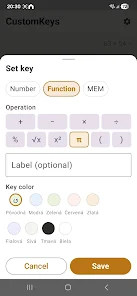
The core is a grid-based keyboard where each key can store a number, an expression, or a scripted routine. Assignments include plain values, formula snippets, or chained operations that execute on press. Keys can trigger clipboard actions, insert formatted results into other apps, or launch calculations that reference previous entries. That flexibility turns CustomKeys Programmable Calc into a productivity tool as much as a calculator.
Key features and tools
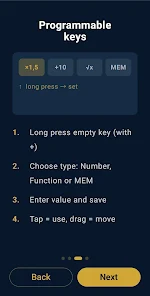
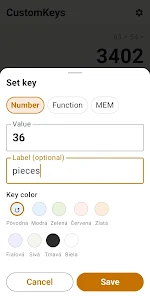
- Programmable buttons: Configure individual keys with expressions, variables, and labels for instant access.
- Macro support: Record or write short sequences that perform multi-step calculations with a single tap.
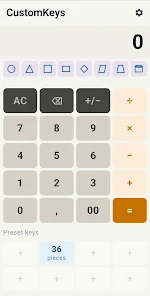
- Custom layouts: Create multiple keypad profiles for different tasks and switch between them quickly.
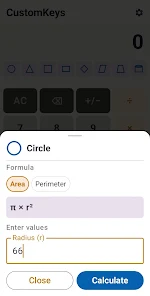
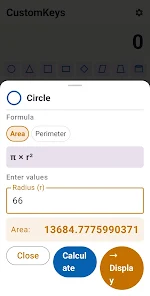
- Advanced functions: Use parentheses, conditionals, and reusable variables to build complex formulas.
- Export and import: Share layouts and scripts across devices or with teammates using JSON exports.
How it works in everyday use
Set up begins by choosing a layout size and populating keys. For retail checkout, map price lookups and tax calculations to a row of keys. For design work, reserve keys for unit conversions and compound formulas. During a session you tap keys to insert values or run macros, then view results in the integrated display. Because assignments are persistent, repeated tasks become faster after one setup pass.
Customization and scripting
Customization is where CustomKeys Programmable Calc stands out. The app includes a lightweight expression language with math operators, functions, and variable handling. You can reference previous results or link keys together so that pressing one key feeds data into another routine. Visual labels and color-coding help keep profiles organized and reduce mistakes when switching between workflows.
User interface and performance
The interface prioritizes clarity. Keys are large, contrasty, and responsive. A compact settings panel provides immediate access to behavior options like auto-clear, confirmation prompts, and decimal precision. Performance is snappy even on older hardware because calculations are handled locally with minimal overhead. The app also supports landscape and tablet layouts for larger work surfaces.
Practical workflows and integrations
CustomKeys Programmable Calc includes small integrations designed for real-world use. Clipboard interactions let you paste results into emails or invoices. Exported layouts can be integrated with enterprise tools or backed up to cloud storage. For power users, the app can act as a programmable input method for other utilities, reducing the need to switch apps during work.
Getting started: setup tips
Begin with a single layout tailored to your most common task. Keep initial macros short and test them with sample values before deploying them in live work. Use descriptive labels and color codes to differentiate numeric pads from function keys. Take advantage of the import/export feature to save a tested layout as a template you can reuse.
Who benefits most
Professionals who perform repetitive calculations—accountants, technicians, sales personnel, and engineers—will find the fastest gains. Hobbyists who build custom tools for projects also gain from the scriptability and layout flexibility. Because it covers both quick numeric entry and more elaborate automation, CustomKeys Programmable Calc fits a broad range of use cases.
Overall, this app is a practical addition to any productivity toolkit where repeated numerical tasks are common. It reduces manual entry, speeds up workflows, and offers enough depth for advanced users without overwhelming beginners. Try configuring one concise layout first and expand as your routines evolve.
Show More
Information
Screenshots


Latest Update












Hot Tags
Latest News
-
![Revealing the Launch Playlists and Cross-Progression for COD Warzone Mobile News]()
-
![March 2024 Free Redemption Codes for Honkai: Star Rail News]()
-
PUBG Mobile Teams Up with Bentley Motors: Luxury Cars, Exclusive Collectibles, and Beyond 2024-04-18
![PUBG Mobile Teams Up with Bentley Motors: Luxury Cars, Exclusive Collectibles, and Beyond News]()
-
![Monster Never Cry is now accessible on both Android and iOS mobile devices. News]()
-
V2.2 of the Farlight 84 update introduces an overhauled Season structure, fresh in-game currency, an 2024-04-16
![V2.2 of the Farlight 84 update introduces an overhauled Season structure, fresh in-game currency, an News]()
-
![Arrival of Genshin Impact 4.6 Update: 'Embers of Two Realms, Twilight of Crimson' News]()
-
April 2024 Clash of Clans Update: Unveiling a Fresh Companion, Enhanced Levels, Chat Tagging, and Be 2024-04-16
![April 2024 Clash of Clans Update: Unveiling a Fresh Companion, Enhanced Levels, Chat Tagging, and Be News]()






