
SCM Faboc User PRO
Version:1.1
Published:2026-10-23
Introduction
SCM Faboc User PRO is a compact Android utility that gives technicians and operators direct control of FABOC hardware over Bluetooth Low Energy (BLE). SCM Faboc User PRO connects to supported devices to issue simple commands such as Open, Close, Up and Down, while also providing on-device emergency contact management and diagnostic readouts. Designed for modern phones running Android 12 or newer, the app emphasizes clear status indicators, straightforward pairing, and a focused feature set to operate and troubleshoot remote FABOC equipment from a smartphone.
Key Features
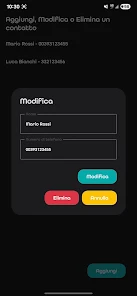
The core of SCM Faboc User PRO centers on reliable BLE control and a small, predictable command set: Open, Close, Up and Down. The app displays connection status and signal strength in real time, and it requires the necessary Bluetooth and location permissions at setup to discover nearby devices. Emergency contacts can be stored and edited on the device so that safety information is available to an operator without navigating away from control screens. Remote diagnostics present basic health metrics and error codes to help identify common issues before a service visit is required. Device compatibility details are gated behind a login to ensure only authorized users can view the supported hardware list.
How Controls Work
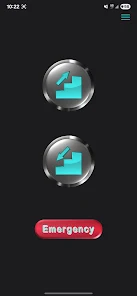
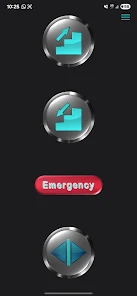
Controls are intentionally minimal to reduce accidental inputs during remote operation. Primary control buttons map to single commands, and sustained actions are supported by a press-and-hold behavior for continuous movement where applicable. Visual confirmations and brief on-screen prompts appear when a command is sent and when a response is received from the device. If a device does not acknowledge a command, the app surfaces the last known status and a concise troubleshooting hint so the operator can decide whether to retry, inspect the device locally, or consult diagnostics.
Setup, Progression and Daily Use
Initial setup walks users through pairing a BLE device and granting required permissions; this guided flow helps users progress from unpaired to operational quickly. Over time, operators will build familiarity with typical signal ranges, common error codes, and the diagnostic patterns that indicate maintenance is needed. The app keeps a local activity history so technicians can review recent commands and device responses to spot intermittent faults. This simple progression from first-time pairing to efficient remote operation is designed for field staff and maintenance teams rather than general consumers.
User Interface and Visual Style
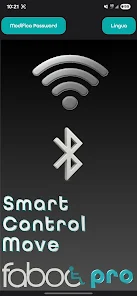
The interface favors readability and functional clarity: status bars, device names, and large command controls are prioritized over decorative elements. High-contrast text, distinct action buttons, and concise diagnostic panels make it faster to interpret device state in outdoor or low-light conditions. Icons and labels are used sparingly to minimize cognitive load during critical operations, and each major screen focuses on a single task—control, contacts or diagnostics—to avoid accidental navigation while actively controlling hardware.
Customization and Accessibility
Users can rename paired devices for easier identification, manage emergency contact entries, and adjust simple timeouts for remote commands to suit the behavior of specific hardware. The app respects system accessibility settings: larger font sizes and standard Android accessibility services such as TalkBack are supported. Because controls are streamlined, users with limited mobility can operate core functions without complex menus or gestures.
Diagnostics and Troubleshooting
Remote diagnostics provide a compact snapshot of device health including signal strength, last response timestamp and any reported error codes. Diagnostic screens include brief explanations of common codes and suggested next steps that a technician can perform. When connection problems arise, the app highlights signal-related information first and recommends basic checks; this diagnostic-first approach reduces unnecessary site visits and helps teams prioritize repairs.
Security, Privacy and Offline Behavior
The app requires a login to view the compatible device list and may request Bluetooth and location permissions to perform scanning and pairing. Personal emergency contacts and diagnostic logs are stored locally on the device unless the user chooses to share them through standard Android sharing features. Offline, SCM Faboc User PRO retains the last known device status and contact entries so core safety information remains accessible even when a BLE connection is not available, but active control and live diagnostics require a Bluetooth connection to the target hardware.
Compatibility, Support and Version Notes
SCM Faboc User PRO supports phones running Android 12 and above and is intended for BLE-capable devices used with FABOC systems. Device compatibility details are visible after logging into the app. The app is published by REW S.R.L., first released on Mar 19, 2026, with the current release listed as Version 1.1 updated on Apr 1, 2026. Downloads are listed as 0+ and the content rating is Everyone. For support and technical inquiries, users can consult the developer contact available on the app store listing or within the app’s support section.
Show More
Information
Screenshots
Latest Update












Latest News
-
![Revealing the Launch Playlists and Cross-Progression for COD Warzone Mobile News]()
-
![March 2024 Free Redemption Codes for Honkai: Star Rail News]()
-
PUBG Mobile Teams Up with Bentley Motors: Luxury Cars, Exclusive Collectibles, and Beyond 2024-04-18
![PUBG Mobile Teams Up with Bentley Motors: Luxury Cars, Exclusive Collectibles, and Beyond News]()
-
![Monster Never Cry is now accessible on both Android and iOS mobile devices. News]()
-
V2.2 of the Farlight 84 update introduces an overhauled Season structure, fresh in-game currency, an 2024-04-16
![V2.2 of the Farlight 84 update introduces an overhauled Season structure, fresh in-game currency, an News]()
-
![Arrival of Genshin Impact 4.6 Update: 'Embers of Two Realms, Twilight of Crimson' News]()
-
April 2024 Clash of Clans Update: Unveiling a Fresh Companion, Enhanced Levels, Chat Tagging, and Be 2024-04-16
![April 2024 Clash of Clans Update: Unveiling a Fresh Companion, Enhanced Levels, Chat Tagging, and Be News]()






