

Sew Assistant
Version:1.0.2
Published:2026-10-24
Introduction
Sew Assistant is a mobile app designed to simplify sewing projects by offering pattern management, measurement tools, and step-by-step guidance in one place. It helps users plan garments, track fabric and supplies, and generate accurate cutting layouts to reduce waste and speed up production for hobbyists and professionals alike.
Key Features and Tools
Sew Assistant bundles a practical set of features that make sewing workflows more efficient. The app includes a digital pattern library where you can store and categorize PDF patterns, annotate seam allowances, and save custom sizing adjustments. A built-in measurement tracker records body measurements and suggests pattern size blends, while a fabric estimator calculates yardage and prints cutting plans based on fabric width.
- Pattern management: import, tag, and annotate pattern files for quick retrieval.
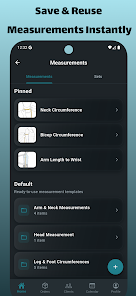
- Measurement profiles: save multiple profiles for different clients or household members.
- Fabric calculator: estimate yardage, layout, and seam allowances automatically.
- Step-by-step guides: integrated instructions and checklists to follow during construction.
User Interface and Navigation
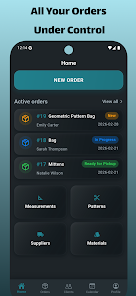
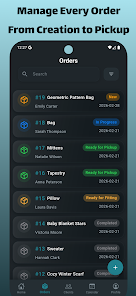
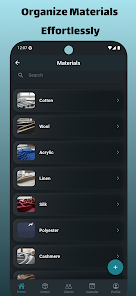
The interface emphasizes clarity and speed. Main actions are grouped into Projects, Patterns, Measurements, and Materials tabs. Large icons and contextual menus keep common tasks one tap away, such as creating a new project or exporting a cutting plan to PDF. Sew Assistant is designed so that frequent functions—resizing patterns or adjusting seam allowances—require minimal navigation.
How Workflow Improves Productivity
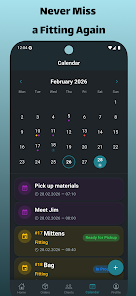
Sew Assistant streamlines the typical sewing project lifecycle. Start by creating a project and assigning a pattern from the library. Enter measurement profiles or accept suggested blends. The fabric estimator then proposes a layout and required yardage. Checklists guide you through cutting, pinning, and stitching steps, while progress tracking notes completed stages. This structured workflow reduces errors and helps users maintain consistent results across multiple garments.
Customization and Precision
Customization is handled through adjustable parameters and precision tools. Users can set seam allowance defaults, switch between metric and imperial units, and tweak pattern scaling with numeric inputs for exact results. The app also supports margin overlays on patterns so you can preview cuts and seam positions before printing. For those who tailor frequently, Sew Assistant enables saving custom modifications as separate pattern versions.
Practical Uses for Different Users
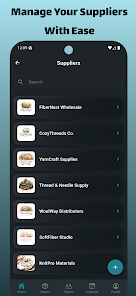
Sew Assistant fits a wide range of use cases. Hobby sewers benefit from organized project tracking and simple measurement storage, while small business owners can standardize production by exporting cutting layouts and material lists to suppliers. Costume makers and educators can use the step-by-step checklists to keep teams synchronized during multi-piece builds. The app’s exportable PDFs are handy for sharing instructions or pattern changes with collaborators.
Performance and Compatibility
The app is optimized to run smoothly on modern Android devices with minimal memory footprint. Pattern rendering is handled locally to avoid slow downloads, and exported files are compact for easy emailing. Sew Assistant supports common file formats such as PDF and JPG for patterns and images, and allows cloud backup to preserve libraries and measurement profiles. Battery-friendly operation ensures it won’t interrupt long workshop sessions.
Advanced Tips and Best Practices
To get the most from Sew Assistant, start by creating a default measurement profile that matches your common pattern size. Use the annotation tools sparingly to avoid cluttering pattern files; instead, maintain a revision log inside each project for major changes. When estimating fabric, double-check directional prints and nap to ensure accurate yardage. Finally, regularly back up your library to a cloud service to prevent data loss.
Getting Started Quickly
Begin with these simple steps: install the app, create an account for cloud backups, and import one or two favorite patterns to learn the annotation tools. Add a measurement profile and create a small project to see the fabric calculator and checklist in action. Sew Assistant’s guided prompts will help you complete the first project without needing to explore menus exhaustively.
Support and Updates
The app includes an in-app help section with FAQs, video tutorials, and contact options for technical questions. Regular updates add format compatibility and workflow enhancements based on user feedback. Sew Assistant’s ongoing improvements focus on reliability, new export options, and additional template libraries to cover more garment styles.
Whether you’re organizing a single sewing project or managing recurring orders, Sew Assistant provides practical tools to keep measurements, patterns, and materials organized while improving accuracy and reducing waste. Try the included sample patterns to explore features before importing your personal collection.
Show More
Information
Screenshots

Latest Update












Latest News
-
![Revealing the Launch Playlists and Cross-Progression for COD Warzone Mobile News]()
-
![March 2024 Free Redemption Codes for Honkai: Star Rail News]()
-
PUBG Mobile Teams Up with Bentley Motors: Luxury Cars, Exclusive Collectibles, and Beyond 2024-04-18
![PUBG Mobile Teams Up with Bentley Motors: Luxury Cars, Exclusive Collectibles, and Beyond News]()
-
![Monster Never Cry is now accessible on both Android and iOS mobile devices. News]()
-
V2.2 of the Farlight 84 update introduces an overhauled Season structure, fresh in-game currency, an 2024-04-16
![V2.2 of the Farlight 84 update introduces an overhauled Season structure, fresh in-game currency, an News]()
-
![Arrival of Genshin Impact 4.6 Update: 'Embers of Two Realms, Twilight of Crimson' News]()
-
April 2024 Clash of Clans Update: Unveiling a Fresh Companion, Enhanced Levels, Chat Tagging, and Be 2024-04-16
![April 2024 Clash of Clans Update: Unveiling a Fresh Companion, Enhanced Levels, Chat Tagging, and Be News]()






