

PianoMeter – Piano Tuner
Version:3.4.2
Published:2026-11-01
Introduction
PianoMeter – Piano Tuner is a precision instrument for piano owners and technicians, offering fast, reliable pitch detection and step-by-step tuning guidance. The app combines clear visual feedback with real-time frequency analysis to help you check strings, diagnose pitch drift, and perform accurate tuning directly from your Android device.
What PianoMeter Does
PianoMeter – Piano Tuner listens to each note and displays its frequency, deviation from the target pitch, and the nearest musical note. It supports standard concert pitch and custom reference frequencies, making it useful for upright, grand, and digital pianos. The app is designed for quick checks and full tuning sessions.
Key Features and Tools
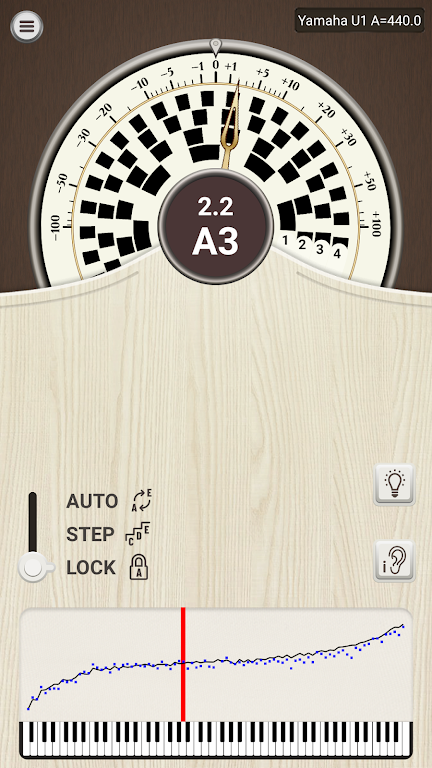
- Real-time frequency meter: Visual needle and numeric readout show exact cents off the target.
- Chromatic detection: Identifies all 12 notes and indicates enharmonic equivalents when relevant.
- Reference tuning: Set A4 to any Hertz value, including 440 Hz or historical concert pitches.
- Stability indicator: Confirms when a note is steady enough for accurate measurement.
- Calibration tools: Fine-tune the app’s sensitivity and filtering for different room conditions.
How the System Works
PianoMeter captures sound through the device microphone and applies frequency analysis to extract the dominant pitch. The app filters noise and displays the note name plus cents deviation from equal temperament. A stability meter helps you avoid reading transient or unstable tones, so you only adjust strings when the app indicates a steady result.
User Interface and Workflow
The layout prioritizes visibility under workshop lighting and stage conditions: a large tuning dial, a digital readout, and concise status text. You can lock the target note or allow chromatic mode for free detection. Visual cues show whether to tighten or loosen a string, reducing the guesswork common in ear-only tuning.
Tuning Modes and Options
PianoMeter – Piano Tuner offers multiple operational modes. Chromatic mode scans any incoming note, while manual mode targets specific keys for systematic tuning. The app includes an adjustable response time to suit loose strings that ring longer and sensitive pickups that produce short impulses. Users can also select concert pitch presets or input custom frequencies for specialized ensembles.
Performance and Compatibility
The app is optimized for Android devices with a working microphone and modest CPU usage so it runs on a wide range of phones and tablets. It performs well in quiet rooms and small studios; for noisy environments, external directional mics can improve accuracy. Low latency analysis ensures feedback is immediate, so your tuning adjustments feel natural and precise.
Practical Tips for Accurate Results
- Use a quiet room and mute sympathetic strings where possible to avoid harmonic interference.
- Allow the note to decay until the stability indicator turns green before taking the reading.
- Warm up an instrument first; pianos change pitch as they reach a stable temperature.
- For fine-tuning, make small, even adjustments and re-check notes frequently to avoid over-tightening.
Who Benefits Most
PianoMeter suits home owners checking occasional pitch drift, music teachers ensuring instruments are student-ready, and technicians who need a portable reference between workshops. The app’s straightforward presentation makes it accessible to users with basic musical knowledge while offering detailed data for advanced users.
Getting Started Quickly
Install PianoMeter – Piano Tuner, grant microphone access, and select your preferred reference pitch. Start in chromatic mode to scan the keyboard, then move to manual mode for targeted tuning. Follow the stability indicator and make gradual adjustments until each string aligns with the displayed target.
Final Notes on Reliability
Accurate tuning depends on stable sound capture and methodical adjustments. PianoMeter – Piano Tuner is a practical, portable tool that complements traditional tuning techniques and offers a clear visual approach to pitch verification. Regular checks with the app can keep an instrument sounding its best between professional servicing.
Show More
Information
Screenshots
Latest Update












Latest News
-
![Revealing the Launch Playlists and Cross-Progression for COD Warzone Mobile News]()
-
![March 2024 Free Redemption Codes for Honkai: Star Rail News]()
-
PUBG Mobile Teams Up with Bentley Motors: Luxury Cars, Exclusive Collectibles, and Beyond 2024-04-18
![PUBG Mobile Teams Up with Bentley Motors: Luxury Cars, Exclusive Collectibles, and Beyond News]()
-
![Monster Never Cry is now accessible on both Android and iOS mobile devices. News]()
-
V2.2 of the Farlight 84 update introduces an overhauled Season structure, fresh in-game currency, an 2024-04-16
![V2.2 of the Farlight 84 update introduces an overhauled Season structure, fresh in-game currency, an News]()
-
![Arrival of Genshin Impact 4.6 Update: 'Embers of Two Realms, Twilight of Crimson' News]()
-
April 2024 Clash of Clans Update: Unveiling a Fresh Companion, Enhanced Levels, Chat Tagging, and Be 2024-04-16
![April 2024 Clash of Clans Update: Unveiling a Fresh Companion, Enhanced Levels, Chat Tagging, and Be News]()






