

TuMangaOnline
Version:1.0.0
Published:2026-11-20
Introduction
TuMangaOnline is a lightweight Android reader that places a large catalog of Spanish-language and translated manga on your device, combining fast browsing, flexible viewing options, and robust offline access. With an emphasis on quick discovery and steady updates, TuMangaOnline helps readers follow series, manage their collection, and tailor the reading experience to personal preferences from the first install.
Features Overview
The app organizes thousands of titles into clear genres and thematic categories so you can explore popular series, niche works, and recent additions without sifting through unrelated results. A precise search engine accepts keywords and author names and includes filters for status and format to narrow results efficiently. The favorites system tracks the series you follow and triggers update alerts for new chapters; combined with a chapter history, this makes it easy to see what you have read and what is new at a glance.
Interface and Navigation
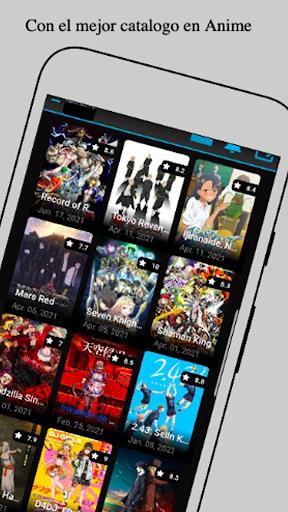
The user interface prioritizes clarity and speed while minimizing clutter. A responsive home feed highlights recent releases and editorial picks, and dedicated tabs separate ongoing reads, completed series, and your saved library. Thumbnail grid and compact list presentations let you choose how covers are displayed, and concise metadata under each title gives a quick snapshot before opening a chapter. Navigation controls are arranged to support one-handed use, with simple gestures and tap targets for turning pages, skipping chapters, and opening menus.
Reading Tools and Customization
Reading mechanics are adjustable to suit different habits: select single-page or double-page layouts, enable continuous vertical scrolling for a manga-long strip, or opt for horizontal paging for a page-by-page flow. Image quality settings let you balance sharpness and data usage, and a night mode reduces eye strain in low light. The reader includes page preloading to reduce interruptions, bookmarks to save specific panels, and pinch-to-zoom for detailed artwork inspection. These controls create a reading progression that feels natural whether you are catching up on a long series or sampling a single chapter.
Downloads and Offline Use
Offline reading is supported with a queueable download manager that accepts multiple-chapter batches and respects a chosen quality level to manage storage and data consumption. Downloaded chapters are organized in a dedicated offline library so you can quickly find volumes without an online connection. You can delete older downloads to recover space, and the app displays storage usage to help you maintain a tidy archive for travel or limited-connectivity situations.
Library Management and Progress Tracking
Library tools let you sort by recent activity, alphabetical order, or reading progress, making it straightforward to resume interrupted sessions. The app records read/unread status and keeps a chronological update log for series you follow. Optional sign-in enables cloud-backed syncing of reading progress across devices, ensuring your place in a chapter is preserved when you switch phones or tablets.
Performance and Compatibility
Designed to run smoothly on a wide range of modern Android devices, the application focuses on efficient memory use and quick load times. Caching strategies and adaptive image delivery reduce buffering and improve responsiveness on slower connections, while settings allow you to tweak performance for older hardware or low-data plans. These optimizations help keep navigation and in-reader interactions fluid even with large libraries.
Accessibility and User Experience
Accessibility is integrated through readable fonts, adjustable interface scaling, clear contrast options, and a night mode for late-night reading. The app minimizes required permissions and keeps privacy choices transparent, so you can use the core features without creating an account. For those who opt in, account settings manage synchronization, notification preferences, and download behavior to match your privacy comfort level.
Practical Tips and Getting Started
Begin by browsing featured categories to find trending or newly added series, then add a few favorites to populate your notification list. Customize reader settings—layout, image quality, and scrolling behavior—so every chapter opens the way you prefer. Use the download manager to prefetch chapters while on Wi‑Fi and clear cached images periodically to recover space. With its combination of catalog depth, configurable reader controls, and reliable offline support, TuMangaOnline makes it straightforward to build a personal reading routine and keep up with the releases that matter to you.
Show More
Information
Screenshots

Latest Update












Hot Tags
Latest News
-
![Revealing the Launch Playlists and Cross-Progression for COD Warzone Mobile News]()
-
![March 2024 Free Redemption Codes for Honkai: Star Rail News]()
-
PUBG Mobile Teams Up with Bentley Motors: Luxury Cars, Exclusive Collectibles, and Beyond 2024-04-18
![PUBG Mobile Teams Up with Bentley Motors: Luxury Cars, Exclusive Collectibles, and Beyond News]()
-
![Monster Never Cry is now accessible on both Android and iOS mobile devices. News]()
-
V2.2 of the Farlight 84 update introduces an overhauled Season structure, fresh in-game currency, an 2024-04-16
![V2.2 of the Farlight 84 update introduces an overhauled Season structure, fresh in-game currency, an News]()
-
![Arrival of Genshin Impact 4.6 Update: 'Embers of Two Realms, Twilight of Crimson' News]()
-
April 2024 Clash of Clans Update: Unveiling a Fresh Companion, Enhanced Levels, Chat Tagging, and Be 2024-04-16
![April 2024 Clash of Clans Update: Unveiling a Fresh Companion, Enhanced Levels, Chat Tagging, and Be News]()






