

Photo Lab PRO Picture Editor
Version:1.0
Published:2026-11-20
Introduction
Photo Lab PRO Picture Editor transforms ordinary photos into polished artworks with a broad collection of filters, effects, and automated tools. Designed for quick edits or deep creative control, this app balances smart one-tap fixes and manual adjustments to help users produce shareable images without complicated workflows.
What the app offers
Photo Lab PRO Picture Editor combines a wide library of creative filters, artistic frames, and retouching tools in a single mobile package. Users can apply fun face montages, vintage looks, or magazine-ready enhancements, all while keeping the ability to fine-tune brightness, contrast, color balance, and detail selectively. The layout keeps frequently used tools within easy reach so edits move quickly.
Core editing tools
- Smart Filters: One-tap styles that transform tone, mood, and color grading across the whole image.
- Portrait Retouch: Skin smoothing, blemish removal, and lighting adjustments tailored for faces.
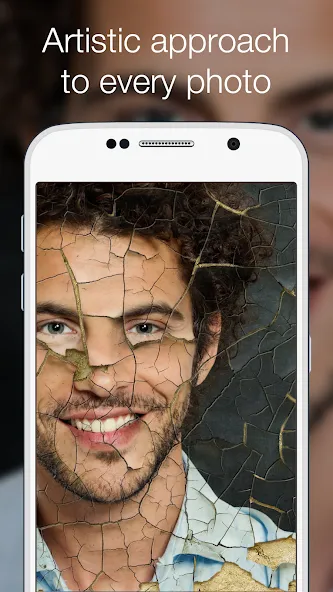
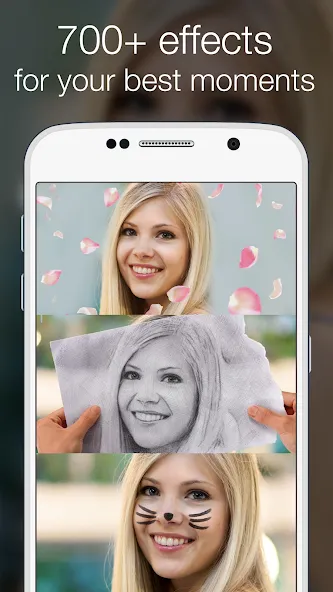
- Creative Effects: Double exposure, sketch, oil painting, and other artistic conversions.
- Frames and Borders: Themed frames and cinematic borders to finish compositions.
- Layered Adjustments: Blend multiple effects and control opacity for nuanced results.
Interface and workflow
The app interface prioritizes clarity: a large preview area, a collapsible tool panel, and contextual sliders for precise control. Photo Lab PRO Picture Editor guides users through a linear workflow—import, apply, refine, export—yet retains freedom to jump between steps. Real-time previews update instantly so users can judge results before committing.
How automation helps
Built-in AI-driven adjustments analyze each photo and recommend improvements such as exposure correction, color enhancement, or background blur. These suggestions speed up routine edits while remaining optional. Automation is especially useful for batch adjustments, allowing photographers to harmonize a set of shots with consistent color and tone.
Manual control for advanced users
For those who want more than presets, the app includes granular sliders for highlights, shadows, midtones, saturation, and sharpness. Masking tools enable selective edits—brighten a subject, darken a sky, or add texture to a single area without affecting surrounding regions. Non-destructive editing means adjustments can be revisited or reversed at any time.
Performance and compatibility
Photo Lab PRO Picture Editor is optimized for modern Android devices to maintain smooth performance while applying complex filters. Rendering pipelines use device GPU acceleration where available to reduce processing time and battery drain. The app supports common image formats and high-resolution exports, ensuring compatibility with social networks and printing services.
Practical use cases
Casual users will appreciate quick social-ready edits for selfies and daily snapshots. Content creators can build consistent visual themes, leveraging batch processing and export presets for Instagram stories or blog posts. Even small business owners can use the app for product photos—improving clarity, background separation, and color accuracy to showcase merchandise more effectively.
Tips for better edits
- Start with the auto-enhance option to get a baseline, then reduce or increase individual sliders for personality.
- Use masking to isolate and perfect key areas like faces or product surfaces.
- Export at the appropriate resolution for your destination to avoid unnecessary compression.
Getting started
Install and open Photo Lab PRO Picture Editor, grant access to your gallery, and pick a photo to edit. Explore the filter gallery first to discover styles that match your vision, then dial in adjustments. Save versions as you go to compare alternatives before exporting the final image. The app’s help section offers quick tutorials and sample workflows to accelerate learning.
Photo Lab PRO Picture Editor blends ease of use with depth, making it a versatile choice for anyone looking to elevate mobile photography. With thoughtful tools, efficient performance, and flexible output options, it fits neatly into both casual editing routines and more demanding creative projects.
Show More
Information
Screenshots

Latest Update









Hot Tags
Latest News
-
![Revealing the Launch Playlists and Cross-Progression for COD Warzone Mobile News]()
-
![March 2024 Free Redemption Codes for Honkai: Star Rail News]()
-
PUBG Mobile Teams Up with Bentley Motors: Luxury Cars, Exclusive Collectibles, and Beyond 2024-04-18
![PUBG Mobile Teams Up with Bentley Motors: Luxury Cars, Exclusive Collectibles, and Beyond News]()
-
![Monster Never Cry is now accessible on both Android and iOS mobile devices. News]()
-
V2.2 of the Farlight 84 update introduces an overhauled Season structure, fresh in-game currency, an 2024-04-16
![V2.2 of the Farlight 84 update introduces an overhauled Season structure, fresh in-game currency, an News]()
-
![Arrival of Genshin Impact 4.6 Update: 'Embers of Two Realms, Twilight of Crimson' News]()
-
April 2024 Clash of Clans Update: Unveiling a Fresh Companion, Enhanced Levels, Chat Tagging, and Be 2024-04-16
![April 2024 Clash of Clans Update: Unveiling a Fresh Companion, Enhanced Levels, Chat Tagging, and Be News]()






