

CutList Optimizer
Version:1.126
Published:2026-11-20
Introduction
CutList Optimizer is an Android productivity app that helps workshops, cabinetmakers and serious DIYers create efficient cutting layouts for sheet materials. CutList Optimizer appears in-app as a straightforward workspace where you define the raw panels you have, add parts with names and dimensions, and then let the algorithm nest pieces to reduce waste. The app name is shown here to help users find and recognize it across search results and their device; CutList Optimizer emphasizes practical controls, clear visual previews and project portability so you can move from tablet to phone without losing work.
How it works
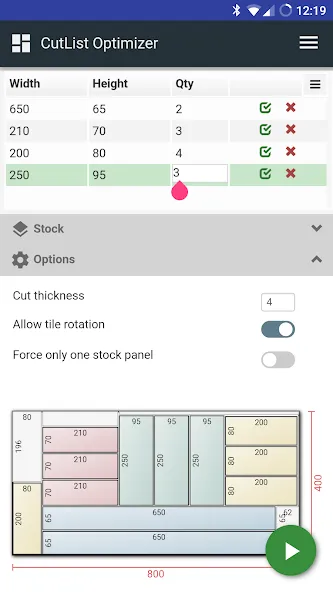
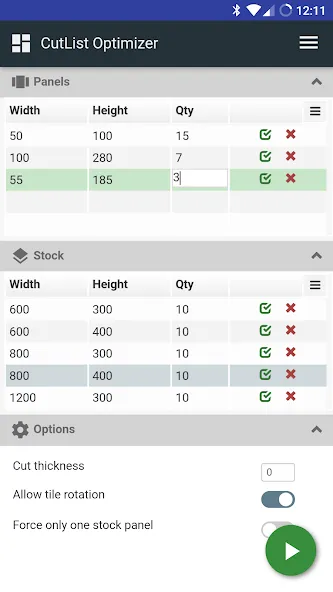
Begin a project by registering the stock sheets you have on hand: set sizes, thicknesses and material type. Then enter the parts you need with custom names, quantities and orientation preferences. The nesting engine attempts to place each part on panels to maximize yield while respecting grain direction and edge banding rules. You can adjust part placement manually with simple touch controls or accept the optimized layout and export a PDF or image for the shop. Projects save to an optional cloud account for synchronization and backup, and local storage keeps files available if you prefer offline work.
Controls and user interface
The interface is designed for quick, repeatable workflows: create a new project, add or import parts, and run optimization with a single tap. Interactive drag and drop and pinch-to-zoom make it easy to inspect tight nests and confirm clearances. Input fields accept imperial, metric and fractional formats so entering dimensions is fast regardless of your measuring system. Labels and editable part names stay attached to parts in the visual preview so you can confirm which component is which before you cut.
Customization and project progression
CutList Optimizer includes flexible project settings that let you tailor the optimization to real-world constraints: define offcut reuse rules, set minimum usable piece sizes, and record preferred grain or edge banding treatments. As projects grow in complexity you can organize parts into project groups and assign tags or job codes for traceability. Reusing templates and saved settings speeds up recurring jobs, creating a natural progression from quick one-off jobs to multi-panel projects managed with consistent rules.
Visual style and export options
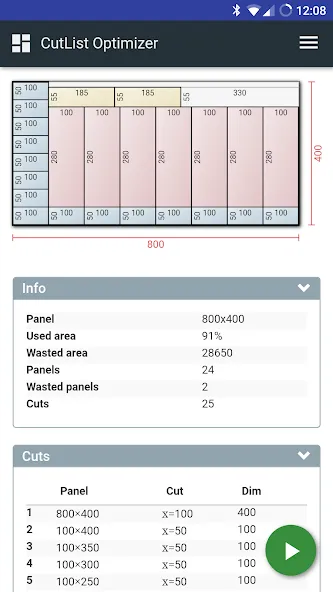
Visual previews render clean, scaled representations of panels with clear part outlines and labels so shop staff can read plans at a glance. Export options include high-resolution PDF for printing, image export for mobile sharing and CSV export to review part lists in spreadsheet tools. The app keeps the presentation simple and legible rather than decorative, prioritizing readable drawings that match shop needs rather than ornate visuals.
Replay value and workflows
While this is a production tool rather than a game, replay value comes from iterating on layouts, experimenting with part orientation and refining constraints to find better yields. Users often run different optimization passes to compare yield, cost and the number of required sheets. Saved projects and templates encourage repeated use across similar jobs, making the app a daily utility for shops that cut panels frequently.
Accessibility and offline use
The app supports adjustable text sizes and clear contrast in its previews to help visibility in busy workshop lighting. Many features are available offline; you can save projects locally, run optimizations without a network connection and export files from the device. Optional cloud sync provides convenience for teams or multi-device users who want to start a job on one device and continue on another.
Limitations and recommended uses
CutList Optimizer focuses on sheet and panel cutting workflows and does not include CAM toolpath generation, direct CNC control or machining-specific features. Users who require machine-level toolpaths or integration with production controllers should pair CutList Optimizer with CAM software designed for those tasks. This app is best used as a planning and layout tool to reduce material waste, document part lists and produce clear cutting diagrams for manual saws and panel saws.
Who benefits most
Carpentry shops, cabinetmakers, furniture makers, sign shops and metal or glass fabricators who work with panels will find the app useful for saving material costs and standardizing layouts. CutList Optimizer helps both professionals and experienced hobbyists streamline pre-cut planning, keep jobs organized with labels and tags, and produce print-ready diagrams for the shop floor.
Show More
Information
Screenshots
Latest Update












Hot Tags
Latest News
-
![Revealing the Launch Playlists and Cross-Progression for COD Warzone Mobile News]()
-
![March 2024 Free Redemption Codes for Honkai: Star Rail News]()
-
PUBG Mobile Teams Up with Bentley Motors: Luxury Cars, Exclusive Collectibles, and Beyond 2024-04-18
![PUBG Mobile Teams Up with Bentley Motors: Luxury Cars, Exclusive Collectibles, and Beyond News]()
-
![Monster Never Cry is now accessible on both Android and iOS mobile devices. News]()
-
V2.2 of the Farlight 84 update introduces an overhauled Season structure, fresh in-game currency, an 2024-04-16
![V2.2 of the Farlight 84 update introduces an overhauled Season structure, fresh in-game currency, an News]()
-
![Arrival of Genshin Impact 4.6 Update: 'Embers of Two Realms, Twilight of Crimson' News]()
-
April 2024 Clash of Clans Update: Unveiling a Fresh Companion, Enhanced Levels, Chat Tagging, and Be 2024-04-16
![April 2024 Clash of Clans Update: Unveiling a Fresh Companion, Enhanced Levels, Chat Tagging, and Be News]()






