

TalkIt!
Version:v1.7.2
Published:2026-11-22
Introduction
TalkIt! is a streamlined voice and text communication app designed for quick conversations, group chats, and efficient message management. It combines clear audio calling, threaded messaging, and intelligent notifications into a compact interface that helps users communicate faster and stay organized across devices.
Purpose and Audience
Built for people who need reliable, low-friction communication, TalkIt! targets commuters, remote teams, and social groups that value speed and clarity. The design prioritizes essential tools—instant voice notes, short-form text replies, and fast group coordination—while avoiding clutter that slows down conversations.
Key Features
- Real-time voice messaging: Send short voice snippets that play inline with other messages so conversations flow more naturally than long text threads.
- Threaded chats and channels: Organize discussions by topic or project with channels and threaded replies to keep context clear.
- Smart notifications: Prioritize alerts for mentions, urgent keywords, or pinned conversations to reduce noise without missing important updates.
- Cross-device sync: Resume conversations seamlessly between phone, tablet, and web without losing attachments or history.
- Lightweight media sharing: Share photos, small files, and location pins quickly with automatic compression and preview.
How the System Works
TalkIt! combines local caching and cloud synchronization to deliver messages instantly while preserving a consistent history. When you send a voice or text message, it is encrypted locally, queued, and then delivered through optimized servers to minimize latency. The app balances battery use and background activity to maintain responsiveness without draining resources.
Interface and Workflow
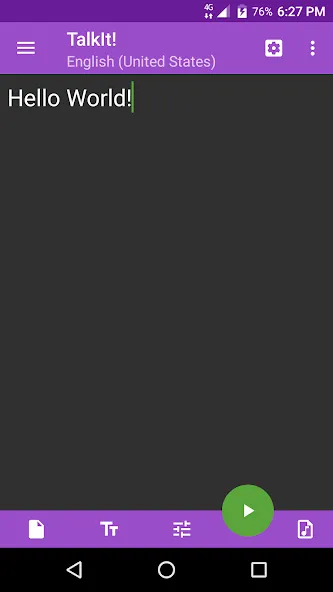
Navigation emphasizes fast access: a compact bottom bar, swipe gestures for marking messages read or muting chats, and an always-available voice-record button for one-tap replies. Message previews and contextual actions appear on long-press, so managing attachments or forwarding content requires only a couple of taps. The interface uses clear typography and unobtrusive colors to keep focus on conversations.
Customization Options
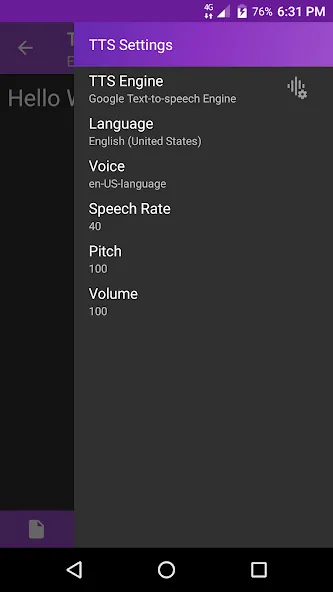
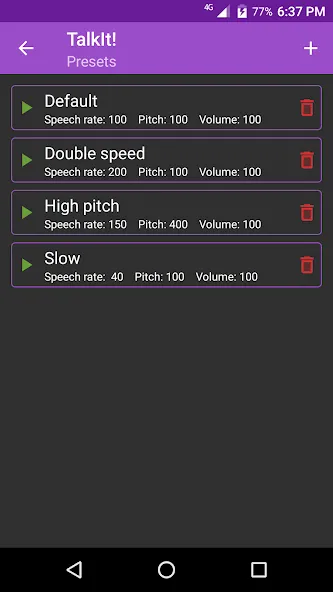
Settings let users tailor TalkIt! to their routines. Choose notification profiles for work, personal, or do-not-disturb modes, customize swipe actions, and select audio quality for voice notes depending on network conditions. Theme options include light, dark, and high-contrast palettes to improve readability in different lighting environments.
Integration and Compatibility
TalkIt! supports single sign-on with common identity providers and integrates with calendar apps and file storage services for quick sharing of events and documents. The app is compatible with a wide range of Android versions and device sizes, and the adaptive layout ensures keyboards, split-screen multitasking, and picture-in-picture calls work smoothly.
Performance and Reliability
Engineered for variable networks, TalkIt! dynamically adjusts audio bitrate and retries message delivery when connectivity drops. Background processes are throttled to protect battery life while essential synchronization keeps threads up to date. Regular updates focus on reducing latency and fixing compatibility issues across Android builds.
Privacy and Security
Security features include end-to-end encryption for messages, optional passcode or biometric locks for the app, and selective message expiration for sensitive conversations. Permission requests are limited to essentials—microphone, storage for file sharing, and optional location—so users maintain control over data access.
User Experience Highlights
Feedback from early users emphasizes speed and minimal friction: voice messages that avoid long typing sessions, quick group coordination without lengthy setup, and predictable notifications. The small learning curve makes TalkIt! suitable for users who prefer action-oriented communication tools rather than feature-heavy platforms.
Getting Started
Setup is straightforward: install the app, verify your phone number or sign in with an identity provider, and set your notification preferences. Create channels or invite contacts to an existing group with a shareable link. New users will find the voice-record button and message threads intuitive to use from the first conversation.
TalkIt! aims to be a practical, efficient alternative for everyday communication—focused on voice-first interactions, reliable performance, and clear conversation organization. Regular improvements expand integrations and refine the interface, making it a lightweight choice for people who want to move faster in chat and calls.
Show More
Information
Screenshots
Latest Update











Latest News
-
![Revealing the Launch Playlists and Cross-Progression for COD Warzone Mobile News]()
-
![March 2024 Free Redemption Codes for Honkai: Star Rail News]()
-
PUBG Mobile Teams Up with Bentley Motors: Luxury Cars, Exclusive Collectibles, and Beyond 2024-04-18
![PUBG Mobile Teams Up with Bentley Motors: Luxury Cars, Exclusive Collectibles, and Beyond News]()
-
![Monster Never Cry is now accessible on both Android and iOS mobile devices. News]()
-
V2.2 of the Farlight 84 update introduces an overhauled Season structure, fresh in-game currency, an 2024-04-16
![V2.2 of the Farlight 84 update introduces an overhauled Season structure, fresh in-game currency, an News]()
-
![Arrival of Genshin Impact 4.6 Update: 'Embers of Two Realms, Twilight of Crimson' News]()
-
April 2024 Clash of Clans Update: Unveiling a Fresh Companion, Enhanced Levels, Chat Tagging, and Be 2024-04-16
![April 2024 Clash of Clans Update: Unveiling a Fresh Companion, Enhanced Levels, Chat Tagging, and Be News]()






