

Kwiky
Version:1.8
Published:2026-11-22
Introduction
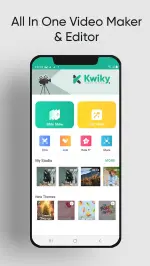
Kwiky is a photo and video editing app designed to turn everyday images and short clips into polished slideshow videos quickly and intuitively. Kwiky puts common editing tools in a streamlined workflow so anyone can arrange photos, set display durations, add background music and trim or join clips without steep learning curves. For users who want attractive, shareable highlights rather than a professional multi-track studio, Kwiky provides a compact set of features that focus on speed, clarity and consistent export quality.
Key features and editing toolbox
The app includes a familiar set of tools that cover the essential steps of slideshow and short video creation: photo sequencing, precise display-time controls, clip trimming and joining, plus options for background music with separate level control for original audio and soundtrack. Kwiky also offers filters and transition effects to smooth scene changes, text overlays with multiple fonts and formatting choices, and a library of stickers for quick embellishment. Export options favor HD output so finished projects are ready for social sharing or local storage, and built-in trimming makes it simple to lengthen or shorten clips to match a soundtrack or mood.
How the creation flow works (gameplay mechanics)
Think of the process as a series of approachable steps rather than layers: choose your photos and clips, arrange the order to tell the story you want, set how long each frame displays, then add music and visual treatments. Kwiky’s workflow encourages iterative refinement—after a first pass you can adjust timings, swap or mute audio tracks and change transitions to refine pacing. The app is optimized for short-form storytelling: pacing controls and clip joins are designed to produce a coherent progress from start to finish without deep manual mixing.
Controls and interaction
The interface emphasizes touch-friendly interactions: drag to reorder frames, tap to open timing and filter options, and pinch or swipe gestures where appropriate for trimming or previewing. Sliders and simple numeric inputs let you fine-tune display durations and audio levels accurately. Preview playback runs directly in the editor so you can test edits at any stage; this immediate feedback loop reduces guesswork and helps speed up the creative process for users of all skill levels.
Customization, visual style and templates
Kwiky balances ready-made looks with manual control. A set of presets for color grading and transitions provides quick, cohesive visual themes, while individual controls allow you to tweak contrast, saturation or apply selective filters per frame. Text formatting supports different fonts, sizes and entry timing so captions can appear exactly when needed. Although the app focuses on slideshows, the available stickers, overlays and transitions make it possible to achieve a range of moods from documentary-style montages to upbeat highlight reels.
Progression, project structure and replay value
As you use Kwiky more, the natural progression comes from increasing the complexity of your projects—longer sequences, tighter audio-video alignment, and more refined visual choices. The app supports iterative editing practices: try a basic cut, then return to refine transitions, swap music or retime captions. That cycle of draft and revision supports replay value because the same source photos can yield many different edits depending on pacing, soundtrack and effects. Users who habitually create family montages, event recaps or short promotional clips will find this flexibility encourages repeat use.
User experience, accessibility and offline use
Kwiky emphasizes clarity in the interface to improve accessibility: large tap targets, clear labels and simple contrast adjustments make the core tools approachable on a variety of screen sizes. The app is designed to work offline for basic editing tasks so you can create and export videos without requiring a network connection. This makes Kwiky convenient for travel, events or situations where connectivity is limited; media files are processed locally and exports are saved directly to the device storage for later sharing.
Limitations and who it suits best
Kwiky is focused on photo-to-video slideshows rather than advanced multi-track video production, so power users seeking complex timelines, layered video tracks or professional-grade color correction may find the toolset limited. Some features are described as coming soon, and while the current feature set suits users who want quick, attractive slideshow videos, those who require deep timeline control or collaborative online workflows will likely need a more specialized editor. For casual creators and anyone prioritizing speed and simplicity, however, Kwiky offers an efficient path from gallery to share-ready video.
Show More
Information
Screenshots

Latest Update











Latest News
-
![Revealing the Launch Playlists and Cross-Progression for COD Warzone Mobile News]()
-
![March 2024 Free Redemption Codes for Honkai: Star Rail News]()
-
PUBG Mobile Teams Up with Bentley Motors: Luxury Cars, Exclusive Collectibles, and Beyond 2024-04-18
![PUBG Mobile Teams Up with Bentley Motors: Luxury Cars, Exclusive Collectibles, and Beyond News]()
-
![Monster Never Cry is now accessible on both Android and iOS mobile devices. News]()
-
V2.2 of the Farlight 84 update introduces an overhauled Season structure, fresh in-game currency, an 2024-04-16
![V2.2 of the Farlight 84 update introduces an overhauled Season structure, fresh in-game currency, an News]()
-
![Arrival of Genshin Impact 4.6 Update: 'Embers of Two Realms, Twilight of Crimson' News]()
-
April 2024 Clash of Clans Update: Unveiling a Fresh Companion, Enhanced Levels, Chat Tagging, and Be 2024-04-16
![April 2024 Clash of Clans Update: Unveiling a Fresh Companion, Enhanced Levels, Chat Tagging, and Be News]()






