

Price Tracker
Version:1.0.19
Published:2026-05-20
Introduction
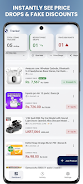
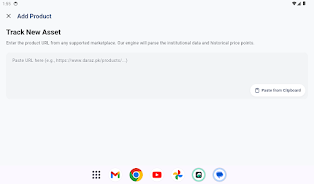
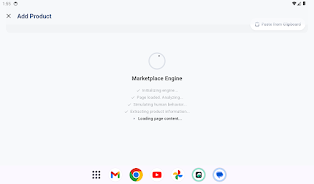
Price Tracker helps you catch discounts automatically by monitoring prices for the products you care about across major online marketplaces. Price Tracker starts simply: paste a product page URL into the app, give it a friendly name if you want, and the app will monitor that listing continuously, sending instant push alerts when a drop occurs so you can buy at the best moment. The first paragraph introduces the app, its core promise and how you begin tracking without repeatedly visiting product pages.
How it works and controls
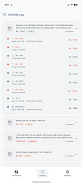
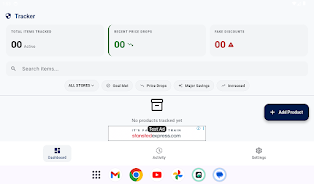
Adding and managing items in Price Tracker is designed to be direct and low-friction. The primary control is the add-item flow where you paste a product URL; from there you can set an optional target price or accept live tracking at the current price. Tracked items appear in a sortable list where simple gestures—tap to open details, swipe to remove or archive—let you keep a tidy watchlist. Notifications are delivered via standard push messages, and you can snooze alerts or mark items as ignored for limited periods if you don't want immediate reminders.
Progression and long-term use
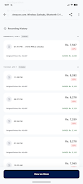
Progression in Price Tracker is represented by the growth and refinement of your watchlist rather than game-like levels. Over time the app learns which items you follow frequently, and the price history charts help you identify seasonal or recurring sale patterns. As you add more items and set thresholds, you build a personalized database of price behavior that makes it easier to spot genuine discounts and avoid impulse buys.
Visual style and price history
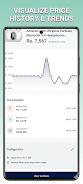
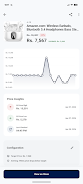
The visual presentation emphasizes clarity and quick comprehension. Each product page shows a compact chart of recent price history so you can see highs, lows, and trends at a glance. Charts include simple annotations for your target price and recent alerts. The interface uses readable typography, clear contrast for data points, and consistent spacing so that charts and lists remain usable on both phones and larger tablets.
List organization and level structure
Price Tracker organizes items into a single watchlist that you can filter and sort by store, currency, or price change recency. There are no complex hierarchies; instead, the app focuses on quick access to the most relevant items: newly dropped prices, items nearing your target, and archived bargains for reference. This structure keeps the app light and practical for daily use.
Customization and alerts
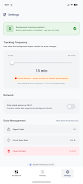
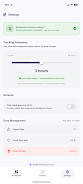
You can tailor how Price Tracker notifies you: set a target price trigger, enable percentage-based alerts, or choose to receive only major price drops. Multi-currency support lets you view and compare prices in your preferred currency, and you can adjust how often background sync runs to balance timeliness with battery use. These personalization options make the app adapt to different shopping habits and budgets without introducing unnecessary complexity.
Replay value and continued usefulness
Price Tracker remains useful for recurring buying needs—electronics, household goods, seasonal clothing or hobby items—because price patterns tend to repeat across the year. Users who invest a few minutes to curate their watchlist often find the app continues to save time and money, turning occasional bargain hunting into a manageable routine rather than a chore.
User experience and accessibility
The app prioritizes an accessible experience: readable fonts, high-contrast color options, and large tappable areas for common actions. Notifications include concise details about which product changed and by how much so users can decide quickly whether to open the app. Price Tracker also respects common power-saving modes and explains when those settings might delay background checks so users understand trade-offs.
Offline behavior and data reliability
Price history and the most recent check results are cached locally so you can review tracked items even without an active internet connection. Complete price verification requires network access, and the app makes it clear when data is stale or when a fresh check is pending. Accuracy depends on how frequently sellers update their listed prices and on device settings that allow background syncing.
Limitations and permissions
To deliver instant alerts, Price Tracker requests permission for push notifications; you can decline but will lose real-time updates. Background checks may be limited by device power-saving policies, which can delay alerts. The app does not require unnecessary permissions beyond those needed to monitor prices and send notifications, and it provides transparent explanations for each permission request.
Show More
Information
Screenshots
Latest Update









Hot Tags
Latest News
-
![Revealing the Launch Playlists and Cross-Progression for COD Warzone Mobile News]()
-
![March 2024 Free Redemption Codes for Honkai: Star Rail News]()
-
PUBG Mobile Teams Up with Bentley Motors: Luxury Cars, Exclusive Collectibles, and Beyond 2024-04-18
![PUBG Mobile Teams Up with Bentley Motors: Luxury Cars, Exclusive Collectibles, and Beyond News]()
-
![Monster Never Cry is now accessible on both Android and iOS mobile devices. News]()
-
V2.2 of the Farlight 84 update introduces an overhauled Season structure, fresh in-game currency, an 2024-04-16
![V2.2 of the Farlight 84 update introduces an overhauled Season structure, fresh in-game currency, an News]()
-
![Arrival of Genshin Impact 4.6 Update: 'Embers of Two Realms, Twilight of Crimson' News]()
-
April 2024 Clash of Clans Update: Unveiling a Fresh Companion, Enhanced Levels, Chat Tagging, and Be 2024-04-16
![April 2024 Clash of Clans Update: Unveiling a Fresh Companion, Enhanced Levels, Chat Tagging, and Be News]()






