
Erwischt
Version:0.1.1
Published:2026-08-24
Introduction
Erwischt is a mobile app designed to organize and energize group activities such as camping trips, team-building outings, and outdoor gatherings by providing a compact toolkit for creating and running interactive scenarios. Erwischt helps organizers set up tasks, monitor progress, and introduce learning elements so events feel structured and engaging without constant supervision. The app is aimed at leaders, teachers, camp counselors and informal group hosts who want a flexible, offline-capable solution that balances control with participant freedom.
Key Features
The app includes an intuitive scenario editor, customizable task templates, progress indicators and an organizer dashboard that keeps configuration and field management straightforward. Built-in educational task types let you add quizzes, observational challenges and simple problem-solving exercises to recreational activities. Real-time update views show current completion status for tasks and teams within an event file, while local saving and export functions protect your event data when connectivity is unavailable. The design emphasizes clarity: color-coded tasks, icons and concise instructions make both setup and execution fast for groups of different ages.
Gameplay and Mechanics
Erwischt structures activities around scenarios composed of discrete tasks or stations. Tasks can be time-limited challenges, scavenger objectives, knowledge questions or hands-on tasks that require participants to perform an action and confirm completion. Organizers can assign points or simple completion flags to tasks, set optional hints, and determine whether tasks must be done in sequence or can be attempted in any order. Each scenario can include checkpoints, optional bonus tasks, and a lightweight verification method so organizers can validate results without complex infrastructure. This keeps gameplay flexible while delivering clear goals to participants.
Controls and Interface
The app uses familiar touch controls designed for quick field use: tap to create or edit a task, drag to reorder steps, long-press to access advanced options, and swipe to mark tasks as completed. The organizer dashboard groups scenario settings, participant views and progress panels in one place to reduce navigation during an event. Templates help minimize repetitive setup: load a template, tweak a few details and the scenario is ready. Simple export and import options let you reuse or share scenario files between devices as needed.
Progression and Level Structure
Scenarios can be built as single-session challenges or as multi-stage experiences that progress through increasing difficulty. Each stage can adjust time limits, introduce new task types, or scale point values to reflect a rising challenge. This progression system lets you design short one-hour games or extended day-long programs with clear pacing. Organizers can also create tiers of objectives—required tasks, recommended tasks and optional bonus content—so groups with mixed abilities remain engaged while motivated participants chase higher scores or faster completion times.
Customization and Replay Value
Customization is central to replay value. Erwischt provides editable templates and variable task parameters so the same scenario can feel different when played multiple times: change clue wording, randomize task order, swap locations, or adjust time and scoring rules. You can tailor content for different age ranges and learning goals, reuse proven templates across events, and evolve challenges seasonally. The capacity to mix educational and recreational elements increases the likelihood that each run offers new learning opportunities and fresh group dynamics.
User Experience and Accessibility
The visual style is intentionally clean and legible: large tap targets, high-contrast text options and clear iconography reduce cognitive load during busy events. Accessibility features include adjustable font sizes, optional audio prompts for key instructions, and a simplified organizer mode that surfaces only the most relevant controls. Language-neutral icons and concise wording help non-native speakers and mixed-age groups follow tasks with minimal explanation from leaders.
Offline Play and Reliability
Offline support is a core strength: once a scenario is created and loaded on a device, events can proceed without an internet connection and all progress is stored locally until export or backup is convenient. This makes the app reliable in remote campsites and outdoor venues with limited signal. Automatic local saves prevent data loss if a device is restarted, and simple backup options let organizers preserve scenario templates for reuse. For events that later reconnect, saved event logs can be exported for record keeping and debriefing.
Challenges and Tips for Organizers
To get the most from Erwischt organizers should plan scenarios ahead of time and run a short trial to gauge timings and clarity. Expect a brief learning period while adjusting templates and familiarizing participants with the app’s flow. Real-time update features are most effective when devices are set up consistently and organizers define clear verification rules for task completion. With modest preparation, Erwischt streamlines planning, reduces on-site friction and enhances engagement across diverse group activities.
Show More
Information
Screenshots
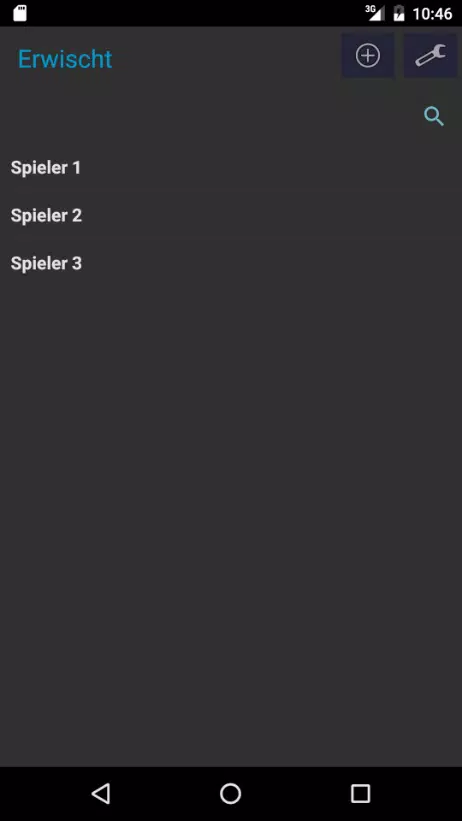
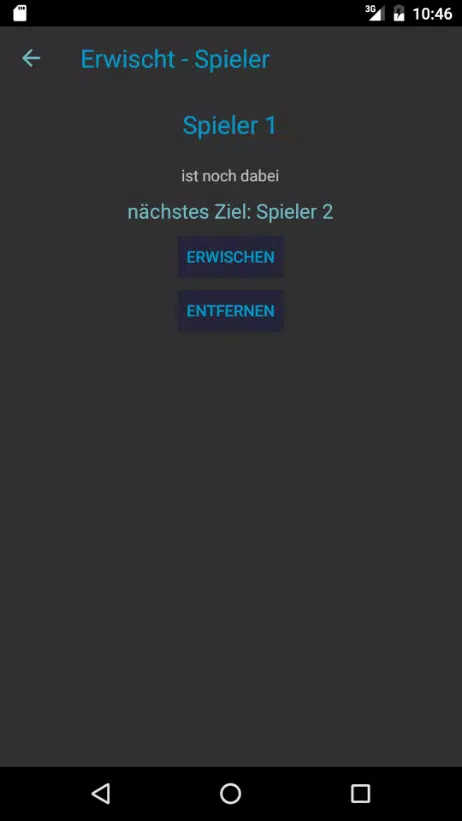
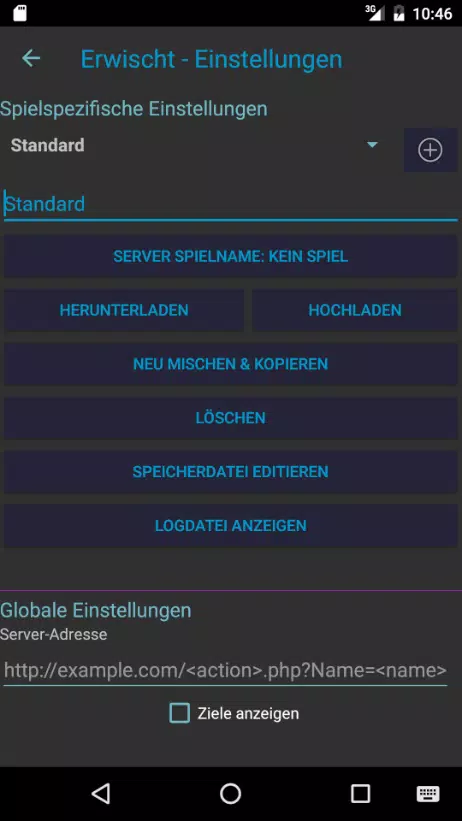
Latest Update
-
![Lines Gold Pro - Icon Pack APK]()
Lines Gold Pro - Icon Pack
-
![Remote Fire TV APK]()
Remote Fire TV
-
![Flight Dark Pro - Icon Pack APK]()
Flight Dark Pro - Icon Pack
-
![Ares Light: Pastel Icon Pack APK]()
Ares Light: Pastel Icon Pack
-
![getConf - Hidden Settings APK]()
getConf - Hidden Settings
-
![Dots Live Wallpaper - Battery APK]()
Dots Live Wallpaper - Battery
-
![Chroma - Icon Pack APK]()
Chroma - Icon Pack
-
![One UI Fluffy Icon Pack APK]()
One UI Fluffy Icon Pack
-
![Pixly Limitless Fluo Icon Pack APK]()
Pixly Limitless Fluo Icon Pack
-
![Compress Video - Resize Video APK]()
Compress Video - Resize Video
-
![Pixly Professional Dark APK]()
Pixly Professional Dark
-
![Tracker Detect Pro APK]()
Tracker Detect Pro










Latest News
-
![Revealing the Launch Playlists and Cross-Progression for COD Warzone Mobile News]()
-
![March 2024 Free Redemption Codes for Honkai: Star Rail News]()
-
PUBG Mobile Teams Up with Bentley Motors: Luxury Cars, Exclusive Collectibles, and Beyond 2024-04-18
![PUBG Mobile Teams Up with Bentley Motors: Luxury Cars, Exclusive Collectibles, and Beyond News]()
-
![Monster Never Cry is now accessible on both Android and iOS mobile devices. News]()
-
V2.2 of the Farlight 84 update introduces an overhauled Season structure, fresh in-game currency, an 2024-04-16
![V2.2 of the Farlight 84 update introduces an overhauled Season structure, fresh in-game currency, an News]()
-
![Arrival of Genshin Impact 4.6 Update: 'Embers of Two Realms, Twilight of Crimson' News]()
-
April 2024 Clash of Clans Update: Unveiling a Fresh Companion, Enhanced Levels, Chat Tagging, and Be 2024-04-16
![April 2024 Clash of Clans Update: Unveiling a Fresh Companion, Enhanced Levels, Chat Tagging, and Be News]()