

Pro IPTV
Version:1.0.2.5
Published:2026-10-15
Introduction
Pro IPTV is a lightweight Android app that brings live television channels and on-demand streams to mobile devices. It organizes streaming lists, supports playlists and EPGs, and focuses on stable playback, low-latency streaming, and a straightforward interface for quickly accessing channels across genres and regions.
Overview and purpose
Designed for users who prefer customizable channel management and efficient playback, Pro IPTV targets both casual viewers and power users. The app acts as a client for IPTV playlists, enabling users to load M3U or Xtream Codes playlists and watch content without clutter. It emphasizes reliability and minimal resource usage while keeping a familiar television-style layout.
Core features at a glance
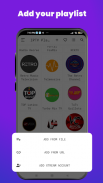
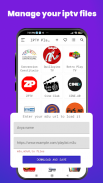
- Playlist support: Load multiple M3U files, URLs, or provider credentials to consolidate channels in one place.
- Electronic Program Guide (EPG): Integrated EPG display helps you see schedules and program descriptions at a glance.
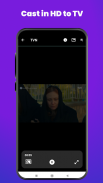
- Multiple player options: Switch between the built-in player and external players like VLC for compatibility and performance tuning.
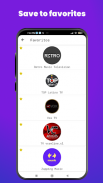
- Favorites and categories: Tag frequently watched channels and create custom folders for quick access.
- Stream quality controls: Adjust video buffering and choose stream resolutions depending on network conditions.
How it works
Getting started is straightforward. Add your IPTV source by entering a URL, uploading a local file, or using provider credentials. The app parses playlists and organizes channels automatically into groups. EPG data, when available, is matched to channels so you can browse schedules and upcoming shows. Playback can begin with a single tap, and the player maintains a steady buffer to reduce interruptions.
Performance and interface
Pro IPTV prioritizes a clean, fast interface. Navigation uses a left-hand menu and channel grid that load quickly even on older devices. Video rendering is optimized for Android, and hardware acceleration is supported to reduce CPU usage. The mute, aspect ratio, and subtitle controls remain easily accessible during playback for quick adjustments during viewing.
Customization options
One advantage of this app is the depth of personalization. Rename channels, rearrange groups, and hide entries you don’t use. Theme choices and a compact view offer visual flexibility for different screen sizes. Advanced users can tweak buffer length, set reconnection rules for dropped streams, and select preferred players on a per-channel basis.
User workflow and daily use
People who rely on IPTV for live sports, news, or international channels will find the workflow intuitive. Import a playlist, organize favorites, and set reminders using the EPG. The app also supports background playback so audio continues while you multitask. For households, profiles and parental filtering keep content organized and appropriate.
Practical tips for new users
- Keep your playlists updated: Periodically refresh your M3U links to remove dead streams.
- Optimize buffering: If you notice frequent stalls, increase the buffer size in settings.
- Use an external player for problematic codecs: Switching to VLC or ExoPlayer can improve compatibility.
- Organize channels into folders: Grouping by language or genre speeds up navigation.
- Check EPG alignment: If guides don’t match channels, manually map EPG entries to correct listings.
Pro IPTV performs well on a wide range of hardware. Memory usage stays modest with typical playlists, and the app scales to large channel lists. Startup time is quick and channel switching is responsive when streams are stable. Network usage varies by stream quality; enabling lower bitrates can preserve bandwidth on limited connections.
Security and privacy notes
Because the app acts as a client, it does not host streams itself. Users should obtain playlists from trusted sources and avoid sharing sensitive credentials. The app supports secure connections where providers offer HTTPS or token-based authentication to protect account information.
Installation and getting started
Install like any Android app: grant necessary playback permissions, add your playlist source, and allow the app to download EPG data if prompted. A brief setup wizard guides you through choosing the default player and enabling hardware acceleration. Once configured, save your setup as a profile for quick switching between different providers.
For anyone seeking an efficient, no-frills IPTV client, Pro IPTV offers a balanced mix of customization, stability, and usability. It’s a practical solution for organizing live TV and stream lists on Android devices without unnecessary complexity.
Show More
Information
Screenshots
Latest Update












Hot Tags
Latest News
-
![Revealing the Launch Playlists and Cross-Progression for COD Warzone Mobile News]()
-
![March 2024 Free Redemption Codes for Honkai: Star Rail News]()
-
PUBG Mobile Teams Up with Bentley Motors: Luxury Cars, Exclusive Collectibles, and Beyond 2024-04-18
![PUBG Mobile Teams Up with Bentley Motors: Luxury Cars, Exclusive Collectibles, and Beyond News]()
-
![Monster Never Cry is now accessible on both Android and iOS mobile devices. News]()
-
V2.2 of the Farlight 84 update introduces an overhauled Season structure, fresh in-game currency, an 2024-04-16
![V2.2 of the Farlight 84 update introduces an overhauled Season structure, fresh in-game currency, an News]()
-
![Arrival of Genshin Impact 4.6 Update: 'Embers of Two Realms, Twilight of Crimson' News]()
-
April 2024 Clash of Clans Update: Unveiling a Fresh Companion, Enhanced Levels, Chat Tagging, and Be 2024-04-16
![April 2024 Clash of Clans Update: Unveiling a Fresh Companion, Enhanced Levels, Chat Tagging, and Be News]()






