

NovelUP —Novel Downloader
Version:2.7.0.350
Published:2026-10-15
Introduction
NovelUP —Novel Downloader is a compact Android utility that lets avid readers search, download, and manage novels and serialized fiction from multiple sources for smooth offline reading. This editor-focused introduction highlights how NovelUP —Novel Downloader organizes files, preserves reading progress, and offers a minimal, responsive interface so you can build a personal library without unnecessary complexity.
Core features and download engine
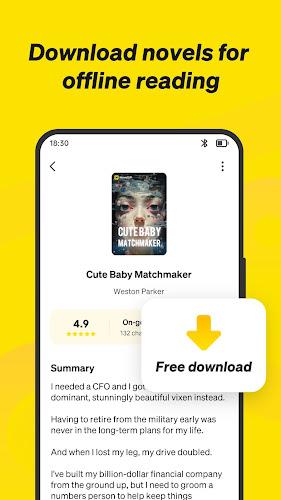
The app provides a multi-source search engine that consolidates results from indexed feeds and supports batch downloads for entire volumes or single chapters. Downloads are queued with visible progress indicators, estimated times, and retry logic for interrupted transfers. Automatic file naming and metadata parsing keep author names, titles, and cover art consistent across formats, and a smart queue can prioritize items so your most important reads finish first.
Interface and navigation
Design choices prioritize clarity and fast access: a clean main screen shows recent downloads, active transfers, and reading progress, while a side menu lets you reach sources, settings, and the built-in reader in a couple of taps. Navigation is optimized for touch—swipe and tap gestures jump between chapters and pages, tap zones open menus or toggle reading controls, and on larger screens the layout adapts to show both library and reader panes.
Search, sources and content management
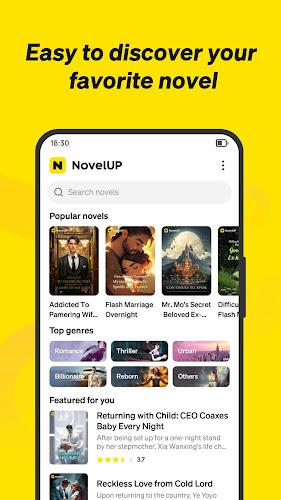
Finding new material is straightforward thanks to a unified search that filters by genre, language, and publishing status. Users can add or remove content sources from a repository list and set source priority to influence search order. Scheduled checks for new chapters and configurable notifications inform you when selected authors or series publish updates, and simple source management keeps the discovery process transparent and controllable.
Download workflow and background operation
Downloading is designed to be flexible: queue individual chapters or whole collections, let background downloads continue while you use other apps, and adjust batch sizes or simultaneous connections to match your network and battery preferences. The downloader can throttle speeds to avoid overloading a connection and exposes retry policies and pause/resume options so transfers are predictable even on flaky networks.
Offline reading experience and library organization
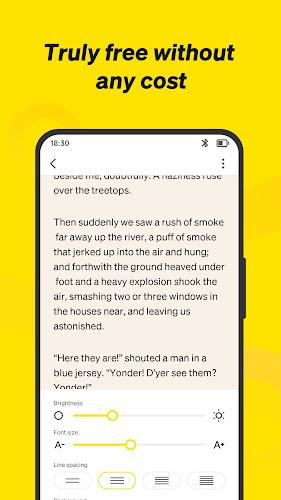
Once content is saved, the offline reader offers adjustable font sizes, multiple typefaces, line spacing, margin control, and day/night themes to make long sessions comfortable. The library view sorts material by reading status, author, and user-defined tags and supports collections and exportable reading lists. Resume points, bookmarks, and chapter lists make progression tracking intuitive, and password-protected backups let you move a curated library to local or cloud storage securely.
Customization, accessibility and personalization
Personalization options help adapt the app to your habits: choose fonts and spacing, toggle controls for pagination or continuous scroll, and set automatic naming rules to keep files neatly ordered. Accessibility settings include large text modes and high-contrast themes, and simple control schemes mean users who prefer minimal configuration can still benefit from robust organization and reading aids.
Performance, compatibility and privacy
The app is built to run efficiently on a wide range of Android devices, keeping CPU and memory use low during background tasks and offering regular updates for compatibility with new system versions. Privacy is respected by storing downloads locally unless you opt into cloud backup; permissions are limited to storage and network access, and optional telemetry can be disabled. Clear history and cache controls let you manage local footprints without digging through system menus.
Getting started and power-user notes
Install NovelUP —Novel Downloader, grant the minimal permissions it requests, then add one or more content sources and run a search to populate results. Configure download folders and batch sizes to match your storage plan, and set up scheduled checks for favorite series to receive timely notifications. For power users, using overnight batch downloads, custom tags for series organization, and prioritized source lists speeds collection building while keeping daytime device performance unaffected.
Reading progression and replay value
Progress tracking and bookmarking turn a casual reader into a consistent collector: resume positions, chapter markers, and reading history make it easy to return to in-progress works, while curated collections and exportable lists encourage revisiting series. The combination of offline access, configurable presentation, and dependable download management gives long-term replay value for readers who rotate through many titles.
Security and maintenance
Backups can be protected with a password and stored locally or in a user-selected cloud folder; optional cache clearing, metadata re-parsing, and library export keep your collection healthy over time. Regular maintenance options and confirmation prompts reduce accidental deletions and make it simple to keep a tidy, private archive of your reading material.
NovelUP —Novel Downloader aims to be a practical, no-frills tool for collecting and enjoying serialized fiction on Android devices, balancing efficient downloads, readable presentation, and straightforward library management so readers can focus on stories rather than configuration.
Show More
Information
Screenshots

Latest Update
-
![Lines Gold Pro - Icon Pack APK]()
Lines Gold Pro - Icon Pack
-
![Remote Fire TV APK]()
Remote Fire TV
-
![Flight Dark Pro - Icon Pack APK]()
Flight Dark Pro - Icon Pack
-
![Ares Light: Pastel Icon Pack APK]()
Ares Light: Pastel Icon Pack
-
![getConf - Hidden Settings APK]()
getConf - Hidden Settings
-
![Dots Live Wallpaper - Battery APK]()
Dots Live Wallpaper - Battery
-
![Chroma - Icon Pack APK]()
Chroma - Icon Pack
-
![One UI Fluffy Icon Pack APK]()
One UI Fluffy Icon Pack
-
![Pixly Limitless Fluo Icon Pack APK]()
Pixly Limitless Fluo Icon Pack
-
![Compress Video - Resize Video APK]()
Compress Video - Resize Video
-
![Pixly Professional Dark APK]()
Pixly Professional Dark
-
![Tracker Detect Pro APK]()
Tracker Detect Pro












Hot Tags
Latest News
-
![Revealing the Launch Playlists and Cross-Progression for COD Warzone Mobile News]()
-
![March 2024 Free Redemption Codes for Honkai: Star Rail News]()
-
PUBG Mobile Teams Up with Bentley Motors: Luxury Cars, Exclusive Collectibles, and Beyond 2024-04-18
![PUBG Mobile Teams Up with Bentley Motors: Luxury Cars, Exclusive Collectibles, and Beyond News]()
-
![Monster Never Cry is now accessible on both Android and iOS mobile devices. News]()
-
V2.2 of the Farlight 84 update introduces an overhauled Season structure, fresh in-game currency, an 2024-04-16
![V2.2 of the Farlight 84 update introduces an overhauled Season structure, fresh in-game currency, an News]()
-
![Arrival of Genshin Impact 4.6 Update: 'Embers of Two Realms, Twilight of Crimson' News]()
-
April 2024 Clash of Clans Update: Unveiling a Fresh Companion, Enhanced Levels, Chat Tagging, and Be 2024-04-16
![April 2024 Clash of Clans Update: Unveiling a Fresh Companion, Enhanced Levels, Chat Tagging, and Be News]()






