

INTRANET
Version:12.8
Published:2026-10-15
Introduction
INTRANET is a secure workplace hub that centralizes company resources, messaging, and document access into a single Android app. Designed for teams, it streamlines internal communication, file sharing, and announcements while offering customizable dashboards and role-based access to keep information organized and easy to retrieve on mobile devices.
Core features and tools
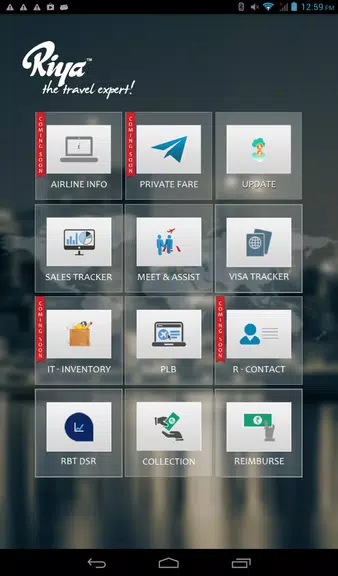
The INTRANET app packages essential office tools into a compact mobile interface. Users get instant access to company news feeds, department-specific boards, and a searchable document repository. Built-in messaging supports one-to-one chats and group conversations, while integrated calendars and task lists help teams coordinate deadlines. Administrators can assign roles, set folder permissions, and publish organization-wide alerts directly from their devices.
User interface and navigation
Navigation favors clarity: a bottom bar offers quick entry to Home, Messages, Files, and More. Content cards and collapsible sections make it easy to browse long announcement streams without losing context. Search is prominent and filters by file type, author, date, and department to reduce time spent hunting for documents. Small touches like preview thumbnails and swipe gestures speed up routine actions.
Integration and workflow
INTRANET is built to fit into existing workflows rather than replace them. It connects with common cloud storage providers, supports single sign-on (SSO) for access control, and can push calendar events to your native device app. The app also enables quick link sharing and deep links that open specific files or conversations, helping teams move from a notification to action in seconds. Workflow automation options let admins set recurring announcements and approve requests from within the mobile interface.
Security and permissions
Security features are central to the platform. Data encryption in transit and at rest, multi-factor authentication options, and granular permission settings give IT teams the controls they need. Role-based access restricts views and editing rights by team or project, while audit logs track changes and downloads for compliance. The app supports remote wipe capabilities to protect sensitive information on lost or stolen devices.
Customization and branding
Organizations can tailor the INTRANET experience with custom branding, color themes, and configurable dashboards. Widgets allow each department to surface the most relevant tools, whether that’s a quick links panel for HR forms, a KPI feed for executives, or a shift schedule for frontline teams. Admins can rearrange navigation and manage visible modules so the interface stays aligned with company needs.
Performance and compatibility
Designed for mobile performance, the app minimizes data usage by syncing only the most recent files and providing offline access to bookmarked documents. It runs smoothly on a wide range of Android devices and includes options to limit background activity for battery conservation. Regular updates improve stability and add support for new Android versions to maintain compatibility across enterprise fleets.
Getting started
Setup is straightforward: administrators register the organization, configure SSO and user roles, and invite team members by email. New users complete a brief onboarding tour that highlights messaging, file access, and personal settings. Tips within the app recommend best practices for naming documents and organizing folders to keep the shared space tidy and searchable.
Practical use cases
- Internal communications: Broadcast company announcements and collect feedback through polls.
- Knowledge management: Keep guides, policies, and training material centrally accessible.
- Project coordination: Share milestones, assign tasks, and attach relevant files to conversations.
- Field teams: Provide offline access to manuals and schedules for employees with limited connectivity.
Tips for administrators
Encourage adoption by creating starter templates for common pages, scheduling regular housekeeping to archive outdated files, and using analytics to identify heavily used areas that may need reorganization. Regularly review permission sets to ensure access mirrors current team structures. With these practices in place, the INTRANET app becomes a stable, mobile-first backbone for internal collaboration.
Show More
Information
Screenshots
Latest Update












Latest News
-
![Revealing the Launch Playlists and Cross-Progression for COD Warzone Mobile News]()
-
![March 2024 Free Redemption Codes for Honkai: Star Rail News]()
-
PUBG Mobile Teams Up with Bentley Motors: Luxury Cars, Exclusive Collectibles, and Beyond 2024-04-18
![PUBG Mobile Teams Up with Bentley Motors: Luxury Cars, Exclusive Collectibles, and Beyond News]()
-
![Monster Never Cry is now accessible on both Android and iOS mobile devices. News]()
-
V2.2 of the Farlight 84 update introduces an overhauled Season structure, fresh in-game currency, an 2024-04-16
![V2.2 of the Farlight 84 update introduces an overhauled Season structure, fresh in-game currency, an News]()
-
![Arrival of Genshin Impact 4.6 Update: 'Embers of Two Realms, Twilight of Crimson' News]()
-
April 2024 Clash of Clans Update: Unveiling a Fresh Companion, Enhanced Levels, Chat Tagging, and Be 2024-04-16
![April 2024 Clash of Clans Update: Unveiling a Fresh Companion, Enhanced Levels, Chat Tagging, and Be News]()






