

Sign In Companion
Version:3.12.1
Published:2026-10-15
Introduction
Sign In Companion streamlines account access and attendance tracking across apps and services, combining automatic check-ins, reminders, and secure credential storage into one tool. It helps users manage daily logins, scheduled check-ins, and multi-account workflows without manual repetition, saving time while maintaining security and auditability.
What Sign In Companion Does
Sign In Companion is designed for people who sign in to multiple platforms every day: workplace portals, member sites, educational systems, or loyalty apps. The app centralizes sign-in processes so you can set rules, run scheduled authentications, and keep activity logs. Instead of juggling passwords and timers, the interface places common tasks within a few taps.
Core Features
- Automated Check-ins: Schedule one-off or recurring sign-ins for apps and web services so attendance and access are recorded automatically.
- Credential Vault: Store usernames and passwords in an encrypted vault protected by PIN, pattern, or biometric unlock.
- Multi-Account Support: Manage multiple profiles for the same service and switch between them quickly without retyping details.
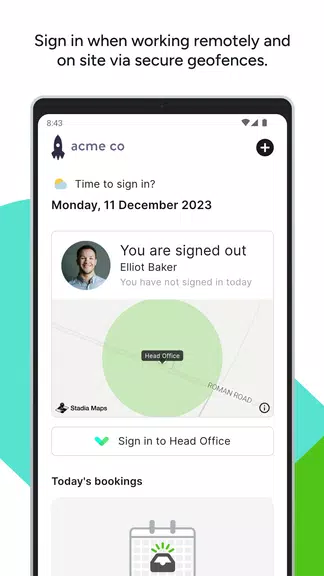
- Custom Rules: Create conditional sign-in rules based on time windows, location, or Wi-Fi networks.
- Notification & Widgets: Use home-screen widgets or notifications to trigger manual or scheduled sign-ins at a glance.
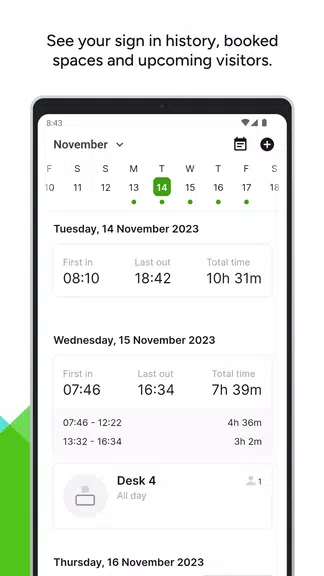
- Activity Logs & Reports: View timestamped histories and export simple reports for attendance or audit purposes.
User Interface and Workflow
The layout focuses on speed and clarity: a dashboard lists upcoming tasks, recent activity, and quick actions. Templates let you capture common sign-in forms so future check-ins require minimal input. A guided setup walk-through helps map fields from web forms or native apps, making templates ready in minutes. The workflow reduces friction so routine sign-ins become predictable and reliable.
Security and Privacy
Security is a priority in Sign In Companion. Sensitive data is encrypted on the device using platform-backed cryptography. Biometric unlock options (fingerprint or face) are supported for fast, secure access. Local backups can be encrypted and restored with a user-defined passphrase, and you can opt out of cloud syncing entirely if you prefer a fully local setup.
Performance and Compatibility
Sign In Companion is optimized for minimal battery and memory impact. Background tasks are scheduled within Android’s recommended constraints to preserve device responsiveness. The app supports a wide range of Android versions and integrates with popular browsers and apps via share sheets and accessibility-friendly helpers, allowing automated sign-ins even when a service uses a native form.
How to Get Started
Getting started takes only a few minutes. Install the app, create a secure master PIN, and add your first sign-in template. Use the in-app guide to capture form fields and set a schedule. Test the entry manually to confirm the template interacts correctly with the target service, then enable automatic runs for the times you need.
Best Practices and Tips
- Use distinct templates for different environments (work, personal, testing) to avoid cross-account confusion.
- Enable biometric unlock to speed daily use while keeping data protected.
- Review activity logs periodically to ensure automated entries are completing as expected.
- When possible, use time-based rules with a short delay to let network connections stabilize before a scheduled sign-in.
Who Benefits Most
Sign In Companion is useful for remote workers who must sign into multiple internal tools, managers tracking team attendance, students logging into class portals, and anyone with repetitive authentication tasks. It reduces manual effort, lowers the risk of missed check-ins, and adds a simple audit trail for accountability.
Support and Updates
Regular updates add new integrations, improve template recognition, and refine background scheduling to align with Android platform changes. The in-app help center contains step-by-step guides and troubleshooting tips. For advanced setups, support can assist in mapping complex form flows or exporting activity records for administrative needs.
Sign In Companion brings practicality and security together so repetitive sign-ins stop being a daily chore. With scheduled automation, encrypted storage, and compact reporting tools, it’s a practical assistant for anyone who needs reliable, repeatable access across services and accounts.
Show More
Information
Screenshots
Latest Update
-
![Lines Gold Pro - Icon Pack APK]()
Lines Gold Pro - Icon Pack
-
![Remote Fire TV APK]()
Remote Fire TV
-
![Flight Dark Pro - Icon Pack APK]()
Flight Dark Pro - Icon Pack
-
![Ares Light: Pastel Icon Pack APK]()
Ares Light: Pastel Icon Pack
-
![getConf - Hidden Settings APK]()
getConf - Hidden Settings
-
![Dots Live Wallpaper - Battery APK]()
Dots Live Wallpaper - Battery
-
![Chroma - Icon Pack APK]()
Chroma - Icon Pack
-
![One UI Fluffy Icon Pack APK]()
One UI Fluffy Icon Pack
-
![Pixly Limitless Fluo Icon Pack APK]()
Pixly Limitless Fluo Icon Pack
-
![Compress Video - Resize Video APK]()
Compress Video - Resize Video
-
![Pixly Professional Dark APK]()
Pixly Professional Dark
-
![Tracker Detect Pro APK]()
Tracker Detect Pro












Latest News
-
![Revealing the Launch Playlists and Cross-Progression for COD Warzone Mobile News]()
-
![March 2024 Free Redemption Codes for Honkai: Star Rail News]()
-
PUBG Mobile Teams Up with Bentley Motors: Luxury Cars, Exclusive Collectibles, and Beyond 2024-04-18
![PUBG Mobile Teams Up with Bentley Motors: Luxury Cars, Exclusive Collectibles, and Beyond News]()
-
![Monster Never Cry is now accessible on both Android and iOS mobile devices. News]()
-
V2.2 of the Farlight 84 update introduces an overhauled Season structure, fresh in-game currency, an 2024-04-16
![V2.2 of the Farlight 84 update introduces an overhauled Season structure, fresh in-game currency, an News]()
-
![Arrival of Genshin Impact 4.6 Update: 'Embers of Two Realms, Twilight of Crimson' News]()
-
April 2024 Clash of Clans Update: Unveiling a Fresh Companion, Enhanced Levels, Chat Tagging, and Be 2024-04-16
![April 2024 Clash of Clans Update: Unveiling a Fresh Companion, Enhanced Levels, Chat Tagging, and Be News]()






