

Video Call Santa
Version:11.0.0
Published:2026-10-15
Introduction
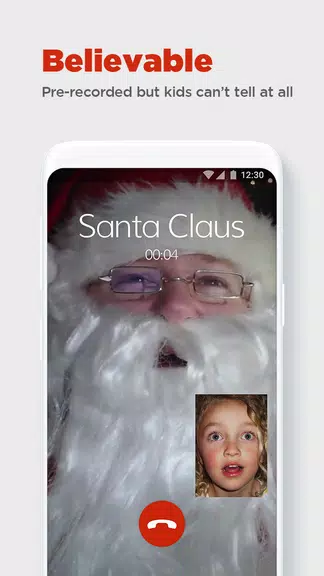
Video Call Santa brings a playful, interactive video experience that lets kids receive personalized calls from Santa Claus, creating memorable holiday moments through realistic audio and video simulations. Designed for ease of use, the app connects children with a festive virtual Santa, complete with customizable scripts and friendly visual touches.
Key Features at a Glance
Video Call Santa is built around accessibility and delight. The main features balance realism with safety and simple controls to let families manage each experience. Highlights include:
- Real-time Video Interaction: Simulated live calls with realistic Santa visuals and responsive dialogue that feels spontaneous and fun.
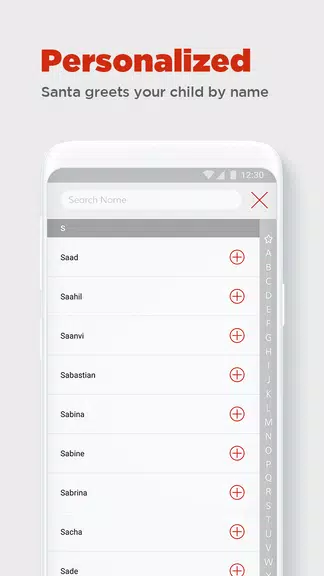
- Personalized Calls: Insert a child’s name, age, interests, and wish list items to make each conversation feel tailored and special.
- Scheduling and Reminders: Set preferred call times around busy family schedules, with reminders so no magical moment is missed.
- Message Recording: Save audio or video clips of each session for playback and sharing with relatives.
- Multi-language Support: Choose from a selection of languages and accents to reach a wider audience.
How the Interaction Works
The app guides parents through creating a believable call without complicated setup. A simple wizard asks for details about the child and the kind of message desired. Once the script is configured, Video Call Santa either initiates a scheduled session or lets parents trigger a spontaneous call. Behind the scenes the app blends pre-recorded segments with dynamic text-to-speech or voice-actor lines to maintain a natural flow.
Customization and Personal Touches
Customization is central to the appeal. Users can choose Santa’s tone, adjust the length of the call, and select topics Santa will discuss—school achievements, recent hobbies, or polite behavior reminders. Visual options include different Santa outfits, background scenes (cozy workshop, snowy rooftop), and animated props to keep children engaged throughout the conversation.
Parental Controls and Privacy
Security and parental oversight are emphasized so families can control content and access. Video Call Santa lets parents preview scripts, lock settings behind a PIN, and determine whether recordings are stored locally or backed up to the cloud. The app avoids collecting unnecessary personal data and offers clear permissions prompts to keep information private and protected.
Performance and Compatibility
Designed to run smoothly on a broad range of Android devices, the app optimizes video and audio quality according to device capability and network speed. Low-bandwidth modes reduce data usage for cellular connections, while higher-definition options are available for Wi-Fi. The interface is lightweight, minimizing battery drain and ensuring consistent performance during calls.
Practical Uses Beyond Holiday Fun
Although focused on seasonal enjoyment, Video Call Santa can be used for birthday surprises, motivational messages, or as a playful reward for good behavior. Educators and family members can repurpose the platform for themed events and classroom activities by customizing scripts and visuals to fit different occasions.
User Experience and Interface
The layout favors clear icons and step-by-step prompts so that even first-time users can set up a call in minutes. Video Call Santa places primary controls within easy reach and provides helpful tooltips for customizing each interaction. Feedback and accessibility settings improve the experience for children with different needs.
Tips for Best Results
- Prepare a short list of facts about the child to make conversations feel authentic.
- Test audio and camera settings ahead of a scheduled call to ensure clarity.
- Use the recording feature to capture highlights and preserve memories.
- Try different Santa personalities to find the style that resonates most with your child.
Getting Started
Begin by downloading Video Call Santa, grant the necessary permissions, and follow the onboarding steps to create a profile. Customize the message, pick a time, and let the app handle the rest. Regular updates deliver new visuals and seasonal content so each year can offer fresh surprises.
With a focus on safe, easy-to-manage interactions and a variety of personalization tools, Video Call Santa aims to make holiday magic accessible and repeatable for families seeking memorable digital experiences.
Show More
Information
Screenshots


Latest Update
-
![Lines Gold Pro - Icon Pack APK]()
Lines Gold Pro - Icon Pack
-
![Remote Fire TV APK]()
Remote Fire TV
-
![Flight Dark Pro - Icon Pack APK]()
Flight Dark Pro - Icon Pack
-
![Ares Light: Pastel Icon Pack APK]()
Ares Light: Pastel Icon Pack
-
![getConf - Hidden Settings APK]()
getConf - Hidden Settings
-
![Dots Live Wallpaper - Battery APK]()
Dots Live Wallpaper - Battery
-
![Chroma - Icon Pack APK]()
Chroma - Icon Pack
-
![One UI Fluffy Icon Pack APK]()
One UI Fluffy Icon Pack
-
![Pixly Limitless Fluo Icon Pack APK]()
Pixly Limitless Fluo Icon Pack
-
![Compress Video - Resize Video APK]()
Compress Video - Resize Video
-
![Pixly Professional Dark APK]()
Pixly Professional Dark
-
![Tracker Detect Pro APK]()
Tracker Detect Pro












Hot Tags
Latest News
-
![Revealing the Launch Playlists and Cross-Progression for COD Warzone Mobile News]()
-
![March 2024 Free Redemption Codes for Honkai: Star Rail News]()
-
PUBG Mobile Teams Up with Bentley Motors: Luxury Cars, Exclusive Collectibles, and Beyond 2024-04-18
![PUBG Mobile Teams Up with Bentley Motors: Luxury Cars, Exclusive Collectibles, and Beyond News]()
-
![Monster Never Cry is now accessible on both Android and iOS mobile devices. News]()
-
V2.2 of the Farlight 84 update introduces an overhauled Season structure, fresh in-game currency, an 2024-04-16
![V2.2 of the Farlight 84 update introduces an overhauled Season structure, fresh in-game currency, an News]()
-
![Arrival of Genshin Impact 4.6 Update: 'Embers of Two Realms, Twilight of Crimson' News]()
-
April 2024 Clash of Clans Update: Unveiling a Fresh Companion, Enhanced Levels, Chat Tagging, and Be 2024-04-16
![April 2024 Clash of Clans Update: Unveiling a Fresh Companion, Enhanced Levels, Chat Tagging, and Be News]()






