

EMIR App & Virtual Networking
Version:4.137.0-1
Published:2026-10-15
Introduction
EMIR App & Virtual Networking brings a compact suite for professionals who need seamless event networking, live sessions, and contact management in one mobile hub. Designed for conferences and hybrid meetings, it streamlines scheduling, digital booths, and attendee connections while keeping privacy and real-time updates at the forefront.
What the app does
The EMIR App & Virtual Networking platform focuses on practical tools that reduce friction before, during, and after events. Rather than being a simple video or chat tool, it combines matchmaking algorithms, exhibitor pages, and calendar-driven agendas so organizers and attendees can focus on meaningful interactions, not logistics.
Smart features that matter
- Matchmaking and networking: Intelligent attendee suggestions based on profiles, interests, and session attendance help users find relevant contacts quickly.
- Live sessions and recordings: High-quality streaming with synchronized Q&A and on-demand playback for attendees who miss live talks.
- Digital exhibitor booths: Rich media support, downloadable resources, and appointment booking make virtual booths feel interactive.
- One-touch contact exchange: Virtual business cards and secure contact exports integrate with common CRMs and address books.
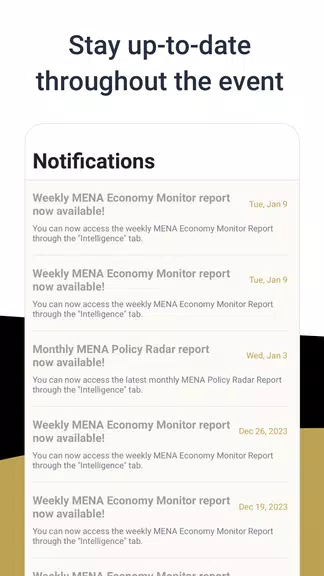
- Agenda and reminders: Personalized schedules with push notifications and time-zone aware reminders keep attendees on track.
Interface and performance
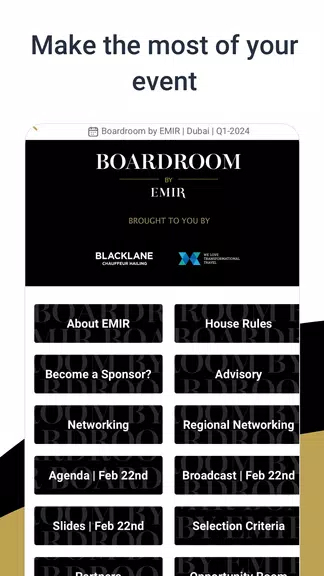
EMIR App & Virtual Networking uses a clean, card-based interface that scales across phones and tablets. Pages load progressively to minimize waiting times, and media streams adapt to network quality to maintain continuity. Animations are subtle, prioritizing responsiveness over flair so users can navigate quickly during busy conference days.
Security and data controls
Privacy controls are exposed clearly: users choose who can view profile details and whether contact data may be exported. Organizers can set role-based permissions for speakers, staff, and exhibitors. Standard encryption for data-in-transit and configurable retention policies help teams meet enterprise and event-specific requirements.
How it works in practice
Set up begins in a web console where organizers upload schedules, speaker bios, and exhibitor assets. Attendees download the mobile client, complete a short profile, and receive tailored recommendations. During events, participants can join live streams, schedule 1:1 meetings, and join topic-based chat rooms. After the event, analytics dashboards show engagement metrics and follow-up lists.
Integration and workflow
The app connects with common calendar systems and CRMs via APIs and webhooks. That integration simplifies lead capture and follow-up workflows: attendee interactions can automatically create CRM records or feed into marketing automation sequences, reducing manual data entry.
Tips for first-time users
- Complete your profile and specify interests to improve match suggestions.
- Set calendar permissions so event reminders sync with your daily schedule.
- Use the one-touch meeting scheduler to lock in conversations—time slots fill quickly at busy conferences.
- Take advantage of recorded sessions to review talks you missed and tag speakers for follow-up.
User experience highlights
Feedback from event professionals highlights fast onboarding and predictable performance even with large attendee numbers. Organizer controls make it straightforward to manage sessions and exhibitor permissions without heavy IT involvement. The balance of automation and manual control helps keep events both dynamic and reliable.
Getting started and setup
To begin, download the app, create a profile, and accept the event invitation code. Organizers will appreciate that EMIR App & Virtual Networking supports bulk uploads for speakers and exhibitors, plus templates for common event types. Regular updates deliver incremental improvements and new integrations, so check the release notes before major events.
For teams looking to improve event ROI, the platform's analytics and exportable leads are practical tools for post-event follow-up. Whether you run one-off conferences or a series of hybrid meetings, this application aims to make networking efficient and measurable while keeping a usable mobile-first experience.
Show More
Information
Screenshots
Latest Update
-
![Lines Gold Pro - Icon Pack APK]()
Lines Gold Pro - Icon Pack
-
![Remote Fire TV APK]()
Remote Fire TV
-
![Flight Dark Pro - Icon Pack APK]()
Flight Dark Pro - Icon Pack
-
![Ares Light: Pastel Icon Pack APK]()
Ares Light: Pastel Icon Pack
-
![getConf - Hidden Settings APK]()
getConf - Hidden Settings
-
![Dots Live Wallpaper - Battery APK]()
Dots Live Wallpaper - Battery
-
![Chroma - Icon Pack APK]()
Chroma - Icon Pack
-
![One UI Fluffy Icon Pack APK]()
One UI Fluffy Icon Pack
-
![Pixly Limitless Fluo Icon Pack APK]()
Pixly Limitless Fluo Icon Pack
-
![Compress Video - Resize Video APK]()
Compress Video - Resize Video
-
![Pixly Professional Dark APK]()
Pixly Professional Dark
-
![Tracker Detect Pro APK]()
Tracker Detect Pro












Latest News
-
![Revealing the Launch Playlists and Cross-Progression for COD Warzone Mobile News]()
-
![March 2024 Free Redemption Codes for Honkai: Star Rail News]()
-
PUBG Mobile Teams Up with Bentley Motors: Luxury Cars, Exclusive Collectibles, and Beyond 2024-04-18
![PUBG Mobile Teams Up with Bentley Motors: Luxury Cars, Exclusive Collectibles, and Beyond News]()
-
![Monster Never Cry is now accessible on both Android and iOS mobile devices. News]()
-
V2.2 of the Farlight 84 update introduces an overhauled Season structure, fresh in-game currency, an 2024-04-16
![V2.2 of the Farlight 84 update introduces an overhauled Season structure, fresh in-game currency, an News]()
-
![Arrival of Genshin Impact 4.6 Update: 'Embers of Two Realms, Twilight of Crimson' News]()
-
April 2024 Clash of Clans Update: Unveiling a Fresh Companion, Enhanced Levels, Chat Tagging, and Be 2024-04-16
![April 2024 Clash of Clans Update: Unveiling a Fresh Companion, Enhanced Levels, Chat Tagging, and Be News]()






