
WatchFlix
Version:1.0.0
Published:2026-10-15
Introduction
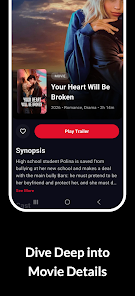
WatchFlix is a sleek Android app for discovering, organizing and watching video content with speed and simplicity. It combines a smart library, robust offline playback and easy casting so users can manage streams, downloads and subtitles from a single polished interface without distractions.
What WatchFlix does
Unlike minimalist players that only play files, WatchFlix aims to be a unified viewing hub. It indexes local media, connects to popular streaming services via user-provided links, and provides tools for downloading, tagging and queuing videos. The app balances power-user controls with an approachable first-run experience.
Core features at a glance
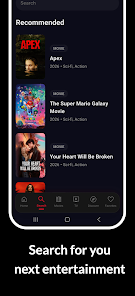
- Integrated media library — Automatic scanning and metadata fetching make your collection searchable and easy to browse.
- Offline downloads — Schedule or manually save content with adjustable quality and storage rules.
- Advanced player — Hardware acceleration, multi-track audio, subtitle timing, playback speed controls and chapter navigation.
- Casting and sharing — Built-in Chromecast and DLNA support to stream to TVs and smart speakers.
- Profiles and parental controls — Create restricted profiles and PIN-protected libraries for family use.
User interface and performance
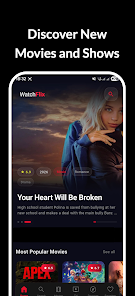
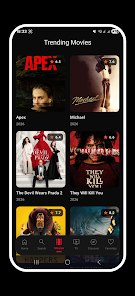
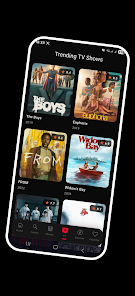
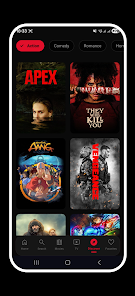
WatchFlix presents a clean, dark-themed layout with prioritized artwork and large thumbnails to reduce visual clutter. Menus are reachable within two taps, and animations are subtle so the app feels responsive even on mid-range devices. Memory use is optimized for multitasking: playback continues smoothly in background or Picture-in-Picture mode while other apps run.
How playback and downloads work
The playback engine in WatchFlix supports a wide range of codecs and adaptive bitrate streaming. When you tap a title, the player analyzes bandwidth and selects a quality level; you can override that manually if you need to conserve data. Downloading uses a queue system that can run on Wi-Fi only or when charging, and files are stored in a dedicated folder with clear file names and embedded metadata.
Customization and organization tools
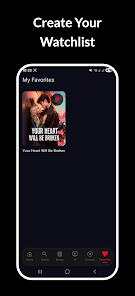
Playlists, tags and smart folders simplify organization. Create a watchlist or generate a “Continue Watching” shelf that keeps track of progress across devices. Subtitle management supports multiple languages, external .srt files and on-the-fly timing adjustments. Users can customize default audio tracks, subtitle size, and which external players to prioritize.
Privacy and account options
WatchFlix is designed to respect local device privacy: user credentials for streaming services are stored with encryption and the app requests only necessary permissions. You can enable a local-only mode that disables cloud syncing and keeps watch history confined to the device.
Tips for new users
- Scan your storage on first launch to populate the library quickly.
- Set download quality limits in Settings to avoid exceeding mobile data caps.
- Use Smart Downloads to automatically remove watched content and free up space.
- Enable hardware acceleration for smoother playback on older phones.
WatchFlix includes contextual help panels on first use, so common features like subtitle syncing and casting are explained in-app without forcing you through long tutorials.
Why people pick it
Users gravitate toward WatchFlix when they want more control than a standard streaming client but less complexity than a full desktop media server. The combination of fast search, robust offline capabilities and reliable casting covers most everyday viewing scenarios. Power users appreciate the codec support and subtitle flexibility, while casual users enjoy the simple playback controls and visual layout.
Getting started
Installation takes a few minutes: grant storage and network permissions, let the scanner run, and optionally link accounts for personalized suggestions. For the best experience, allow access to local storage so the library can pull artwork and chapter info for files already on your device.
Whether you want a device-centric media companion or a flexible app to manage downloads and casting, WatchFlix offers a practical feature set and dependable performance. Frequent updates refine compatibility and add convenience features, making it a solid choice for Android users who watch a variety of content on multiple screens.
Show More
Information
Screenshots
Latest Update
-
![Lines Gold Pro - Icon Pack APK]()
Lines Gold Pro - Icon Pack
-
![Remote Fire TV APK]()
Remote Fire TV
-
![Flight Dark Pro - Icon Pack APK]()
Flight Dark Pro - Icon Pack
-
![Ares Light: Pastel Icon Pack APK]()
Ares Light: Pastel Icon Pack
-
![getConf - Hidden Settings APK]()
getConf - Hidden Settings
-
![Dots Live Wallpaper - Battery APK]()
Dots Live Wallpaper - Battery
-
![Chroma - Icon Pack APK]()
Chroma - Icon Pack
-
![One UI Fluffy Icon Pack APK]()
One UI Fluffy Icon Pack
-
![Pixly Limitless Fluo Icon Pack APK]()
Pixly Limitless Fluo Icon Pack
-
![Compress Video - Resize Video APK]()
Compress Video - Resize Video
-
![Pixly Professional Dark APK]()
Pixly Professional Dark
-
![Tracker Detect Pro APK]()
Tracker Detect Pro












Latest News
-
![Revealing the Launch Playlists and Cross-Progression for COD Warzone Mobile News]()
-
![March 2024 Free Redemption Codes for Honkai: Star Rail News]()
-
PUBG Mobile Teams Up with Bentley Motors: Luxury Cars, Exclusive Collectibles, and Beyond 2024-04-18
![PUBG Mobile Teams Up with Bentley Motors: Luxury Cars, Exclusive Collectibles, and Beyond News]()
-
![Monster Never Cry is now accessible on both Android and iOS mobile devices. News]()
-
V2.2 of the Farlight 84 update introduces an overhauled Season structure, fresh in-game currency, an 2024-04-16
![V2.2 of the Farlight 84 update introduces an overhauled Season structure, fresh in-game currency, an News]()
-
![Arrival of Genshin Impact 4.6 Update: 'Embers of Two Realms, Twilight of Crimson' News]()
-
April 2024 Clash of Clans Update: Unveiling a Fresh Companion, Enhanced Levels, Chat Tagging, and Be 2024-04-16
![April 2024 Clash of Clans Update: Unveiling a Fresh Companion, Enhanced Levels, Chat Tagging, and Be News]()






