
ZenMoney - Control de gastos
Version:1.0.0
Published:2026-10-16
Introduction
ZenMoney - Control de gastos is a streamlined personal finance app that helps users track spending, set budgets, and visualize cash flow quickly. It combines intuitive expense entry with visual reports so you can spot trends, adjust habits, and keep monthly goals on track without clutter or confusing menus.
Quick overview
ZenMoney - Control de gastos targets people who want simple, actionable control over their finances. The app avoids overly complex accounting terminology while still offering powerful categorization, multiple account support, and automatic summaries. It’s suitable for daily tracking and monthly planning alike.
What it does well
The core strength of ZenMoney - Control de gastos is speed. Recording an expense takes just a couple of taps. Built-in categories, recurring transaction templates, and quick-edit shortcuts reduce friction. For anyone who abandons money apps because they’re slow, this one keeps the interaction short and consistent.
Key features at a glance
- Expense and income tracking – Add transactions manually or import from linked accounts where supported.
- Budgeting – Create monthly or custom-period budgets and monitor progress with clear meters.
- Custom categories – Organize spending using predefined groups or your own labels.
- Multi-account support – Manage cash, bank accounts, and credit cards in one place.
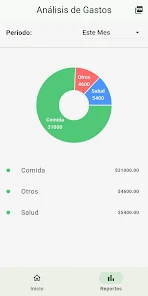
- Reports and charts – Visual breakdowns show where money goes by category, tag, or timeframe.
- Recurring transactions – Automate bills and salary entries to reflect real-world cash flow.
How it works day-to-day
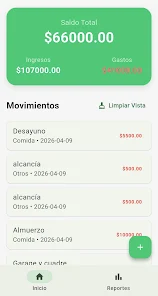
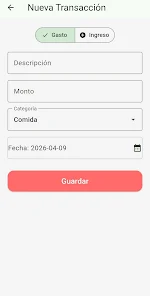
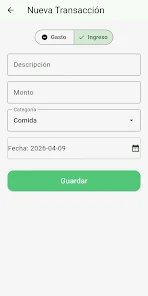
Daily use centers on quick transaction entry and periodic review. You open the app, tap the add button, choose a category, enter an amount, and optionally attach a note or photo of a receipt. At month end, the built-in report aggregates data into a simple chart that highlights overspending and savings opportunities.
Interface and performance
ZenMoney - Control de gastos presents a clean, minimalist UI. Primary actions are placed within thumb reach. Colors are used sparingly to emphasize budget health and alerts. Animations are subtle, improving perceived speed without distracting from tasks. On average hardware the app loads fast and handles large transaction histories without lag.
Customization and settings
While it stays light, the app allows meaningful personalization. You can rename categories, set default payment methods, and configure notification preferences. These adjustments make the tool work for a range of routines—freelancers, households, or commuters who want to track daily coffee runs.
User experience and workflows
The workflow emphasizes low effort. For example, you can classify multiple past transactions in bulk, merge duplicate entries, or split a single purchase across categories. These small conveniences reduce bookkeeping time and keep records accurate.
Security and privacy
Security is treated as standard: optional passcode protection, biometric unlock, and local encryption for stored data. If you connect bank accounts, check the app’s permissions and data handling policies. The goal is practical protection without obstructing everyday use.
Practical tips for new users
- Start with a few core categories to avoid overcomplicating your ledger.
- Set a single monthly budget for variable expenses to see quick wins.
- Use recurring transactions for fixed bills so you don’t forget them.
- Review the weekly report to catch trends early rather than waiting for month-end.
- Back up data regularly if you keep long-term records locally.
For those evaluating personal finance apps, ZenMoney - Control de gastos strikes a balance between simplicity and control. It’s not aimed at accountants; instead, it offers a practical, daily-friendly approach to money management. If you need straightforward budgeting, fast transaction entry, and clear visual feedback, this app is worth testing.
Getting started
Installation and setup are straightforward. Grant only the permissions you need, enter a starting balance, and try adding a week’s worth of transactions to get the feel. Small, consistent use unlocks the most benefit: tracking expenses regularly creates the data you need to make better financial choices.
Show More
Information
Screenshots
Latest Update












Hot Tags
Latest News
-
![Revealing the Launch Playlists and Cross-Progression for COD Warzone Mobile News]()
-
![March 2024 Free Redemption Codes for Honkai: Star Rail News]()
-
PUBG Mobile Teams Up with Bentley Motors: Luxury Cars, Exclusive Collectibles, and Beyond 2024-04-18
![PUBG Mobile Teams Up with Bentley Motors: Luxury Cars, Exclusive Collectibles, and Beyond News]()
-
![Monster Never Cry is now accessible on both Android and iOS mobile devices. News]()
-
V2.2 of the Farlight 84 update introduces an overhauled Season structure, fresh in-game currency, an 2024-04-16
![V2.2 of the Farlight 84 update introduces an overhauled Season structure, fresh in-game currency, an News]()
-
![Arrival of Genshin Impact 4.6 Update: 'Embers of Two Realms, Twilight of Crimson' News]()
-
April 2024 Clash of Clans Update: Unveiling a Fresh Companion, Enhanced Levels, Chat Tagging, and Be 2024-04-16
![April 2024 Clash of Clans Update: Unveiling a Fresh Companion, Enhanced Levels, Chat Tagging, and Be News]()






