

Photo Resizer & Compressor
Version:1.0.2
Published:2026-10-17
Introduction
Photo Resizer & Compressor helps you quickly shrink image file sizes and adjust dimensions for sharing, storage, or web use. The app combines batch resizing, format conversion, and quality controls into a lightweight toolkit that prioritizes speed and simplicity for Android users.
Overview of the tool
Built for users who need practical image management without a steep learning curve, Photo Resizer & Compressor focuses on essential editing tasks. It strips away unnecessary menus and delivers reliable reductions in file size while preserving as much visual fidelity as possible. Whether you want to make photos email-friendly or prepare visuals for social media, the workflow stays direct and efficient.
Core capabilities
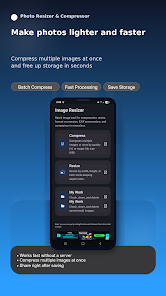
The app supports multiple image operations in one place. You can change dimensions, compress images, and convert between formats. It also offers batch processing, letting you apply the same settings to dozens of photos at once. These features are especially useful when freeing up storage or preparing a set of images for an online gallery.
Key features at a glance
- Batch resize and compress - Process groups of images in one pass to save time.
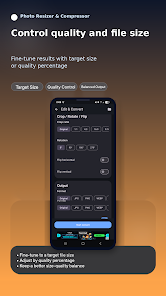
- Compression quality slider - Balance between smaller files and image clarity.
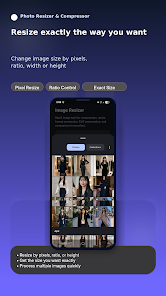
- Preset sizes and custom dimensions - Choose common sizes or input exact pixel values.
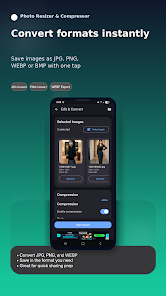
- Format conversion - Switch between JPEG, PNG, and other widely supported formats.
- Preview before saving - See estimated file size and a visual preview of results.
How it works in practice
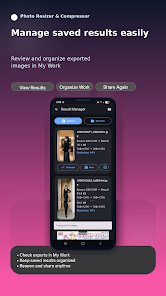
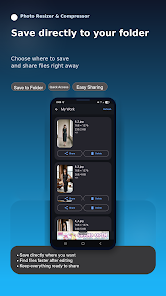
Start by selecting images from the gallery or a file manager. Next, choose a preset or enter the desired width and height. Use the compression slider to set the target quality or pick a file-size goal. When you start the operation, the app queues tasks and processes files sequentially, showing a progress indicator for each photo. Finished images are saved to a specified folder or optionally replace the originals after confirmation.
Interface and performance
Photo Resizer & Compressor keeps the interface minimal: large buttons, clear labels, and an uncluttered options panel. Performance is optimized for mobile hardware, so resizing and compression complete quickly even on older devices. Background processing prevents the app from blocking tasks you need to do while it runs.
Practical workflow tips
- When preparing photos for email, set a width of 1024 pixels and medium compression to keep attachments small but readable.
- For social media posts, try preset aspect ratios and export as JPEG to maximize compatibility.
- Test compression on one image before batch processing to avoid unwanted quality loss.
- Use the conversion tool to change PNGs to JPEGs when transparency isn’t required and smaller size is the priority.
Customization options
Although streamlined, the app offers useful customization: choose output folders, set naming conventions for processed files, and enable notifications on completion. These small controls help integrate the app into daily routines and automated backups.
User experience and reliability
Users report straightforward results with consistent file-size reductions across varied image types. The preview and revert options reduce risk when applying aggressive compression. Photo Resizer & Compressor maintains image metadata by default, but you can opt to strip EXIF data to save a little extra space and protect privacy.
Getting started and installation
Installation is quick and the initial setup walks you through default output folders and compression presets. The first-run experience includes a brief guide to the main controls and suggests common workflows depending on whether you want to save storage, speed up uploads, or prepare images for printing.
Who benefits most
This app is useful for casual photographers, bloggers, social media managers, and anyone needing to manage large photo libraries on a mobile device. It removes repetitive steps and accelerates common tasks while keeping control over final image quality.
Overall, Photo Resizer & Compressor is a practical utility for Android users who want a focused tool that reduces file sizes, converts formats, and simplifies batch processing without compromising usability. Its balance of speed, control, and accessibility makes it a solid choice for routine image optimization tasks.
Show More
Information
Screenshots
Latest Update












Hot Tags
Latest News
-
![Revealing the Launch Playlists and Cross-Progression for COD Warzone Mobile News]()
-
![March 2024 Free Redemption Codes for Honkai: Star Rail News]()
-
PUBG Mobile Teams Up with Bentley Motors: Luxury Cars, Exclusive Collectibles, and Beyond 2024-04-18
![PUBG Mobile Teams Up with Bentley Motors: Luxury Cars, Exclusive Collectibles, and Beyond News]()
-
![Monster Never Cry is now accessible on both Android and iOS mobile devices. News]()
-
V2.2 of the Farlight 84 update introduces an overhauled Season structure, fresh in-game currency, an 2024-04-16
![V2.2 of the Farlight 84 update introduces an overhauled Season structure, fresh in-game currency, an News]()
-
![Arrival of Genshin Impact 4.6 Update: 'Embers of Two Realms, Twilight of Crimson' News]()
-
April 2024 Clash of Clans Update: Unveiling a Fresh Companion, Enhanced Levels, Chat Tagging, and Be 2024-04-16
![April 2024 Clash of Clans Update: Unveiling a Fresh Companion, Enhanced Levels, Chat Tagging, and Be News]()






