
Battery Health Controller
Version:2.0
Published:2026-10-18
Introduction
Battery Health Controller is a compact diagnostic and management toolkit that brings detailed battery information, automated scheduling and lifespan forecasting together in one app. Battery Health Controller displays live percentage, voltage, current, temperature and an instant color-coded health score while keeping all processing and stored records on your device for privacy. Designed for users who want clear, actionable insight rather than opaque numbers, the app supports monitoring of the phone battery as well as Bluetooth accessories and Wear OS devices when connected.
Key features explained
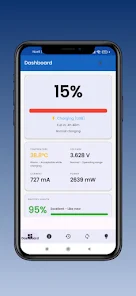
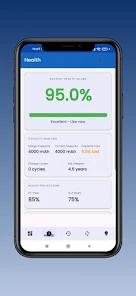
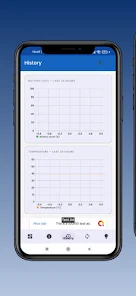
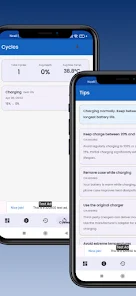
The app offers a real-time dashboard with precise readings of voltage in millivolts, current in milliamps and power in milliwatts, accompanied by a temperature readout and an immediately visible health indicator. Historical charts show 30 days of charge and discharge cycles, depth-of-discharge statistics and temperature trends with the option to export your logs as CSV for offline review. A machine-learning-based predictor analyzes your individual charge and discharge patterns to estimate when usable capacity may fall below 80 percent; this is presented as an estimated remaining timeframe so you can plan battery maintenance or replacement. Smart charging scheduling helps reduce time spent at high states of charge by prompting you to plug or unplug within user-defined windows, and a charging heatmap visualizes times and temperatures associated with heavier battery wear.
How it works and what to expect
The app continuously samples the kernel battery APIs and combines those signals into an instant health score and trend projections without sending data to external servers. Sampling intervals and the level of detail can be adjusted in settings to balance battery monitoring with the device’s own power usage. When accessories such as wireless earbuds or a Wear OS watch are paired, their battery levels appear in the same interface so you can view multi-device status at a glance. The lifespan predictor uses recent usage blocks and cycle counts to generate conservative, model-based estimates; these are meant as guidance rather than guarantees and are accompanied by confidence indicators in the UI.
Controls, interface and accessibility
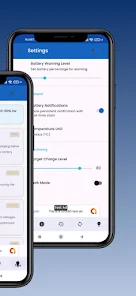
The user interface combines large, readable gauges and tappable graphs; pinch-to-zoom and horizontal swipes let you explore historical trend lines and isolate specific charge sessions. Controls for the scheduler and alerts use simple toggles and sliders so you can set thresholds, charging windows and temperature limits without navigating deep menus. Accessibility options include scalable text sizes, high-contrast modes and readouts for screen readers so users with different needs can access the same diagnostics. A home screen widget and Wear OS companion provide quick access to live percentage and the last health score without opening the main app.
Progression, customization and replay value
Rather than a game progression, Battery Health Controller offers a progression of insight: as you use the app it collects more history and the predictions and recommendations become more tailored to your habits. Customization allows you to choose which metrics are visible on the dashboard, set notification priorities and define device-specific charging profiles. The replay value comes from revisiting trends after changing charging behavior, comparing benchmark data for the same device model and experimenting with different scheduler settings to see measurable effects in the heatmap and cycle statistics.
Visual style and reports
The visual design is utilitarian and data-driven with clear color coding for health tiers, smooth animated transitions when updating live values and interactive line graphs for voltage and temperature. Exported reports are CSV-formatted so they can be opened in spreadsheets for deeper analysis or shared with repair technicians. Graphs include legends and tooltips to clarify units and timestamps, and a benchmarking view positions your device against anonymized, model-specific averages when available.
Offline capabilities and battery impact
All core features work offline because data collection and analysis are performed on-device; no account is required and there is no mandatory cloud sync. To limit its own impact on battery life, sampling frequency defaults to moderate intervals and can be reduced further in settings. Short diagnostic tests that stress the battery for calibration are optional and clearly labeled so you can run them when convenient and monitor temperature changes in real time.
Compatibility, privacy and known limitations
Battery Health Controller supports Android 8.0 and newer and generally works on phones and tablets that expose standard battery statistics through the system APIs; Wear OS integration and Bluetooth accessory monitoring depend on the companion devices supporting battery reporting. Privacy is a central design choice: all battery logs and prediction models remain on your device unless you explicitly export them. Limitations include the fact that AI-based lifespan predictions are estimates influenced by many variables, and some legacy devices may not surface the full set of metrics required for every feature.
Practical tips
Use the scheduler to minimize long periods at high charge, check the heatmap after heavy usage like gaming or navigation to spot thermal stress, and export a CSV before service appointments so technicians have a concise history. Regularly reviewing the trends will make the app’s recommendations more useful over time and help you take small steps that extend usable battery life.
Show More
Information
Screenshots
Latest Update
-
![Lines Gold Pro - Icon Pack APK]()
Lines Gold Pro - Icon Pack
-
![Remote Fire TV APK]()
Remote Fire TV
-
![Flight Dark Pro - Icon Pack APK]()
Flight Dark Pro - Icon Pack
-
![Ares Light: Pastel Icon Pack APK]()
Ares Light: Pastel Icon Pack
-
![getConf - Hidden Settings APK]()
getConf - Hidden Settings
-
![Dots Live Wallpaper - Battery APK]()
Dots Live Wallpaper - Battery
-
![Chroma - Icon Pack APK]()
Chroma - Icon Pack
-
![One UI Fluffy Icon Pack APK]()
One UI Fluffy Icon Pack
-
![Pixly Limitless Fluo Icon Pack APK]()
Pixly Limitless Fluo Icon Pack
-
![Compress Video - Resize Video APK]()
Compress Video - Resize Video
-
![Pixly Professional Dark APK]()
Pixly Professional Dark
-
![Tracker Detect Pro APK]()
Tracker Detect Pro












Latest News
-
![Revealing the Launch Playlists and Cross-Progression for COD Warzone Mobile News]()
-
![March 2024 Free Redemption Codes for Honkai: Star Rail News]()
-
PUBG Mobile Teams Up with Bentley Motors: Luxury Cars, Exclusive Collectibles, and Beyond 2024-04-18
![PUBG Mobile Teams Up with Bentley Motors: Luxury Cars, Exclusive Collectibles, and Beyond News]()
-
![Monster Never Cry is now accessible on both Android and iOS mobile devices. News]()
-
V2.2 of the Farlight 84 update introduces an overhauled Season structure, fresh in-game currency, an 2024-04-16
![V2.2 of the Farlight 84 update introduces an overhauled Season structure, fresh in-game currency, an News]()
-
![Arrival of Genshin Impact 4.6 Update: 'Embers of Two Realms, Twilight of Crimson' News]()
-
April 2024 Clash of Clans Update: Unveiling a Fresh Companion, Enhanced Levels, Chat Tagging, and Be 2024-04-16
![April 2024 Clash of Clans Update: Unveiling a Fresh Companion, Enhanced Levels, Chat Tagging, and Be News]()






