
Encrypted Notebook
Version:1.0
Published:2026-10-18
Introduction
Encrypted Notebook is a secure note-taking app that encrypts your personal and business notes locally, offering password-protected notebooks, biometric unlock, and offline storage. It organizes notes with tags and folders while providing export and import options for safe backups across devices.
Secure storage and encryption
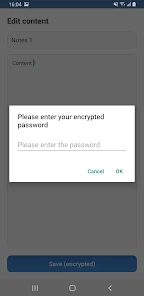
Encrypted Notebook protects your data with industry-standard cryptography and stores everything on your device by default. Notes and attachments are encrypted before they are written to disk, which reduces the risk of exposure if the device is lost or accessed without authorization. The app supports strong password protection and optional biometric unlocking for quick access without sacrificing security.
Key features at a glance
- Local encryption: All notes are encrypted locally using robust algorithms so your content remains private.
- Biometric unlock: Use fingerprint or face recognition for fast, secure entry.
- Organizational tools: Create notebooks, tags, and nested folders to keep ideas tidy.
- Attachments: Save images, PDFs, and other files alongside text notes.
- Backup and portability: Export encrypted archives for secure backups or transfer between devices.
Interface and workflow
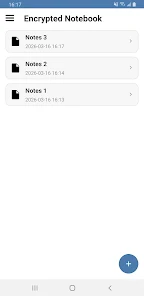
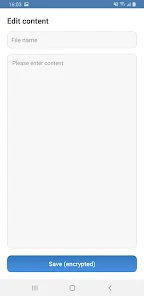
The user interface in Encrypted Notebook is designed for focused writing and quick retrieval. A clean sidebar presents notebooks and tags, while a distraction-free editor helps you compose and edit content. Inline search and filter tools make finding specific notes fast, and a preview pane displays attachments without leaving the app. Creating a new note takes just a tap, and saving is automatic so you won’t lose changes.
Practical use cases
Encrypted Notebook is suited to a wide range of everyday needs: journal keeping, project planning, password hints, secure drafts, and storing sensitive lists. Small business owners can use it to keep private meeting notes, while remote workers can record account information and ideas safely. Because data is encrypted locally, the app can be useful anywhere you need privacy without relying on cloud services.
Customization and organization
Customize notebooks with colors and titles to create visual distinctions between work and personal content. Tagging lets you group notes across different notebooks for quick access, and a pin/priority feature keeps frequently used items at the top of the list. Encrypted Notebook also supports templates so you can quickly start new notes with predefined structure for meeting minutes, checklists, or research logs.
Backup, sync, and compatibility
While Encrypted Notebook favors local storage for privacy, it includes tools for creating encrypted backup files that you can store on your own cloud account or external media. Exported archives remain encrypted and require the app or a compatible tool to open. The app is optimized for modern Android devices, supports both phones and tablets, and is designed to perform smoothly even with large note collections.
Performance and reliability
The app is lightweight and responsive: notes open instantly, and search operates quickly even with hundreds of entries. Background tasks such as automatic backups and encryption are scheduled to minimize battery impact. Regular integrity checks help detect file issues early so you can restore from a backup if needed.
Getting started tips
- Set a strong master password and enable biometric unlock for convenience.
- Organize notes into a few high-level notebooks, then use tags for cross-cutting categories.
- Export an encrypted backup after adding important content and store it off-device.
- Use templates for recurring note types to save time.
Encrypted Notebook balances privacy and usability, making secure note management practical for everyday life. With a clear interface, robust encryption, and thoughtful organizational tools, it helps users keep sensitive information accessible only to those who hold the keys.
Show More
Information
Screenshots
Latest Update
-
![Lines Gold Pro - Icon Pack APK]()
Lines Gold Pro - Icon Pack
-
![Remote Fire TV APK]()
Remote Fire TV
-
![Flight Dark Pro - Icon Pack APK]()
Flight Dark Pro - Icon Pack
-
![Ares Light: Pastel Icon Pack APK]()
Ares Light: Pastel Icon Pack
-
![getConf - Hidden Settings APK]()
getConf - Hidden Settings
-
![Dots Live Wallpaper - Battery APK]()
Dots Live Wallpaper - Battery
-
![Chroma - Icon Pack APK]()
Chroma - Icon Pack
-
![One UI Fluffy Icon Pack APK]()
One UI Fluffy Icon Pack
-
![Pixly Limitless Fluo Icon Pack APK]()
Pixly Limitless Fluo Icon Pack
-
![Compress Video - Resize Video APK]()
Compress Video - Resize Video
-
![Pixly Professional Dark APK]()
Pixly Professional Dark
-
![Tracker Detect Pro APK]()
Tracker Detect Pro












Hot Tags
Latest News
-
![Revealing the Launch Playlists and Cross-Progression for COD Warzone Mobile News]()
-
![March 2024 Free Redemption Codes for Honkai: Star Rail News]()
-
PUBG Mobile Teams Up with Bentley Motors: Luxury Cars, Exclusive Collectibles, and Beyond 2024-04-18
![PUBG Mobile Teams Up with Bentley Motors: Luxury Cars, Exclusive Collectibles, and Beyond News]()
-
![Monster Never Cry is now accessible on both Android and iOS mobile devices. News]()
-
V2.2 of the Farlight 84 update introduces an overhauled Season structure, fresh in-game currency, an 2024-04-16
![V2.2 of the Farlight 84 update introduces an overhauled Season structure, fresh in-game currency, an News]()
-
![Arrival of Genshin Impact 4.6 Update: 'Embers of Two Realms, Twilight of Crimson' News]()
-
April 2024 Clash of Clans Update: Unveiling a Fresh Companion, Enhanced Levels, Chat Tagging, and Be 2024-04-16
![April 2024 Clash of Clans Update: Unveiling a Fresh Companion, Enhanced Levels, Chat Tagging, and Be News]()






