

Family Planner
Version:3.8
Published:2026-10-18
Introduction
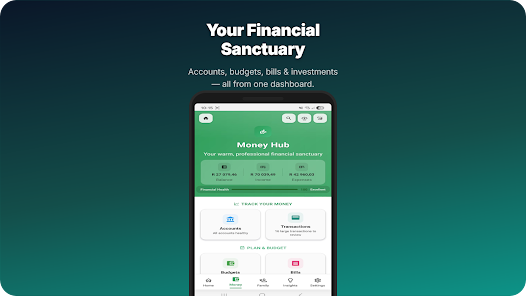
Family Planner helps households coordinate schedules, chores, and shared tasks with a clear calendar, reminders, and customizable profiles. Designed for parents and family groups, Family Planner centralizes events, shopping lists, and routines so everyone stays informed. Fast setup and intuitive controls reduce friction when organizing busy weeks.
What Family Planner Does
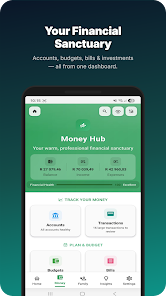
Family Planner is a household management app that brings calendars, to-dos, and reminders into one easy-to-use interface. It replaces fragmented notes and separate messaging threads with a unified space where every member can see the family timeline, assigned tasks, and shopping items. Notifications and color-coded events make it simple to spot conflicts and upcoming commitments at a glance.
Core Features
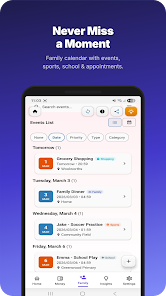
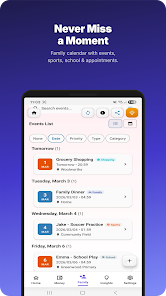
- Shared calendar: Create events, set repeat schedules, and assign attendees so school nights, appointments, and extracurriculars are visible to everyone.
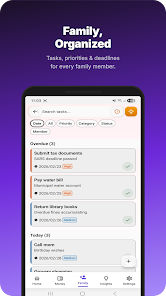
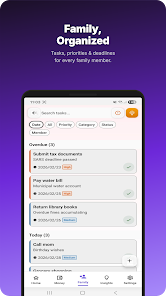
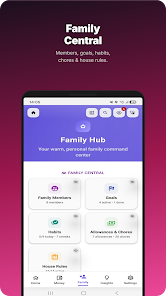
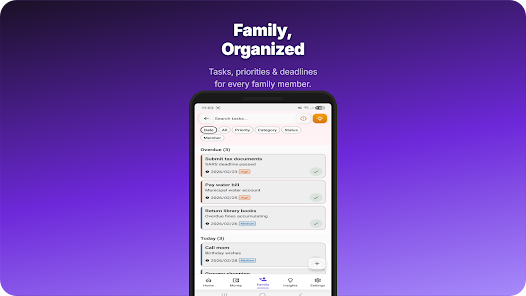
- Task & chore lists: Make recurring chores, assign them to individuals, and track completion history to balance household responsibilities.
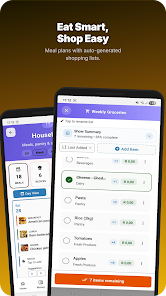
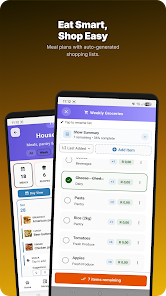
- Shopping & packing lists: Build collaborative lists that update in real time, with item notes and category grouping to speed up errands.
- Reminders & alerts: Custom reminders for each event or task, including snooze options and priority levels to reduce missed appointments.
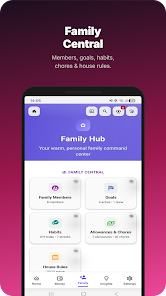
- Profile customization: Individual profiles with avatars, contact shortcuts, and notification preferences to tailor the experience per family member.
How the Planning System Works
Events and tasks in Family Planner live on a unified timeline. You can drag-and-drop items to reschedule, set multi-day events, or create linked tasks that depend on one another. Built-in templates speed up the creation of repetitive items like weekly cleaning, bill payments, or meal planning. Team assignment tags show who is responsible and provide quick access to message that person directly.
User Interface and Workflow
The interface focuses on clarity and speed. A month view gives an overview while a day view breaks down hourly commitments. Color-coded labels and icons help differentiate school, work, and social activities. The workflow encourages a weekly planning session: review upcoming events, assign chores, and update lists so the family starts the week with a clear plan.
Customization and Profiles
Family Planner supports multiple profiles so each user can set their preferred notification style, display name, and avatar. Parents can create child profiles with restricted editing rights, making it easier to manage responsibilities without losing oversight. Custom categories and tags allow families to tailor the system to their routines, whether that means sports schedules, medication reminders, or rotating babysitting duties.
Sync, Compatibility, and Offline Use
Real-time sync ensures all devices reflect the same calendar and lists. Family Planner works across phones and tablets, and integrates with standard calendar services so events can appear in third-party apps if desired. Offline mode stores edits locally and pushes updates when the device reconnects, which is useful during commutes or in areas with limited connectivity.
Security and Privacy
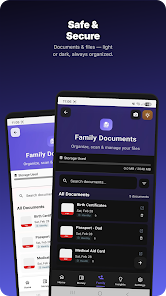
Privacy controls let administrators manage who can view or edit specific information. Data is stored using encrypted channels and family groups are isolated to prevent cross-account access. Permission settings include read-only views for guests and full access for designated family administrators, giving control over sensitive items like medical appointments or financial reminders.
Performance and Battery Impact
Family Planner is optimized to minimize battery and data usage. Background sync intervals can be adjusted to save power, and push notifications are bundled to avoid constant wake-ups. The app aims to load the calendar quickly even with lengthy histories and multiple lists, keeping the experience responsive on mid-range devices.
Tips for Getting the Most Out of Family Planner
- Establish a weekly planning routine where the family reviews and updates the calendar together to prevent surprises.
- Use color labels for quick visual separation of school, work, and leisure events.
- Enable location-based reminders for errands and pickups to trigger context-aware notifications.
- Keep recurring chores automated with templates to save time on setup.
- Limit notification types per profile to reduce alert fatigue while maintaining essential reminders.
Family Planner streamlines the logistics of modern family life by combining scheduling, shared tasks, and collaborative lists into a single app. Whether managing a busy school year or coordinating weekend plans, the app helps reduce friction and keep everyone on the same page.
Show More
Information
Screenshots
Latest Update












Latest News
-
![Revealing the Launch Playlists and Cross-Progression for COD Warzone Mobile News]()
-
![March 2024 Free Redemption Codes for Honkai: Star Rail News]()
-
PUBG Mobile Teams Up with Bentley Motors: Luxury Cars, Exclusive Collectibles, and Beyond 2024-04-18
![PUBG Mobile Teams Up with Bentley Motors: Luxury Cars, Exclusive Collectibles, and Beyond News]()
-
![Monster Never Cry is now accessible on both Android and iOS mobile devices. News]()
-
V2.2 of the Farlight 84 update introduces an overhauled Season structure, fresh in-game currency, an 2024-04-16
![V2.2 of the Farlight 84 update introduces an overhauled Season structure, fresh in-game currency, an News]()
-
![Arrival of Genshin Impact 4.6 Update: 'Embers of Two Realms, Twilight of Crimson' News]()
-
April 2024 Clash of Clans Update: Unveiling a Fresh Companion, Enhanced Levels, Chat Tagging, and Be 2024-04-16
![April 2024 Clash of Clans Update: Unveiling a Fresh Companion, Enhanced Levels, Chat Tagging, and Be News]()






