

CommLink
Version:1.1.16
Published:2026-10-19
Introduction
CommLink is a communication and collaboration app designed to streamline team workflows, centralize messages, and integrate tools in one workspace. It combines chat, file sharing, and threaded discussions with customizable notifications and quick access to project resources, enabling teams to move from idea to action with fewer interruptions.
What CommLink Does
CommLink brings multiple workplace functions into a compact mobile experience. The app focuses on reducing fragmented communication by combining persistent group chats, direct messages, and topic-specific threads. Built-in file previews and search reduce time spent hunting for attachments, while integrations connect calendars, task managers, and cloud storage services to your conversations.
Notable Capabilities
- Real-time messaging: Fast one-to-one and group chats that support multimedia and quick replies.
- Threaded discussions: Keep conversations organized around specific topics or projects.
- File handling: Preview documents, images, and video without leaving the app.
- Integrations: Link popular productivity tools and view important updates inline.
- Search and filters: Locate messages, files, and people with granular filters.
Interface and Daily Workflow
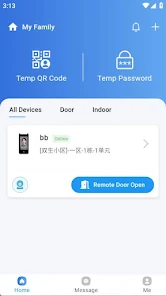
The interface prioritizes clarity: a left-hand navigation for channels, a main pane for the active conversation, and a compact composer at the bottom. CommLink’s layout adapts for phones and tablets, with gestures and shortcuts for power users. Notifications are grouped and can be adjusted per channel so you receive only the updates that matter.
How Teams Use It
Teams often adopt CommLink for project coordination and incident response. Channel-based organization lets product groups, support teams, and marketing keep separate spaces while retaining cross-channel search. When an issue arises, escalation patterns can be automated using integrations, reducing manual handoffs.
Customization and Extensions
CommLink supports custom notifications and role-based permissions to align with team structures. Admin tools allow workspace owners to manage integrations and data retention policies. Developers can extend functionality with webhooks and API hooks, creating bespoke automations or connecting internal tools.
Security and Data Handling
Security features include optional end-to-end encryption for sensitive channels, single sign-on support, and audit logs for administrative oversight. File transfers use encrypted transport, and configurable retention policies let organizations control how long chat history and attachments are preserved.
Performance and Usability
Performance is tuned for low-latency messaging and efficient media loading. Offline mode caches recent conversations and queues outgoing messages until a connection is restored. The app also manages bandwidth for mobile users by restricting automatic media downloads over cellular networks.
Tips for Getting the Most from CommLink
- Set channel norms: Define when to use threads versus channels to prevent noisy timelines.
- Use integrations wisely: Limit automated posts to reduce clutter and highlight critical alerts.
- Customize notifications: Mute nonessential channels and create priority alerts for critical topics.
- Organize files: Tag or pin frequently used documents for fast retrieval.
Onboarding and Installation
Getting started with CommLink is straightforward. New users can sign up with an email address or SSO provider, join existing workspaces, or create new ones. Admins can bulk-invite team members and preconfigure integrations to accelerate adoption. The app offers guided tips and a help center with best-practice templates for common workflows.
Why Teams Adopt It
Teams choose CommLink when they want a single place to coordinate work without switching between multiple apps. Its balance of real-time chat, threaded organization, and integrations makes it useful for product development, customer support, and distributed teams. The combination of performance optimizations and administrative controls helps organizations scale collaboration while maintaining security.
For organizations evaluating collaboration platforms, CommLink is worth testing for a few weeks to see how it reshapes daily communication and reduces context switching. With clear channel organization, targeted notifications, and extensible integrations, it is designed to keep teams focused and connected.
Show More
Information
Screenshots
Latest Update
-
![Lines Gold Pro - Icon Pack APK]()
Lines Gold Pro - Icon Pack
-
![Remote Fire TV APK]()
Remote Fire TV
-
![Flight Dark Pro - Icon Pack APK]()
Flight Dark Pro - Icon Pack
-
![Ares Light: Pastel Icon Pack APK]()
Ares Light: Pastel Icon Pack
-
![getConf - Hidden Settings APK]()
getConf - Hidden Settings
-
![Dots Live Wallpaper - Battery APK]()
Dots Live Wallpaper - Battery
-
![Chroma - Icon Pack APK]()
Chroma - Icon Pack
-
![One UI Fluffy Icon Pack APK]()
One UI Fluffy Icon Pack
-
![Pixly Limitless Fluo Icon Pack APK]()
Pixly Limitless Fluo Icon Pack
-
![Compress Video - Resize Video APK]()
Compress Video - Resize Video
-
![Pixly Professional Dark APK]()
Pixly Professional Dark
-
![Tracker Detect Pro APK]()
Tracker Detect Pro












Hot Tags
Latest News
-
![Revealing the Launch Playlists and Cross-Progression for COD Warzone Mobile News]()
-
![March 2024 Free Redemption Codes for Honkai: Star Rail News]()
-
PUBG Mobile Teams Up with Bentley Motors: Luxury Cars, Exclusive Collectibles, and Beyond 2024-04-18
![PUBG Mobile Teams Up with Bentley Motors: Luxury Cars, Exclusive Collectibles, and Beyond News]()
-
![Monster Never Cry is now accessible on both Android and iOS mobile devices. News]()
-
V2.2 of the Farlight 84 update introduces an overhauled Season structure, fresh in-game currency, an 2024-04-16
![V2.2 of the Farlight 84 update introduces an overhauled Season structure, fresh in-game currency, an News]()
-
![Arrival of Genshin Impact 4.6 Update: 'Embers of Two Realms, Twilight of Crimson' News]()
-
April 2024 Clash of Clans Update: Unveiling a Fresh Companion, Enhanced Levels, Chat Tagging, and Be 2024-04-16
![April 2024 Clash of Clans Update: Unveiling a Fresh Companion, Enhanced Levels, Chat Tagging, and Be News]()






