
Speed Test Pro: WiFi & Ping
Version:1.2
Published:2026-10-19
Introduction
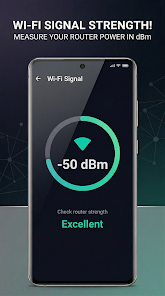
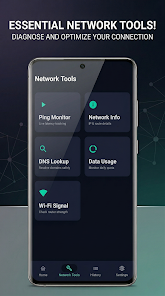
Speed Test Pro: WiFi & Ping is a utility that measures network performance with precision, displaying download and upload speeds, latency, and packet loss in a simple interface. It’s designed for users who need quick diagnostics, consistent benchmarking, and clear visual feedback about their Wi‑Fi and mobile connections.
Quick look at the app
Speed Test Pro: WiFi & Ping delivers fast tests and detailed logs so you can verify ISP claims, identify local network issues, and compare routers or hotspots. The tool runs single-tap tests, records results over time, and exports data for tracking trends or troubleshooting.
What the main tools do
- Download and upload speed tests — Measures throughput in Mbps using multiple parallel connections to get realistic results.
- Latency and ping — Reports ping times to selectable servers and highlights jitter for gaming and VoIP diagnostics.
- Packet loss detection — Identifies dropped packets that can cause stuttering and retransmissions.
- History and export — Keeps a timeline of tests and allows CSV export for deeper analysis.
How testing works
The app runs a sequence of small and large transfers to estimate available bandwidth without saturating your connection unnecessarily. It begins with short probes to determine server responsiveness, then ramps up parallel streams to measure peak throughput. Ping tests run concurrently to show how latency behaves under load.
Server selection and accuracy
Results are influenced by server proximity and routing. Speed Test Pro: WiFi & Ping lets you choose nearby servers or pick specific endpoints, which helps isolate whether slowdowns are due to your local network, ISP routing, or remote servers. Repeated tests at different times provide a fuller picture.
User interface and design choices
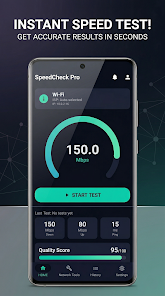
The interface focuses on clarity: large numeric readouts, color-coded latency markers, and simple charts. Test results are presented instantly with a one-screen summary plus a tappable timeline for historical detail. Controls are straightforward, making it easy for non-experts to run a test and interpret the results.
Visual feedback and reports
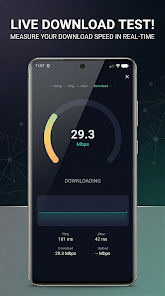
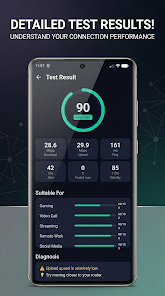
Real-time graphs show speed changes during a test so you can see throttling or fluctuations. Detailed reports list server locations, timestamps, and full metrics, helping technicians and curious users compare performance across devices or places in the home.
Practical uses and workflows
For everyday users, Speed Test Pro: WiFi & Ping is handy when you want to confirm whether your connection matches your plan. Network admins can use it to benchmark hardware, document flaky Wi‑Fi spots, or validate improvements after changing equipment. Gamers and streamers will appreciate the low-latency indicators and packet loss metrics.
Tips for reliable measurements
- Run multiple tests at different times of day to account for congestion.
- Test on both Wi‑Fi and wired connections to compare overheads.
- Close other bandwidth-heavy apps during a test for a baseline reading.
- Use server selection to check routing differences or ISP peering effects.
Performance and device compatibility
The app is optimized to minimize battery and CPU impact while performing accurate measures. It scales tests to your device’s capabilities and adapts to cellular and Wi‑Fi networks. Background logging is available for long-term monitoring without continuous active use.
Security and privacy considerations
Network tests naturally send and receive data; Speed Test Pro: WiFi & Ping limits collection to test metrics and server endpoints. Exported logs contain performance details but avoid transmitting sensitive personal information. Check the app’s privacy settings to control history retention and data sharing.
Getting started
Installation is straightforward. Grant the minimal permissions required for network diagnostics, then run an initial test to establish a baseline. Use the history view to compare later tests, and export data if you need to share results with technical support or your ISP.
Who benefits most
Home users, IT support staff, and mobile professionals who depend on reliable connections will find Speed Test Pro: WiFi & Ping useful. Its balance of accessible UI and technical detail makes it suitable for casual checks and deeper troubleshooting alike.
Show More
Information
Screenshots
Latest Update
-
![Lines Gold Pro - Icon Pack APK]()
Lines Gold Pro - Icon Pack
-
![Remote Fire TV APK]()
Remote Fire TV
-
![Flight Dark Pro - Icon Pack APK]()
Flight Dark Pro - Icon Pack
-
![Ares Light: Pastel Icon Pack APK]()
Ares Light: Pastel Icon Pack
-
![getConf - Hidden Settings APK]()
getConf - Hidden Settings
-
![Dots Live Wallpaper - Battery APK]()
Dots Live Wallpaper - Battery
-
![Chroma - Icon Pack APK]()
Chroma - Icon Pack
-
![One UI Fluffy Icon Pack APK]()
One UI Fluffy Icon Pack
-
![Pixly Limitless Fluo Icon Pack APK]()
Pixly Limitless Fluo Icon Pack
-
![Compress Video - Resize Video APK]()
Compress Video - Resize Video
-
![Pixly Professional Dark APK]()
Pixly Professional Dark
-
![Tracker Detect Pro APK]()
Tracker Detect Pro












Hot Tags
Latest News
-
![Revealing the Launch Playlists and Cross-Progression for COD Warzone Mobile News]()
-
![March 2024 Free Redemption Codes for Honkai: Star Rail News]()
-
PUBG Mobile Teams Up with Bentley Motors: Luxury Cars, Exclusive Collectibles, and Beyond 2024-04-18
![PUBG Mobile Teams Up with Bentley Motors: Luxury Cars, Exclusive Collectibles, and Beyond News]()
-
![Monster Never Cry is now accessible on both Android and iOS mobile devices. News]()
-
V2.2 of the Farlight 84 update introduces an overhauled Season structure, fresh in-game currency, an 2024-04-16
![V2.2 of the Farlight 84 update introduces an overhauled Season structure, fresh in-game currency, an News]()
-
![Arrival of Genshin Impact 4.6 Update: 'Embers of Two Realms, Twilight of Crimson' News]()
-
April 2024 Clash of Clans Update: Unveiling a Fresh Companion, Enhanced Levels, Chat Tagging, and Be 2024-04-16
![April 2024 Clash of Clans Update: Unveiling a Fresh Companion, Enhanced Levels, Chat Tagging, and Be News]()






