

Hearing Pro
Version:1.1.7
Published:2026-10-21
Introduction
Hearing Pro is a mobile utility designed to enhance listening in noisy environments by adjusting audio, amplifying soft sounds, and providing customizable equalizer profiles. It targets users who need better clarity during calls, meetings, or media playback and offers quick controls, presets, and simple calibration tools for immediate improvement.
What the app does
At its core, Hearing Pro acts as a personal audio assistant that works with your device’s microphone and playback channels to improve intelligibility. Rather than replacing hearing devices, it complements built-in audio processing with fine-grained controls, live amplification, and noise suppression options. The app is aimed at people who want clearer speech, less background noise, and more control over how sound reaches their ears.
Key tools and features
Hearing Pro packs several practical features tailored for everyday listening scenarios. Below are the most useful tools you’ll interact with:
- Live Amplifier — Boosts soft sounds in real time while keeping loud noises comfortable.
- Adaptive Noise Reduction — Filters steady background hums and wind noise without muting voices.
- Custom EQ Presets — Save and switch between profiles optimized for conversation, music, or lectures.
- Speech Focus Mode — Prioritizes frequencies associated with human speech to increase clarity.
- Calibration Wizard — Guides users through a quick setup to match amplification to personal preferences.
How it works in daily use
The app offers a straightforward workflow: open the interface, choose a profile or let the auto-mode evaluate ambient sound, then fine-tune sliders if necessary. For calls or meetings, you can enable a speech-oriented preset that reduces room reverberation and lifts vocal frequencies. For media playback, the equalizer gives a transparent boost where needed without introducing harshness.
Interface and performance
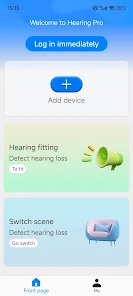
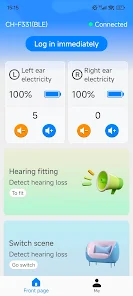
Hearing Pro presents a clean, minimal interface focused on large, accessible controls. Important functions are one tap away, and the contrast and typography aim to be readable in various lighting conditions. Performance-wise, the app is optimized to run with low latency so amplification feels natural. Battery and CPU impact vary by device, but background processing is kept minimal unless continuous live listening is enabled.
User workflow and customization
Customization is a strong suit. Users can create multiple profiles for different environments and assign them to quick-access buttons. For example, a "Commute" preset reduces bass and enhances midrange for spoken announcements, while a "Theater" preset emphasizes full-range audio. The calibration wizard walks through steps to adapt gain to personal comfort, ensuring the app remains practical for extended use.
Tips for first-time users
- Begin with the calibration wizard to prevent over-amplification.
- Test presets in real environments — a quiet room, a busy café, and a car — to fine-tune settings.
- Use Speech Focus when you need to follow a single speaker in a crowded space.
- Monitor battery usage if you plan to run live amplification for long periods.
Accessibility and compatibility
Hearing Pro supports a variety of headsets and the built-in speaker system. It respects system audio routing so calls and media can be processed selectively. The app also includes adjustable font sizes and color contrast options to improve usability for those with visual limitations. Compatibility notes and required permissions are clearly documented within the app to help users set it up safely.
Why people choose this tool
Users often praise Hearing Pro for its direct approach to improving real-world listening rather than offering abstract settings. The ability to save profiles, the responsiveness of the live amplifier, and the practical calibration steps make it useful for commuters, students, and professionals who attend frequent meetings. The app balances advanced controls with an approachable interface, so newcomers and power users can both configure it effectively.
Getting started
Installation is simple: grant the app microphone permissions, run the calibration wizard, and try a preset in a familiar environment. If you use headphones, test both wired and Bluetooth modes to confirm expected behavior. Regularly update profiles as your listening needs change and explore the recommended presets to find a starting point that fits your daily routine.
Whether you need marginal boosts in clarity or a reliable on-the-go listening assistant, Hearing Pro offers a focused toolset to make speech and media more intelligible while remaining friendly to nontechnical users.
Show More
Information
Screenshots

Latest Update
-
![Lines Gold Pro - Icon Pack APK]()
Lines Gold Pro - Icon Pack
-
![Remote Fire TV APK]()
Remote Fire TV
-
![Flight Dark Pro - Icon Pack APK]()
Flight Dark Pro - Icon Pack
-
![Ares Light: Pastel Icon Pack APK]()
Ares Light: Pastel Icon Pack
-
![getConf - Hidden Settings APK]()
getConf - Hidden Settings
-
![Dots Live Wallpaper - Battery APK]()
Dots Live Wallpaper - Battery
-
![Chroma - Icon Pack APK]()
Chroma - Icon Pack
-
![One UI Fluffy Icon Pack APK]()
One UI Fluffy Icon Pack
-
![Pixly Limitless Fluo Icon Pack APK]()
Pixly Limitless Fluo Icon Pack
-
![Compress Video - Resize Video APK]()
Compress Video - Resize Video
-
![Pixly Professional Dark APK]()
Pixly Professional Dark
-
![Tracker Detect Pro APK]()
Tracker Detect Pro












Hot Tags
Latest News
-
![Revealing the Launch Playlists and Cross-Progression for COD Warzone Mobile News]()
-
![March 2024 Free Redemption Codes for Honkai: Star Rail News]()
-
PUBG Mobile Teams Up with Bentley Motors: Luxury Cars, Exclusive Collectibles, and Beyond 2024-04-18
![PUBG Mobile Teams Up with Bentley Motors: Luxury Cars, Exclusive Collectibles, and Beyond News]()
-
![Monster Never Cry is now accessible on both Android and iOS mobile devices. News]()
-
V2.2 of the Farlight 84 update introduces an overhauled Season structure, fresh in-game currency, an 2024-04-16
![V2.2 of the Farlight 84 update introduces an overhauled Season structure, fresh in-game currency, an News]()
-
![Arrival of Genshin Impact 4.6 Update: 'Embers of Two Realms, Twilight of Crimson' News]()
-
April 2024 Clash of Clans Update: Unveiling a Fresh Companion, Enhanced Levels, Chat Tagging, and Be 2024-04-16
![April 2024 Clash of Clans Update: Unveiling a Fresh Companion, Enhanced Levels, Chat Tagging, and Be News]()






