

Dash - Route planner
Version:2.0.5
Published:2026-10-21
Introduction
Dash - Route planner accelerates daily navigation with fast multi-stop routing, live traffic updates, and intelligent optimization. Designed for drivers and delivery professionals, it blends simple controls with robust planning features to create efficient itineraries, predict accurate arrival times, and export routes for sharing or offline use.
Overview of the app
At its core, Dash - Route planner is a utility for people who move from place to place frequently. It combines mapping, scheduling, and route optimization so users can minimize travel time, reduce fuel consumption, and stay on schedule. The app supports personal commutes, courier runs, sales calls, and small fleet coordination without overwhelming casual users.
Primary capabilities
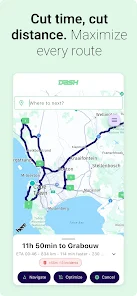
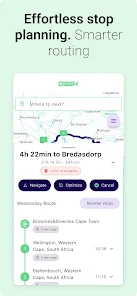
- Multi-stop planning: Build routes with dozens of stops and reorder them with drag-and-drop.
- Automatic optimization: Let the app compute the fastest or shortest sequence based on current conditions.
- Traffic-aware routing: Real-time congestion and incident data adjust routes and ETAs.
- Offline maps: Download regions for routing where connectivity is limited.
- Export and share: Save itineraries as files or send them to team members and navigation apps.
How it works in practice
To plan a route, enter addresses manually, import from spreadsheets, or load calendar appointments. The route engine evaluates distances, estimated speeds, and live traffic to propose an optimized order. Users can lock high-priority stops, set time windows for appointments, and apply preferences like avoiding tolls or highways. For recurring runs, templates can be saved to reuse with one tap.
Tools for professional workflows
Delivery drivers and field service teams will appreciate the batch import and export tools. CSV and GPX support let dispatchers stage routes in bulk. The app also integrates with contact lists and calendar apps so scheduled visits appear automatically. For teams, live tracking and simple route assignment help managers keep operations visible without switching between multiple platforms.
Design and performance
Dash - Route planner favors a clean interface that balances detail with readability. Map layers can be toggled for traffic, satellite, or terrain views. Controls are responsive on mid-range devices, and the app minimizes battery drain through efficient background processing. Map tiles are cached intelligently to reduce data use while still updating traffic frequently when online.
Customization and settings
Users can tailor routing preferences, including speed profiles for different vehicle types, preferred arrival buffer times, and optimization goals (time versus distance). Waypoints can carry notes and contact details, and routes can include pauses for breaks or loading/unloading windows. The ability to label and color-code routes simplifies managing multiple tasks in the same day.
Practical tips for new users
Start by creating a simple two-stop route to learn the interface. Use the optimization toggle to compare manual ordering with automatic suggestions, and try the traffic preview to see how departure time shifts ETA. For recurring deliveries, save routes as templates and test CSV imports with a small sample before bulk uploading. Regularly update offline maps before long trips.
Common troubleshooting
If addresses don’t geolocate accurately, check for typos and consider switching to a nearby point of interest. When battery use spikes, reduce background refresh or limit satellite view during navigation. Exported files include route metadata so you can audit and adjust stops outside the app if needed.
Getting started and compatibility
Installing Dash - Route planner is straightforward: download from the Android store, grant location and file permissions, and complete the quick setup to select map regions. The app supports a broad range of Android versions and works on phones and tablets. For fleets, optional subscription tiers unlock bulk features, live customer support, and advanced integrations.
Why users pick it
People choose Dash - Route planner because it delivers tangible time savings without a steep learning curve. Its combination of route optimization, flexible import/export, and useful settings makes it a practical tool for solo drivers and small teams. Regular updates add refinements based on user feedback, keeping the app aligned with everyday routing needs.
Show More
Information
Screenshots
Latest Update












Hot Tags
Latest News
-
![Revealing the Launch Playlists and Cross-Progression for COD Warzone Mobile News]()
-
![March 2024 Free Redemption Codes for Honkai: Star Rail News]()
-
PUBG Mobile Teams Up with Bentley Motors: Luxury Cars, Exclusive Collectibles, and Beyond 2024-04-18
![PUBG Mobile Teams Up with Bentley Motors: Luxury Cars, Exclusive Collectibles, and Beyond News]()
-
![Monster Never Cry is now accessible on both Android and iOS mobile devices. News]()
-
V2.2 of the Farlight 84 update introduces an overhauled Season structure, fresh in-game currency, an 2024-04-16
![V2.2 of the Farlight 84 update introduces an overhauled Season structure, fresh in-game currency, an News]()
-
![Arrival of Genshin Impact 4.6 Update: 'Embers of Two Realms, Twilight of Crimson' News]()
-
April 2024 Clash of Clans Update: Unveiling a Fresh Companion, Enhanced Levels, Chat Tagging, and Be 2024-04-16
![April 2024 Clash of Clans Update: Unveiling a Fresh Companion, Enhanced Levels, Chat Tagging, and Be News]()






