
zzzGuard : Auto Lock on Sleep
Version:ZZZ_GUARD_1.0_BETA
Published:2026-10-21
Introduction
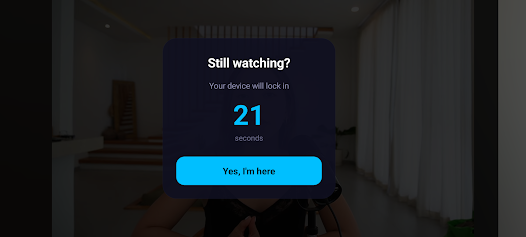
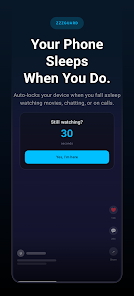
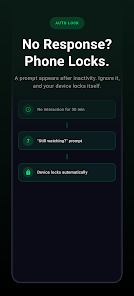
zzzGuard : Auto Lock on Sleep quietly locks your phone when you stop interacting with it, helping prevent overnight battery drain and accidental touches when you fall asleep watching videos or scrolling. This small utility watches for inactivity and shows a brief "Still watching?" prompt; if the prompt is not acknowledged the device locks after the timeout you choose. The description below explains how zzzGuard : Auto Lock on Sleep operates, how to configure its modes and schedules, and what to expect from the current beta release.
Key features and how they work
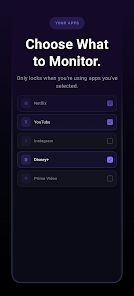
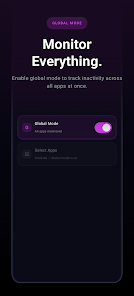
At its core the app runs a configurable inactivity timer you set between 5 and 60 minutes. When the timer elapses a short, unobtrusive countdown prompt appears; tapping the prompt cancels the lock, while letting the countdown finish locks the screen immediately. Monitoring can be applied globally or targeted to specific apps so you can focus on media players and social feeds without affecting reading or productivity apps. The per-app selector lists installed apps and applies monitoring with a single tap, making it quick to adapt for different usage patterns.
Controls and user flow
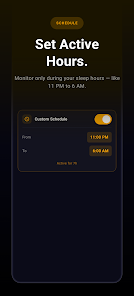
Controls are designed for immediate clarity: a master toggle enables the service, a slider sets your preferred timeout, and the per-app list lets you include or exclude apps from monitoring. A schedule selector lets you define active hours (for example, 11:00 PM to 7:00 AM) so the lock behavior is only enforced at night. Setting up takes only a few steps: enable the Accessibility permission when prompted, choose global or per-app mode, set the timer and schedule, and the app runs in the background with minimal intervention.
Customization, profiles and progression
While not a game, zzzGuard : Auto Lock on Sleep supports a kind of progression through customizable profiles and schedule presets. You can create different night and day settings, store preferred timeout values, and switch modes quickly when you anticipate long media sessions. These profiles act like levels of protection—short timeouts for shared devices, longer ones for quiet nights—so you can gradually adjust behavior until the app matches your routine. This approach increases the app's replay value as you fine-tune settings for holidays, travel, or household changes.
Visual style and accessibility
The interface favors readable typography, clear labels, and high-contrast controls for quick glances. Prompts are intentionally minimal to avoid disturbing video playback or full-screen apps. Accessibility considerations include large touch targets, concise on-screen text during the setup flow, and explicit in-app explanations for required permissions. These choices make the utility usable for a broad range of users, including those who need larger fonts or simplified interactions.
Offline behavior and privacy
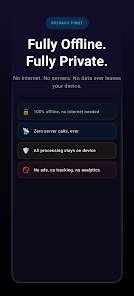
zzzGuard : Auto Lock on Sleep operates entirely on-device: no internet connectivity is required, no analytics are collected, and no data is transmitted off the phone. The app uses the Accessibility Service permission to perform reliable screen locking; this requirement is described step by step inside the app with a direct link to the system settings page so enabling the permission is straightforward. All inactivity detection and locking logic run locally, preserving privacy and making the feature dependable when you are offline.
Real-world scenarios and practical benefits
Using this app reduces unnecessary screen-on time and can extend battery life by preventing long unattended media sessions. Parents can apply per-app mode to avoid accidental taps when children watch videos, commuters can prevent pocket activations, and anyone who consumes media before bed can keep bright screens from staying on all night. The lightweight design keeps background consumption low, so the app itself has a negligible impact on battery life while protecting against unintended input.
Limitations, compatibility and notes
The app requires Android 9 or newer and needs Accessibility permission to function, which some users may be cautious about granting; the description and setup screens explain exactly what the permission enables and how it is used. Timeout options are intentionally limited to the 5–60 minute range to balance convenience with protection. The current release is a beta (ZZZ_GUARD_1.0_BETA), so occasional refinements and updates should be expected; in-app links let you report issues or suggest improvements directly to the developer.
Version, packaging and ongoing value
Offered by 1 Dollar Apps, zzzGuard : Auto Lock on Sleep is distributed as a small APK (approximately 3 MB) and is intended to be a stable, low-friction utility rather than a continually changing online service. Settings persist between sessions so once you tailor timeouts and select target apps, the behavior remains consistent. Because it runs locally and is lightweight, the app continues to deliver value night after night as a practical guard against accidental screen time and battery waste.
Show More
Information
Screenshots
Latest Update
-
![Lines Gold Pro - Icon Pack APK]()
Lines Gold Pro - Icon Pack
-
![Remote Fire TV APK]()
Remote Fire TV
-
![Flight Dark Pro - Icon Pack APK]()
Flight Dark Pro - Icon Pack
-
![Ares Light: Pastel Icon Pack APK]()
Ares Light: Pastel Icon Pack
-
![getConf - Hidden Settings APK]()
getConf - Hidden Settings
-
![Dots Live Wallpaper - Battery APK]()
Dots Live Wallpaper - Battery
-
![Chroma - Icon Pack APK]()
Chroma - Icon Pack
-
![One UI Fluffy Icon Pack APK]()
One UI Fluffy Icon Pack
-
![Pixly Limitless Fluo Icon Pack APK]()
Pixly Limitless Fluo Icon Pack
-
![Compress Video - Resize Video APK]()
Compress Video - Resize Video
-
![Pixly Professional Dark APK]()
Pixly Professional Dark
-
![Tracker Detect Pro APK]()
Tracker Detect Pro












Latest News
-
![Revealing the Launch Playlists and Cross-Progression for COD Warzone Mobile News]()
-
![March 2024 Free Redemption Codes for Honkai: Star Rail News]()
-
PUBG Mobile Teams Up with Bentley Motors: Luxury Cars, Exclusive Collectibles, and Beyond 2024-04-18
![PUBG Mobile Teams Up with Bentley Motors: Luxury Cars, Exclusive Collectibles, and Beyond News]()
-
![Monster Never Cry is now accessible on both Android and iOS mobile devices. News]()
-
V2.2 of the Farlight 84 update introduces an overhauled Season structure, fresh in-game currency, an 2024-04-16
![V2.2 of the Farlight 84 update introduces an overhauled Season structure, fresh in-game currency, an News]()
-
![Arrival of Genshin Impact 4.6 Update: 'Embers of Two Realms, Twilight of Crimson' News]()
-
April 2024 Clash of Clans Update: Unveiling a Fresh Companion, Enhanced Levels, Chat Tagging, and Be 2024-04-16
![April 2024 Clash of Clans Update: Unveiling a Fresh Companion, Enhanced Levels, Chat Tagging, and Be News]()






