
NFC Tools: Tag Reader & Writer
Version:1.1
Published:2026-10-23
Introduction
NFC Tools: Tag Reader & Writer is a compact utility that reads, writes and programs NFC tags for everyday automation and data transfer. In roughly fifty words, it provides an approachable tag editor, supports common NFC formats, and integrates simple actions that let you attach settings, links or notes to physical tags without any scripting experience.
Overview of the utility
Designed for Android devices with NFC capability, NFC Tools: Tag Reader & Writer focuses on practical, non-technical workflows. The app exposes core NFC operations—reading existing tag content, creating new NDEF records, and executing predefined tasks—while keeping the interface accessible for both hobbyists and professionals who want quick tag-based automation.
Key capabilities at a glance
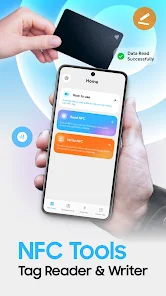
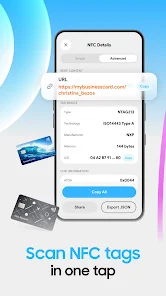
- Read and inspect: View NDEF records, raw memory, and tag type details for diagnostics or verification.
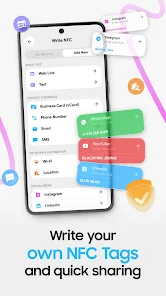
- Write and compose: Create text, URI, contact, and custom records to program new tags.
- Task automation: Launch actions like toggling Wi‑Fi, opening URLs or starting apps when a tag is scanned.
- Compatibility: Works with popular tag standards such as NTAG, MIFARE Ultralight, and Type 2/4 tags, covering most consumer NFC products.
How it actually works
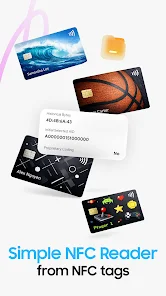
The app uses your phone’s NFC radio to interact with tags. Reading is immediate—tap a tag and the app decodes the payload into human-readable fields. Writing is a guided process: choose a record type, enter the content, and present the tag to store data. For multi-action tags you can stack records or create sequences that run when scanned.
Practical tools and formats
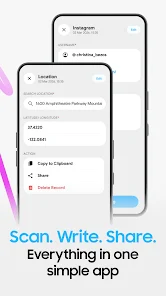
Beyond plain text and URLs, NFC Tools: Tag Reader & Writer supports vCard contacts, MIME types, and geo-coordinates. It also offers a raw editor for advanced users who need to craft non-standard records or inspect memory blocks. Export and import functions let you back up tag configurations or replicate setups across multiple tags.
User interface and performance
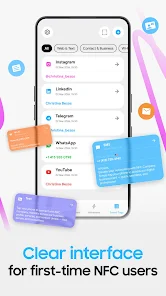
The interface is clean and optimized for quick tasks. Buttons and forms are clearly labeled; common operations like copy, share and erase are a tap away. Performance depends on the device’s NFC chipset, but everyday tasks complete nearly instantly. Error messages are concise and typically indicate tag compatibility or write protection issues rather than cryptic codes.
Workflow ideas and real-world use
- Home automation: Stick tags near your front door to enable night mode, silence your phone, or toggle smart lights.
- Business use: Program tags to share contact details, Wi‑Fi credentials, or product links in retail and hospitality settings.
- Personal shortcuts: Place tags in your car for navigation shortcuts or on a desk to launch productivity apps.
Tips for beginners
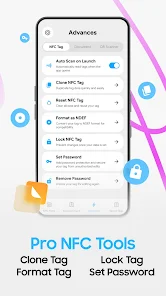
If you’re new to NFC, start by reading pre-written tags to see common record structures. When writing, verify the tag capacity and choose the smallest record set that fulfills your needs. Keep one test tag to experiment safely before writing to valuable media. Also, remember some tags may be locked after writing; use the lock feature only when you’re sure you won’t need to change the content.
Security and limitations
The app is a utility for reading and writing unencrypted tag data; it does not bypass security on protected cards. Sensitive information should not be stored on public tags unless additional encryption is used. Compatibility varies: certain proprietary cards and secure elements are not writable by consumer apps, and multi-sector tags may require specialized tools.
Why users pick this app
Users praise its straightforward approach and reliability. NFC Tools: Tag Reader & Writer strikes a balance between power and simplicity, making it suitable for quick personal automations as well as repeated professional deployments. The ability to combine different record types and export configurations speeds up repetitive tasks.
Getting started
To begin, enable NFC in your device settings, install the app, and follow the in-app prompts to read or create a tag. Keep the device back near the tag antenna for consistent detection. If you need repeated or batch programming, consider external tag writers or NFC hardware that supports your workflow.
For anyone who wants to bring physical interactions into digital routines, NFC Tools: Tag Reader & Writer provides a practical, well-organized toolkit that covers the essentials without demanding technical depth.
Show More
Information
Screenshots

Latest Update
-
![Lines Gold Pro - Icon Pack APK]()
Lines Gold Pro - Icon Pack
-
![Remote Fire TV APK]()
Remote Fire TV
-
![Flight Dark Pro - Icon Pack APK]()
Flight Dark Pro - Icon Pack
-
![Ares Light: Pastel Icon Pack APK]()
Ares Light: Pastel Icon Pack
-
![getConf - Hidden Settings APK]()
getConf - Hidden Settings
-
![Dots Live Wallpaper - Battery APK]()
Dots Live Wallpaper - Battery
-
![Chroma - Icon Pack APK]()
Chroma - Icon Pack
-
![One UI Fluffy Icon Pack APK]()
One UI Fluffy Icon Pack
-
![Pixly Limitless Fluo Icon Pack APK]()
Pixly Limitless Fluo Icon Pack
-
![Compress Video - Resize Video APK]()
Compress Video - Resize Video
-
![Pixly Professional Dark APK]()
Pixly Professional Dark
-
![Tracker Detect Pro APK]()
Tracker Detect Pro












Hot Tags
Latest News
-
![Revealing the Launch Playlists and Cross-Progression for COD Warzone Mobile News]()
-
![March 2024 Free Redemption Codes for Honkai: Star Rail News]()
-
PUBG Mobile Teams Up with Bentley Motors: Luxury Cars, Exclusive Collectibles, and Beyond 2024-04-18
![PUBG Mobile Teams Up with Bentley Motors: Luxury Cars, Exclusive Collectibles, and Beyond News]()
-
![Monster Never Cry is now accessible on both Android and iOS mobile devices. News]()
-
V2.2 of the Farlight 84 update introduces an overhauled Season structure, fresh in-game currency, an 2024-04-16
![V2.2 of the Farlight 84 update introduces an overhauled Season structure, fresh in-game currency, an News]()
-
![Arrival of Genshin Impact 4.6 Update: 'Embers of Two Realms, Twilight of Crimson' News]()
-
April 2024 Clash of Clans Update: Unveiling a Fresh Companion, Enhanced Levels, Chat Tagging, and Be 2024-04-16
![April 2024 Clash of Clans Update: Unveiling a Fresh Companion, Enhanced Levels, Chat Tagging, and Be News]()






