
Smart Text Weight
Version:1.0
Published:2026-10-24
Introduction
Smart Text Weight is a focused typography utility built to help designers, developers, students and content creators preview, test, and fine-tune font weights with confidence. With Smart Text Weight you get a compact, distraction-free workspace and a live preview that updates as you adjust values, so weight choices are faster and less guesswork. The app emphasizes clarity and repeatable results, helping you validate type hierarchy for headlines, body text and interface labels before moving into full production.
Key features and controls
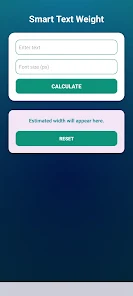
The core of the tool is a responsive preview that reflects weight changes instantly and accurately. Controls include a smooth weight slider for broad adjustments and precision step controls for fine tuning so you can compare subtle differences between neighboring weights. A side-by-side compare mode lets you view two weights simultaneously to judge relative contrast, while sample text size, line spacing and case can be adjusted to test real-world applications like user interfaces or editorial layouts. The interface keeps editing lightweight: values are visible and editable, and visual feedback focuses attention on the type rather than the chrome.
How it works in a typical workflow
Start by selecting the typeface you want to evaluate, set a sample phrase, and choose a display size that matches your project context. Use the slider to find the general weight range and the stepper to lock in precise values. Toggle between single-preview and comparison modes to evaluate headline vs body or different treatment options. Because the preview updates immediately, iterating through several weight choices takes minutes instead of hours. Notes you make during review translate directly into specs you can copy into design mockups or style guides.
Progression and project organization
Smart Text Weight supports an iterative approach rather than a linear progression: you cycle through a set of candidate weights, mark the ones that pass visual checks, and refine adjustments in the same session. The tool is intended to sit early in your design sequence—validate weight and contrast choices here, then lock them into layout or component libraries. For students and trainees the application serves as a quick feedback loop that accelerates learning typographic judgment, showing how small weight changes influence readability and tone.
Customization, visual style and accessibility
The preview area is designed for neutral, high-contrast rendering so typographic differences are easy to read. You can choose common sample texts and switch display modes to mimic light or dark backgrounds, which helps test legibility across themes. Accessibility considerations are built into the workflow: larger interface elements, clear numeric readouts for weight values, and keyboard-friendly controls make the tool usable for people who prefer non-touch interaction. These options help ensure your typographic choices perform well for diverse audiences and assistive technologies.
Performance, offline use and device support
Smart Text Weight is intentionally lightweight and optimized for responsive rendering on mobile devices and tablets. The app works offline for local testing, so you can evaluate weights without an internet connection or cloud dependency. Because it focuses on real-time preview rather than heavy processing, battery and memory use remain modest even during extended sessions, making it practical for on-the-go reviews and classroom demonstrations.
Limitations and intended scope
Smart Text Weight is specialized: it focuses on weight selection and real-time preview rather than acting as a full-featured font editor or layout tool. It does not replace vector or page layout applications when you need complex composition, color management, or advanced glyph editing. If your workflow requires intricate kerning across large character sets or multi-page typesetting, you will still need dedicated design software. That said, Smart Text Weight excels as a validation and decision-making aid that reduces guesswork and helps you produce consistent typographic hierarchies.
Smart Text Weight provides a practical middle ground between raw type specimens and full production tools: use it to speed typographic decisions, teach visual weight relationships, and arrive at cleaner, more professional results before exporting your choices to the rest of your design pipeline.
Show More
Information
Screenshots
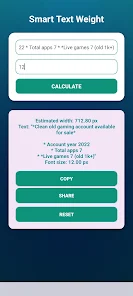
Latest Update
-
![Lines Gold Pro - Icon Pack APK]()
Lines Gold Pro - Icon Pack
-
![Remote Fire TV APK]()
Remote Fire TV
-
![Flight Dark Pro - Icon Pack APK]()
Flight Dark Pro - Icon Pack
-
![Ares Light: Pastel Icon Pack APK]()
Ares Light: Pastel Icon Pack
-
![getConf - Hidden Settings APK]()
getConf - Hidden Settings
-
![Dots Live Wallpaper - Battery APK]()
Dots Live Wallpaper - Battery
-
![Chroma - Icon Pack APK]()
Chroma - Icon Pack
-
![One UI Fluffy Icon Pack APK]()
One UI Fluffy Icon Pack
-
![Pixly Limitless Fluo Icon Pack APK]()
Pixly Limitless Fluo Icon Pack
-
![Compress Video - Resize Video APK]()
Compress Video - Resize Video
-
![Pixly Professional Dark APK]()
Pixly Professional Dark
-
![Tracker Detect Pro APK]()
Tracker Detect Pro












Hot Tags
Latest News
-
![Revealing the Launch Playlists and Cross-Progression for COD Warzone Mobile News]()
-
![March 2024 Free Redemption Codes for Honkai: Star Rail News]()
-
PUBG Mobile Teams Up with Bentley Motors: Luxury Cars, Exclusive Collectibles, and Beyond 2024-04-18
![PUBG Mobile Teams Up with Bentley Motors: Luxury Cars, Exclusive Collectibles, and Beyond News]()
-
![Monster Never Cry is now accessible on both Android and iOS mobile devices. News]()
-
V2.2 of the Farlight 84 update introduces an overhauled Season structure, fresh in-game currency, an 2024-04-16
![V2.2 of the Farlight 84 update introduces an overhauled Season structure, fresh in-game currency, an News]()
-
![Arrival of Genshin Impact 4.6 Update: 'Embers of Two Realms, Twilight of Crimson' News]()
-
April 2024 Clash of Clans Update: Unveiling a Fresh Companion, Enhanced Levels, Chat Tagging, and Be 2024-04-16
![April 2024 Clash of Clans Update: Unveiling a Fresh Companion, Enhanced Levels, Chat Tagging, and Be News]()






